Updated: June 13, 2026
There is currently 1 active code in Grow a Garden 2 as of June 13, 2026. The best one to use is TEAMGREENBEAN, as it grants you 3 Green Bean Seeds. We'll make sure to verify each new code as soon as it drops and keep our list updated daily.
Grow a Garden 2, the sequel to Grow a Garden by The Garden Game, is officially out now and completely revamps the original formula by blending peaceful farming with chaotic base defense. It's not just about watering carrots anymore. The game features a high-stakes competitive loop split into day and night cycles: plant seeds, tend your plots, and harvest rare flora to fill your wallet… then hold on tight when the sun goes down, because other players are coming for your crops. Luckily, Grow a Garden 2 codes do exist and are the same as the original game's, and they'll give you various useful freebies.
What Are All the Active Grow a Garden 2 Codes?
As of June 12, there is 1 active code. Redeem them to get free cosmetics, plants, and other cool freebies that will help you grow the prettiest garden and defend it from other players. Make sure to also check out our Grow Anything Codes article for more fun freebies.
Grow a Garden 2 Active Codes
| Code | Copy | Description |
|---|---|---|
| TEAMGREENBEAN | 3 Green Bean Seeds NEW |
Grow a Garden 2 Inactive Codes
| Code | Copy | Description |
|---|---|---|
| STARBUD | Free rewards | |
| torigate | 1 Whispering Torii | |
| RDCAward | 1x RDC Award cosmetic | |
| LUNARGLOW10 | Free rewards | |
| BEANORLEAVE10 | 1x Green Bean Chamber cosmetic |
Related: Grow Happy Garden Codes
How Do You Redeem Codes in Grow a Garden 2?
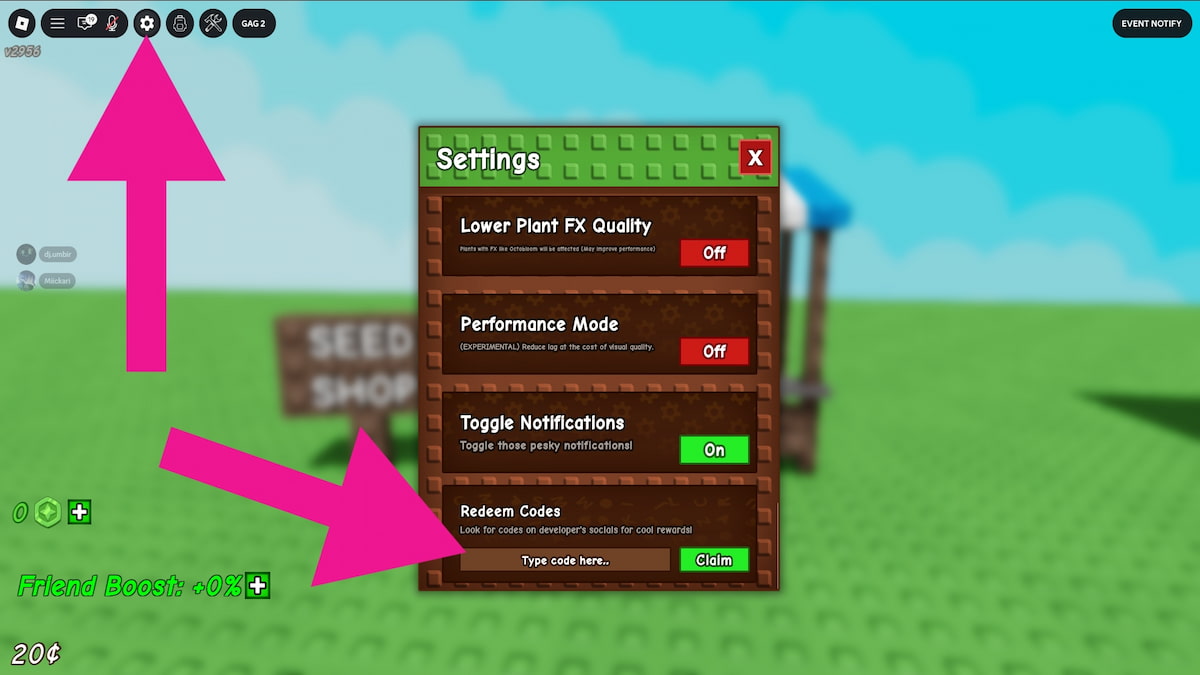
To redeem Grow a Garden 2 codes, you need to open the Settings. These are all the steps you need to complete:
- Open Grow a Garden 2 on Roblox.
- Click the cog wheel button in the top-left corner.
- Scroll down to the Codes section.
- Enter your code into the text field.
- Press Claim to get your rewards.
The game won't accept your codes unless you enter them exactly as they appear, so consider copying and pasting them if you're experiencing issues. If this doesn't help, the code has already expired.
Where Do You Find New Grow a Garden 2 Codes?
You'll find codes on social media such as the Grow a Garden Discord, X (@GrowaGardenRblx), and YouTube (@GrowaGardenR). Alternatively, you can always come back here and check our list to always get the latest freebies hassle-free.
For more codes, visit our Roblox Game Codes page! You can also check out our Grow a Tree Codes and get your hands on more gardening items!