


Updated January 12, 2026
Prepare for the Hytale early access by claiming your username in time.
Hytale's early access launches on January 13, 2026, and if you want to secure your username, you need to act fast. Usernames in Hytale are unique—only one person can claim each name, so of course, we went with ProGameGuides. Look for us on your server, and feel free to ask for help! To reserve your Hytale username, you'll need to pre-order the game first.
How to Reserve Hytale Username (Early Access)
The username reservation process is simple, but you must pre-purchase the game first. Once you pre-order Hytale, you can immediately reserve your username, which locks it to your account. After you apply it to your game profile, that username is permanently yours—no one else can use it.
Unlike most multiplayer games, where multiple players can share the same name, Hytale doesn't allow duplicates. This makes the reservation process competitive, especially for short or popular usernames.
How to pre-purchase Hytale and unlock username reservation
Before you can reserve a username, you need to pre-order Hytale. Here's the process:
- Visit the official Hytale web store.
- Click on any "Pre-Order Now" button.
- If you haven't already, create a Hytale account by clicking "Register."
- Choose your registration method (Discord, Epic Games, Google, Microsoft, Twitch, or email).
- Verify your age and save your date of birth.
- Enter your email address and agree to the Terms of Service and Privacy Policy.
- Verify your account by clicking the link sent to your email.
- Log in with your new account details.
- Select one of the three Hytale Early Access editions available.
- Click "Pre-Purchase" and enter your payment details.
- Complete your purchase.
All three editions include early game access and username reservation lock. Each edition comes with exclusive cosmetic sets and capes. These are Limited Editions - they're only available for purchase during Early Access, but all unlocks stay on your account forever.
Related:

How to reserve your Hytale username step-by-step
Once you've pre-ordered Hytale, you can claim your username by following these steps:
- Log in to your Hytale account on hytale.com
- Click "Account" in the top-right corner of the page
- Select "Game Profiles" from the left-hand menu
- Find your game profile (it will have a temporary username assigned)
- Click "Change Username" next to the temporary name
- Enter your desired username in the field
- Confirm the change.
- Your username is now permanently locked to your game profile and ready for the January 13 launch.
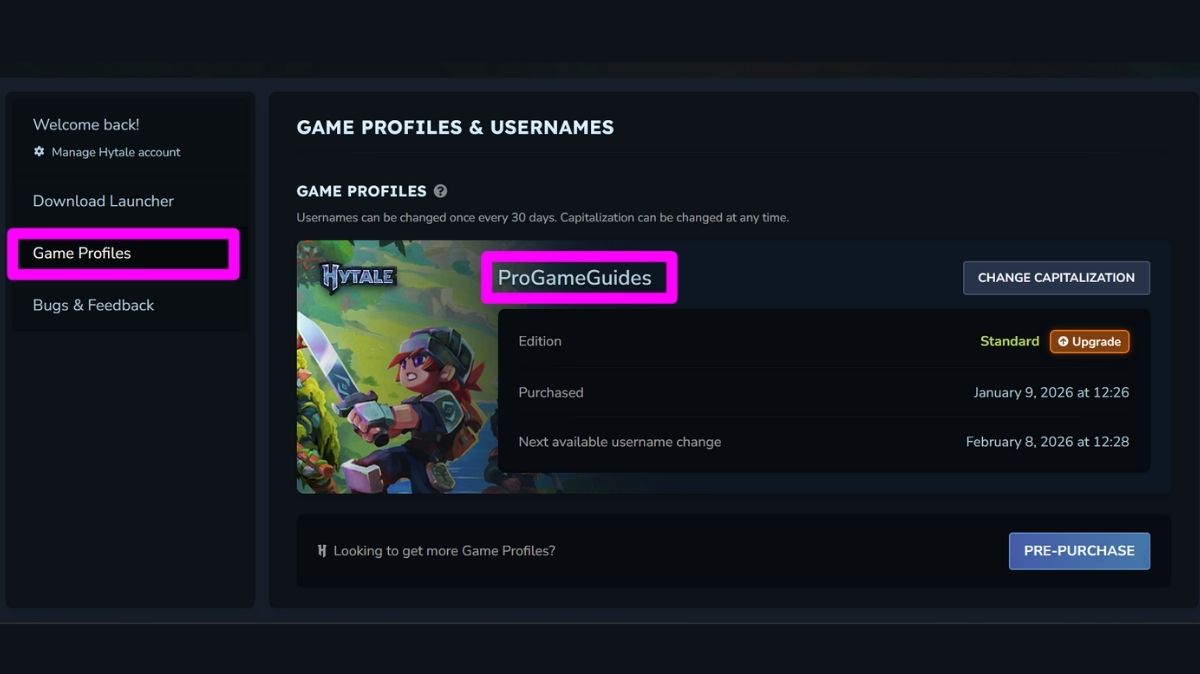
Note about reservation tokens: Some players who signed up for the beta in 2018 or subscribed to Hytale newsletters received reservation tokens via email. These tokens allowed players to reserve usernames before pre-orders opened on December 13, 2025. Tokens are no longer needed—pre-purchasing is the only way to reserve a username now.
Best Hytale Username Ideas and Tips
Choosing a good Hytale username can be tough with the unique naming system. Here's what you should know:
- Short names go fast - Usernames between 3-8 characters are easy to remember but extremely competitive. Most short names were claimed within minutes of pre-orders opening.
- Use your brand - If you stream or create content, stick with your established name to keep consistency across platforms.
- Smart alternatives if your name is taken - Add "PvP," "YT," or "TTV" if you stream. You can also try prefixes like "Its" or "The" (ItsSteve, TheShadow). Just avoid the generic "123" approach.
- Underscores work better than numbers - "Dark_Knight" looks better than "DarkKnight123" and feels less like a backup choice.
- Reserve immediately after buying - Popular names from Minecraft, Roblox, anime, and popular culture will be claimed fast, so don't wait!
- Choose carefully - Username changes are allowed once every 30 days, so pick something you'll be happy with in the long term.
Hytale Username FAQ
You'll need to pick something else. Since usernames are unique and first-come, first-served, popular names disappear fast. Try variations like adding underscores, numbers (but not just "111" at the end), or prefixes like "Its" or "The." For example, if "Player" is taken, try "ItsPlayer," "Player_PvP."
Hytale usernames must follow these rules:
* Between 3-16 characters
* Only letters, numbers, and underscores are allowed
* No spaces or special characters
* Case-insensitive during reservation
* No profanity or inappropriate terms
Yes, but only once every 30 days. Changing just the capitalization doesn't count as a full name change and won't start the cooldown. To change capitalization, go to Game Profiles, click "Change Capitalization," make your edits, and save.
Your username stays reserved for 7 days after the refund. After that, it becomes available for other players to claim.
Each game profile gets one username. However, you can buy multiple game licenses (profiles) on the same account, which means you can reserve a different username for each profile you purchase.
Yes. Hypixel Studios can revoke usernames to prevent abuse. Specifically, names reserved for reselling, trading, ransom, or blocking others violate the Terms of Service. Also, using a well-known person's name might result in it being reclaimed.
If you reserved a username with a token but never applied it to a profile after buying the game, it'll be released in early February 2026.
There's no official checker from Hypixel Studios. Some third-party sites offer availability checkers, but the only sure way is to try reserving the name when you pre-purchase.
No. Once a username is assigned to a game profile, it's permanently locked to that profile. You can't move or sell it to another player.
The username remains locked for a while before becoming available again. This prevents immediate name sniping and protects against accidental deletions.
No. Only letters (a-z), numbers (0-9), and underscores (_) work. Spaces, symbols, and other special characters will be rejected.
Right after you pre-order. The system is first-come, first-served, so popular names get claimed within hours or even minutes. Don't wait until January 13, 2026, launch—reserve your name immediately after buying.
Yes. You can upgrade to a higher edition at any time by paying only the price difference. For example, if you bought the Standard Edition ($19.99) and want to upgrade to Supporter ($34.99), you'll only pay $15. All edition upgrades are available during the Early Access period.
.
Now that you know how the Hytale username reservation works, check out more Hytale guides on PGG.


