


Bizarre Lineage Gangs, also known as Clans, are one of the core social gameplay mechanics in Bizarre Lineage. Gangs unlock Gang Wars, Gang Contracts, and other gameplay features. However, some players are having issues creating a Gang in Bizarre Lineage, particularly with name filters and invalid Emblem or Decal IDs for the Bizarre Lineage Gang Logo. Here’s how to fix the issue.
How to Create Gangs in Bizarre Lineage
If you want to create a Gang, you can either do it on your own or have one of your friends do it. Alternatively, you can join another player’s Gang; you just need to get an invitation. However, this guide isn’t about that, but rather about creating a Gang. Many players are currently having issues creating their Gangs in Bizarre Lineage, and that’s why we’re here: to explain how to do it. Here it is, step-by-step:
- In-game, open the Menu by pressing M (or click on the icon in the lower-right corner of the screen).
- Select the Gangs icon (the icon in the lower-right corner).
- A Gangs screen will open.
- You will need to create a Gang Logo and select a Gang Name to create a Gang.
- Once you have the Gang's name and logo, press the Finalize button to create your Gang.
- Start inviting people to your Gang!
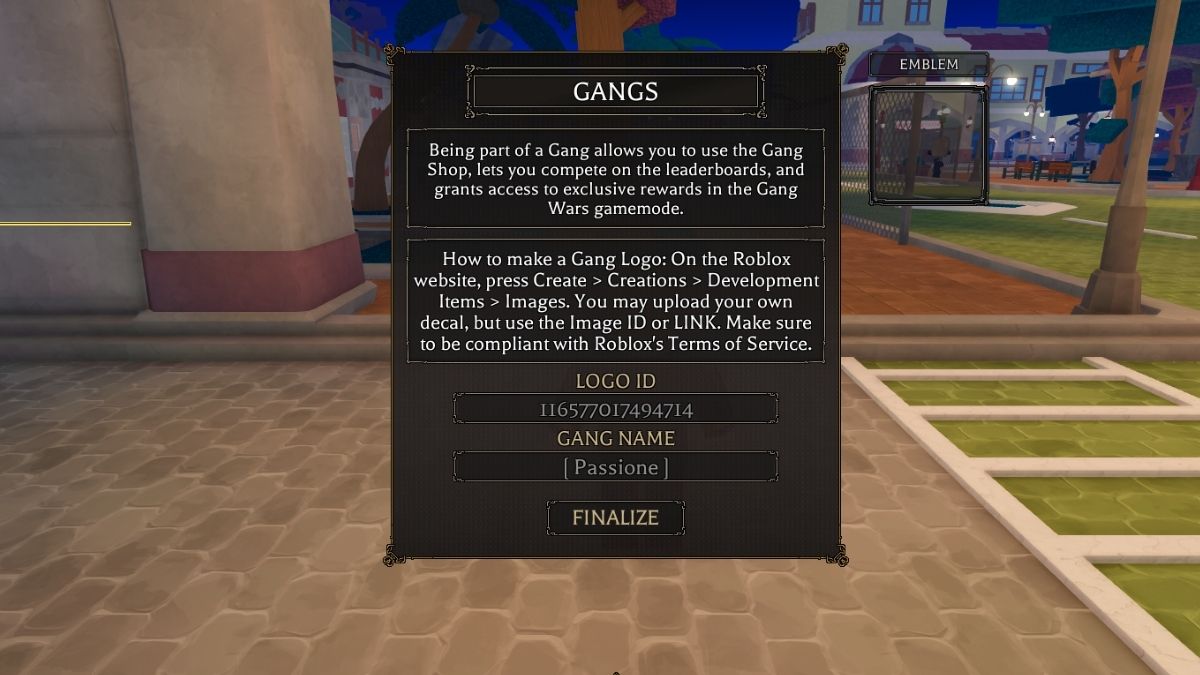
Emblem Must Be Valid - Wrong Decal ID Issue
Currently, a number of players are experiencing issues creating a Gang in Bizarre Lineage because the game says the Decal ID is wrong and that "Emblem Must Be Valid." Why is this happening, and what can you do about it? For starters, let's see how to create a log for your Gang, step-by-step.
- Log in to the Roblox website with your account via a browser.
- From the Roblox homepage, click on the Create option in the header menu (it's between the Marketplace and Robux options).
- You should see the Roblox Creators homescreen.
- From the menu on the left, select Creations.
- On the Creations screen, select the Development Items tab.
- From the Development Items tab, select the Images tab.
- Select Go to Decals.
- Select Upload Asset and upload an image you wish to use for the Bizarre Lineage Gang Logo.
- Click on the three dots icon next to the image’s name on the left.
- Click “Copy Asset ID” and paste it into the Logo ID field on the Gang Creation screen in-game.
IMPORTANT NOTE: Many players are getting the “Emblem Must Be Valid” error when creating a Gang in Bizarre Lineage, or the game says they are using the wrong Decal ID. That’s because you must copy the Image Asset ID, not the Decal ID! The system automatically creates an image from the decal you upload, so return to the Images tab in your Creations and copy the Asset ID from there.
RELATED: How to Prestige in Bizarre Lineage – Prestiging Requirements
Bizarre Lineage Gang Name Filtered Issue
Aside from the problems with the Logo/Decal ID, many players are also having trouble naming their Bizarre Lineage Gangs due to an issue with the Gang name filters. A number of players on the official Discord and Reddit are reporting that they cannot use almost any name they try for their Gang, no matter what they attempt. As it stands, it seems there’s a bug currently triggering the name filters for Gangs, even if the name is not problematic at all.
If you can't create a Gang because the game keeps triggering the filters, I recommend trying simple names using only the English alphabet, with no symbols, numbers, capital letters in the middle of words, or spaces. While this is not guaranteed to work, in my experience, it’s the best way to avoid triggering the filter. Hopefully, they will fix this issue soon, and you will be able to use other names as well
Bizarre Lineage Gangs FAQs
Open the Menu, select the Gang icon, upload a logo, select a name, and click finalize.
The Gang Contractor NPC gives Gang Quests, which reward Gang Points and/or Common and Rare Chests.
You can spend them in the Gang Shop to buy various items, including Stand Conjuration Essence, Stand Stat Essence, Stand Personality Essence, Lucky Arrow, Legendary Chest, DIO’s Bone, DIO’s Diary, Hammer, and Rare Chest.
Gang Territories are special zones across the map that Gangs can capture and control to generate passive rewards, including income and exclusive perks.
Gang Fame (Rank) functions as an overall rating system for your Gang, similar to an ELO system. It is calculated based on overworld kills; each kill earned while you are in a Gang grants 5 Fame.
Gang Wars is a dedicated PvP mode where Gangs face off against each other in organized team-based battles.
So there you have it, that's how you create a Gang in Bizarre Lineage. I hope this guide helped you with filtered Gang names and wrong Decal ID issues. Thanks for reading, and while you're here, don’t forget to check out our Bizarre Lineage section for more guides, news, walkthroughs, tier lists, and much more!


