


It's not easy fighting hordes of infected (let's just call them zombies), but you can make your post-apocalyptic life much easier by using Infection Free Zone console commands and cheat codes. These monsters won't know what hit them.
Recommended Videos
All Infection Free Zone cheat codes and console commands list
The main purpose of Infection Free Zone cheat codes is to allow you to quickly learn game mechanics without fear of being destroyed. Below, you'll find all Infection Free Zone console commands and how to enter them.
| Cheat Codes & Commands | Description | Type of command |
|---|---|---|
| SpawnSquadAtCursor | Spawns a squad on the ground where you click | Spawn |
| SpawnImmigrantsAccept | All immigrants you see will join your community | Spawn |
| SetHour | Sets the time | Settings |
| EndMission | Completes a mission | Mission |
| SetDay | Sets the date | Settings |
| AddWeatherForecastPoints | Increases the number of Weather Forcast Points | Resources |
| ShowAllGroups | All squads are visible | Map |
| AddScientificMaterials | Adds Scientific Materials needed for research | Resources |
| AddResourcesToBuilding | Adds resources to a building. The amount can exceed the maximum building capacity | Resources |
| ChangeLanguage | Switch to another language | Settings |
| CompleteActiveMissions | Completes all active missions | Mission |
| SpawnGroupInBuilding | Summons friends or foes inside a building | Spawn |
| SpawnGroupsAtExpedition | Summons friends or foes on an expedition | Spawn |
| CreateWall | Builds a wall of your choice. | Spawn |
| CreateFarmLand | Builds a farm field | Spawn |
| ShowAllGroups | Shows all units on the map | Mission |
| SpawnBigSquadAtCursor | Spawns a squad of soldiers. | Spawn |
| SetTimeSpeed | Speeds up time | Settings |
| KillAllGroups | Kills all groups on the map | Spawn |
| KillWorker | Kills workers | Spawn |
| SpawnImmigrants | Summons immigrants on the map | Spawn |
| DestroyResourceCursor | Removes resources | Resources |
| SpawnVehicle | Creates an empty vehicle on the map | Spawn |
| SpawnVehicleGroupAtCursor | Spawns friends of foes inside a vehicle | Spawn |
| AdaptBuilding | Upgrades an abandoned building into a structure you set. | Map |
| SetFPSLimit | Sets maximum fps | Settings |
| SpawnSquadAt | Summons a squad at chosen coordinates | Spawn |
| UnlockContent | Allows access to all available buildings and resources | Resources |
| SetLoggingLevel | Sets logging pick up speed | Settings |
| AddEventToPool | Activates an event | Map |
| SetSoldierHP | Specifies the amount of health of your squad members | Spawn |
| AddResourcesToHQ | Add a resource you need to Headquarters | Resources |
| RemoveResourcesFromHQ | Removes resources from Headquarters | Resources |
| AddResouresToBuilding | Add a resource to the building of your choice | Resources |
| SaveGame | Save your game (not really a cheat, right?) | Settings |
| UnlockResearchType | Unlocks specific research you need | Map |
| ScavengeAllBuildings | Shows available resources in the expedition area | Map |
| SpawnRandomSquad | Spawns a random squad with weapons inside a vehicle | Spawn |
| HideFPS | Stops showing fps. | Settings |
| SpawnHordeAt | Summons enemies at specified coordinates. | Spawn |
| CreateGate | Add a gate of a specified type | Map |
| CreateResourceCursor | Adds a set amount of resources at a specified place. Add what you need and the amount | Resources |
| DestroyResourceCursor | Removes resources | Resources |
| ShowAllVehicles | Shows all vehicles on the map | Map |
| AddResearchProgressPoints | Speeds up your research | Settings |
| SetSpawnPointVisualizationState | I'll let you know as soon as I crack this! | Spawn |
| AddWorkersToHQ | Adds a certain number of workers to headquarters | Spawn |
| RemoveMoodModifier | Removes mood modifiers | Settings |
| AddMoodModifier | Adds mood modifiers | Settings |
| SpawnGroupAtCursor | Spawn a group of friends or foes. Add inf_name_of_unit and a number of them. | Spawn |
| ClearNavData | Resets navigation data. | Settings |
| UnlockAllExpeditionTiles | Unlocks expedition area restrictions | Mission |
| StartWeatherFog | Add or remove fog. Add false or true depending on what you want. | Map |
How to activate cheats and enter Infection Free Zone console commands
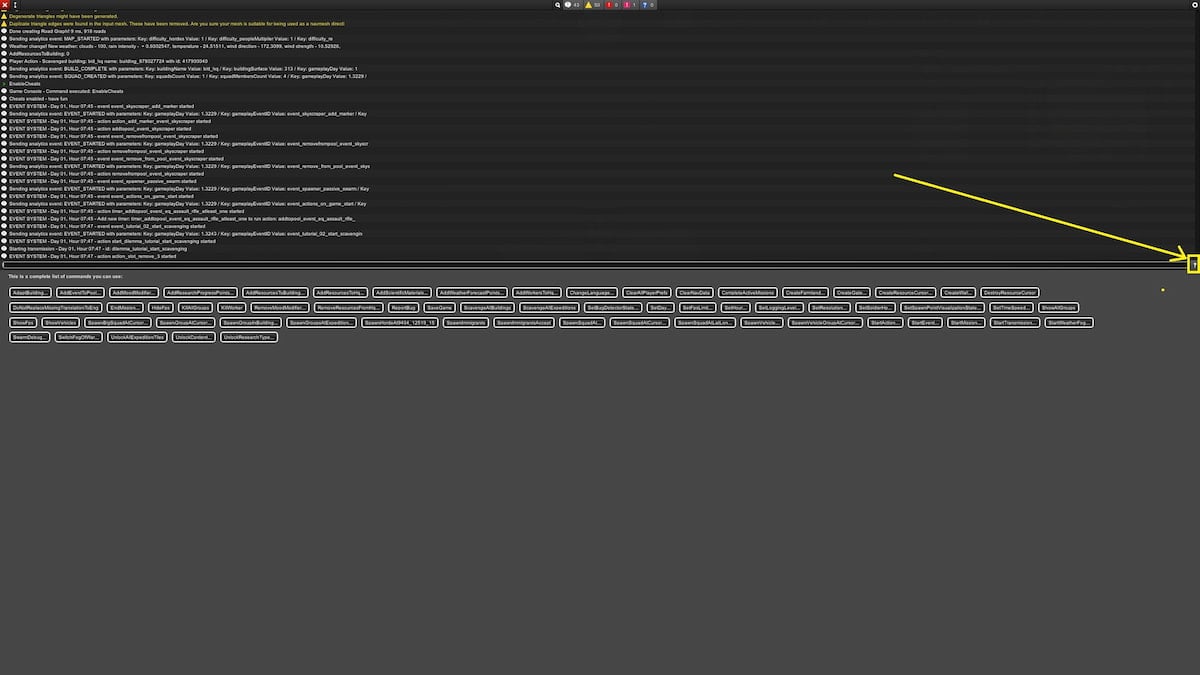
To activate cheats and enter console commands in Infection Free Zone, follow the steps below:
- Launch Infection Free Zone.
- Start the scenario.
- Press the tilde button (~) above the Tab button on your keyboard to open the console. If you have trouble opening the console, check if your key layout is QWERTY (US keyboard in the Windows settings)
- Click on the small question mark button (?) on the right side of the console command.
- Write the EnableCheats command to start using cheats.
- Enter Infection Free Zone console commands, but don't forget to add values (amounts) to certain cheats, as they won't work otherwise.
For more zombie action, check out 7 Days to Die Guide for Beginners on Pro Game Guides.


