


Updated: October 4, 2026
We checked for new codes. There are three working A Dusty Trip codes, and the latest is BROKEN-CARS28. The next update which landed on October 4 unfortunately didn't bring us any new codes.
A Dusty Trip codes don't come often, so each one is worth claiming while it still works. Inspired by The Long Drive, this Roblox road trip survival game lets you and your friends scavenge parts, fight mutants, and see how far your car can go before the desert wins.
All A Dusty Trip Codes List
A Dusty Trip code gives you free Dusty Coins, saving you time as you patch up your car and push deeper into the desert. Below is a complete list of working A Dusty Trip codes, so redeem them before they expire. If you need more help, check out our how to fix your van in A Dusty Trip guide.
A dusty trip Active Codes
| Code | Copy | Description |
|---|---|---|
| BROKEN-CARS28 | 500 Dusty Coins | |
| DustyCoins1 | 800 Dusty Coins | |
| S7GONESOON | 800 Dusty Coins |
A dusty trip Inactive Codes
| Code | Copy | Description |
|---|---|---|
| S7-HAVOC | Rewards | |
| 20EASTER25 | Rewards | |
| ROYALRANGERGONESOON512 | Rewards | |
| NEWSTRGE25 | Rewards |
Related: All items in A Dusty Trip and how to get them
How to Redeem Codes in A Dusty Trip
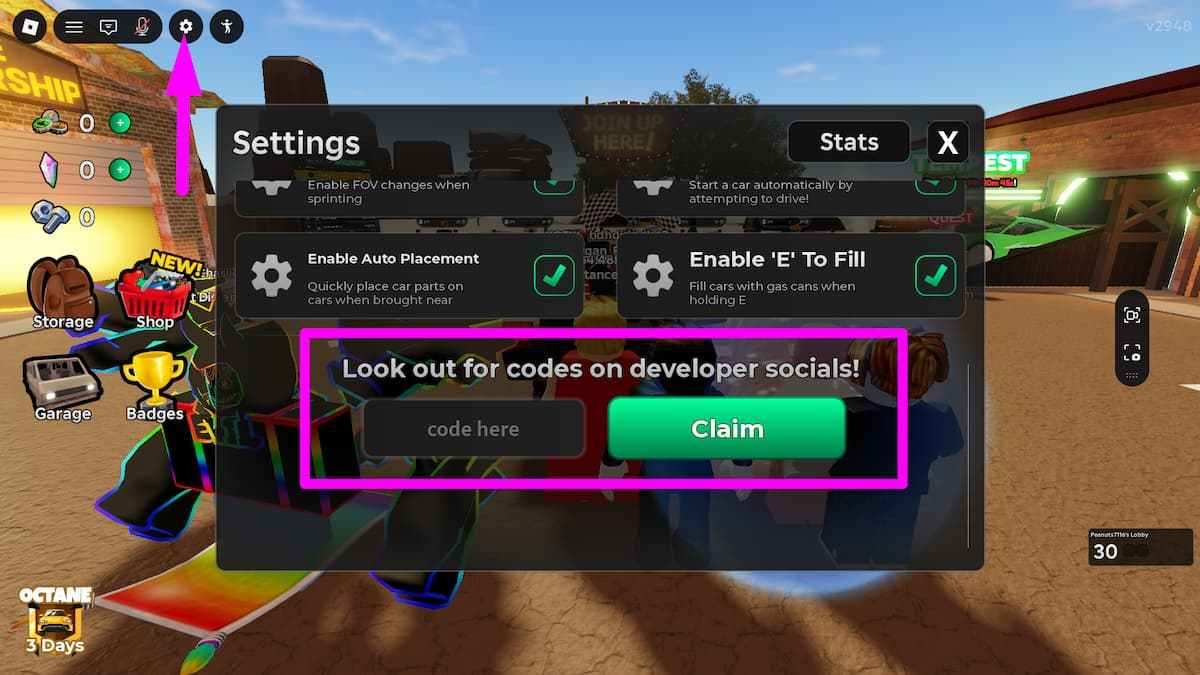
The code box is inside the game's Settings menu. Here's how to claim your rewards:
- Launch A Dusty Trip on Roblox.
- Open Settings with the cog icon in the upper-left corner of the screen.
- Scroll down to the text box labeled "code here" next to the green Claim button.
- Type or paste an active code from the list above.
- Hit Claim to collect your Dusty Coins.
Why Is My A Dusty Trip Code Not Working?
If a code gets rejected, one of these is usually the cause:
- A typo in the code. Codes are case-sensitive, and a single wrong letter, number, or hyphen will cause it to fail. Copying and pasting from our list avoids this.
- You already claimed it. Each code only pays out once per Roblox account.
- The code has expired. Codes can be retired after a season or update ends, often without warning. Check the expired list above.
What Are Dusty Coins Used For in A Dusty Trip?
Dusty Coins are rewards you use in the lobby on the Car Raffle for special vehicles and in the Skin Crate for cosmetic skins and wraps. Stacking free coins from codes means fewer runs spent grinding before your next spin.
How to Get More A Dusty Trip Codes
New A Dusty Trip codes don't follow a set schedule, but they tend to appear alongside big updates, new seasons, and events. The developer shares them first on the official A Dusty Trip Discord server and in the Jandel's Road Trip Roblox community. The simplest option is to bookmark this page, since we check for new codes regularly and add them as soon as they go live.
Want to add music to your drive? Our A Dusty Trip Song ID codes list works with the in-game car radio.
Frequently Asked Questions (FAQs)
The latest A Dusty Trip code is BROKEN-CARS28, which gives 500 Dusty Coins.
As of September 30, 2026, there are three working A Dusty Trip codes: BROKEN-CARS28, DustyCoins1, and S7GONESOON. Together, they give 2,100 free Dusty Coins.
Open Settings with the cog icon in the upper-left corner, scroll down to the code box, enter the code, and press the green Claim button.
Dusty Coins are spent on the Car Raffle, which can reward special vehicles, and the Skin Crate, which gives cosmetic skins and wraps.
There's no fixed schedule, but new codes usually arrive with major updates and events. The next A Dusty Trip update is set for October 4, 2026.
For more on A Dusty Trip, check out A Dusty Trip Discord, Trello, and Social Media Links and All Controls in A Dusty Trip, here on PGG.


