


Updated: October 27, 2026
As of October 27, 2026, there are 2 active Blind but dangerous codes you can redeem. Use MOBILEFIX and 500LIKES for Coins, and come back daily to check for more codes.
Would you play hide-and-seek if the seeker had a shotgun? Yeah, me neither. In Blind but Dangerous, you'll randomly play as either a hider trying to stay out of sight or a seeker hunting everyone down. Just remember, hiders have to whistle every few seconds, giving away their position. If you want a little help staying one step ahead, check out the latest Blind but dangerous codes!
What Are All the Active Blind but dangerous Codes?
You can redeem 2 active Blind but dangerous codes to get Coins, which you can use for a plethora of items that will make the hiding or seeking much easier, or an emote to taunt the seeker. We'll keep updating this article with all the latest codes, so come back often to pick up new rewards. If you're a little thrill chaser, feel free to check out our Camo or Snipe Codes!
blind but dangerous Active Codes
| Code | Copy | Description |
|---|---|---|
| MOBILEFIX | 200 Coins | |
| 500LIKES | 300 Coins |
Related: Fight the Shooter Codes
How Do You Redeem Blind but dangerous Codes?
Here's how to get freebies in a few easy steps:
- Run Blind but dangerous on Roblox.
- Click on the Settings icon in the top-left corner of the screen.
- Input your code in the Enter a code... field.
- Press Redeem to get your rewards.
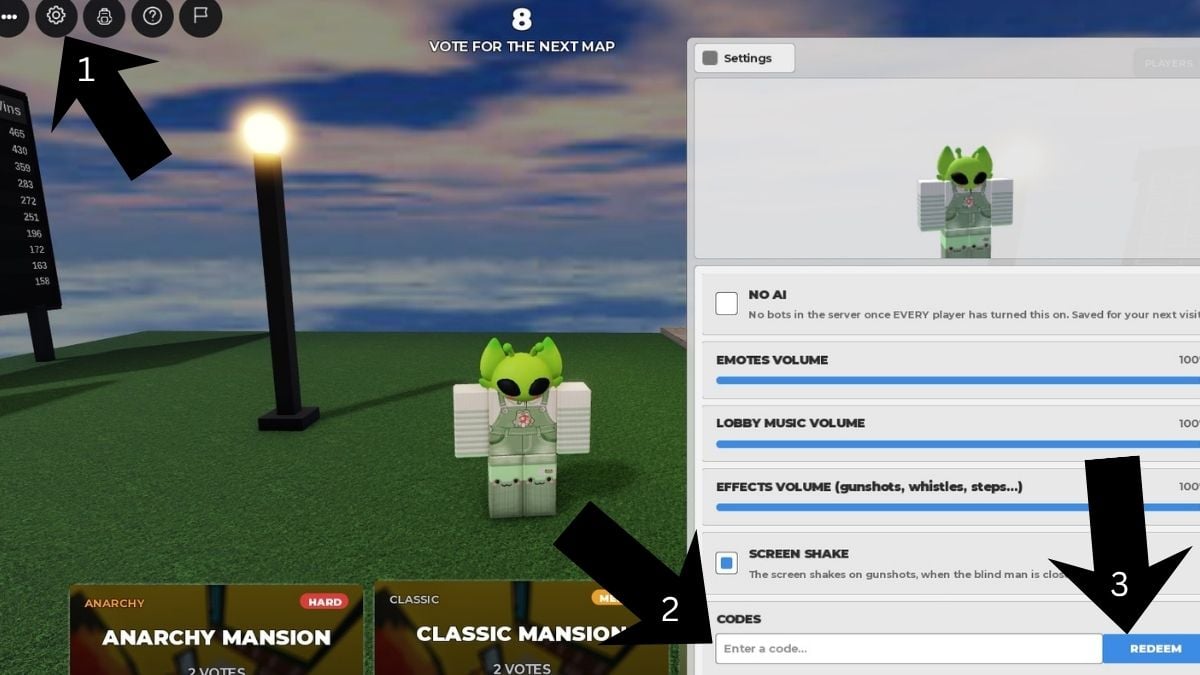
Make sure you enter each code correctly to avoid any errors when claiming your rewards. The easiest way to do this is to copy and paste the codes directly from our list, so you can grab your freebies without any trouble.
Where Do You Find New Blind but dangerous Codes?
For any game updates you might be interested in, you can follow the official Blind But Dangerous Discord Server. If you want to avoid Discord, you're welcome to bookmark our page and check back soon because we will be providing updates as soon as codes drop!
What Do Coins Do in Blind but dangerous?
In Blind but dangerous, Coins are the main in-game currency used to purchase everything from helpful survival items to emotes that can give away your hiding spot. You can even spend them on customizations for the seekers. After all, who wouldn't want to chase players down with a pink shotgun?
Visit our Roblox Game Codes page to claim even more rewards for titles such as Supernatural Realm and more!


