


Updated: November 26, 2026
There are 5 active Build a Bank codes you can redeem as of November 26, 2026. SECURITYUPDATE1 and SECURITYUPDATE are the latest codes, each giving you a 20-minute Earnings Boost.
Are you good with numbers? Me neither, but I've always wanted to run my own bank and prove that you don’t need a finance degree to make it work. In Build a Bank, I started hiring staff and expanding my branch, but I immediately went into debt because of their wages. Plus, pickpockets started robbing my clients, but Build a Bank codes helped me get back on my feet!
What Are All the Active Build a Bank Codes?
The 5 Build a Bank codes will give you all the Earnings Boosts you need to make the most of each transaction. Whatever your progress level, you'll have plenty of use for the Boosts to help you expand your branch, hire more staff, and keep your business profitable. Once you've become a bank mogul, visit our Imperial Tycoon Codes guide and rule the Galaxy Far, Far Away in another tycoon game.
Build a Bank Active Codes
| Code | Copy | Description |
|---|---|---|
| SECURITYUPDATE1 NEW | 2x Earnings Boost (20 min) NEW | |
| SECURITYUPDATE NEW | 2x Earnings Boost (20 min) NEW | |
| CARUPDATE1 | 2x Earnings Boost (30 min) | |
| CARUPDATE | 2x Earnings Boost (20 min) | |
| BUGFIX | 2x Earnings Boost (20 min) |
Build a Bank Inactive Codes
| Code | Copy | Description |
|---|---|---|
| BUGFIX1 | Free Rewards |
Related: LINE UP Metro Tycoon Codes
How Do You Redeem Build a Bank Codes?
Redeeming Build a Bank codes comes down to following these steps in sequence:
- Launch Build a Bank in Roblox.
- Click the Shop button at the top of the screen.
- Click the Codes tab in the Shop window.
- Type in your code into the text box.
- Click Redeem to collect your rewards.
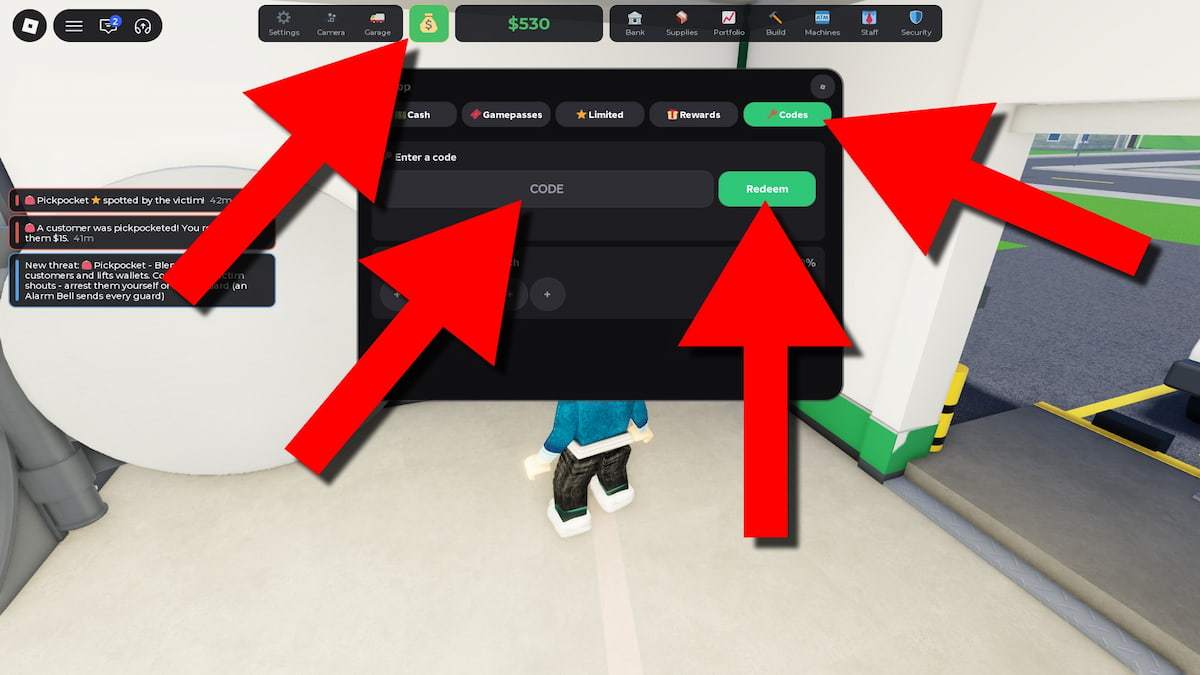
Type in your code exactly as you see it on our list, and double-check every code for spelling errors. Otherwise, it will take you way longer to redeem them.
Where Do You Find More Build a Bank Codes?
If you join the Build a Bank Discord server and AverageDevStudios Roblox group, you'll be able to look for new codes straight from the source.Alternatively, you can bookmark this article (Ctrl+D) and check back whenever you want to grab the latest available freebies!
How To Grind Cash in Build a Bank?
To maximize profits in Build a Bank, don't branch out more than you can afford. Sell off your Cash Racks and Coin Bins and replace them with higher-capacity assets, such as Currency Safes or Coin Racks. Next, hire more Delivery Drivers and buy more vehicles so that you can keep the supplies rolling in at all times. Finally, focus on upgrading existing Machines before buying more.
Jump into our Roblox Game Codes section and grab a wide array of rewards for all your favorite games! Also visit our Roblox Pet Store Tycoon Codes article to try another addictive tycoon.