


Updated: October 25, 2026
There are currently 2 active Chop A Forest codes as of October 25, 2026, giving you Candy Corn and Hellrider Spins. Redeem HALLOWEEN for 250 Candy Corn and 3 Hellrider Spins!
Grab your axe and get ready to turn an entire forest into your personal payday! Chop A Forest is a Roblox simulator where you break trees for logs, sell your haul for Coins, and reinvest your earnings in better tools. Build your way toward the best classes and equipment, and redeem these Chop A Forest codes to snag some seasonal rewards before heading back into the woods.
What Are All The Active Chop A Forest Codes?
There are currently 2 active Chop A Forest codes as of October 25, 2026. Together, they reward you with 550 Candy Corn and 3 Hellrider Spins in total, giving you a few extra goodies to collect while you work on upgrading your gear. If you enjoy gathering resources, upgrading equipment, and steadily building your way toward better gear, check out our Roblox Foresters Codes!
Chop A Forest Active Codes
| Code | Copy | Description |
|---|---|---|
| HALLOWEEN | +3 Hellrider spins, +250 candy corn | |
| SORRYCANDY | +300 candy corn |
Related: Axe RNG Codes
How to Redeem Chop A Forest Codes
Before you start chopping, follow the steps listed below in order to redeem your Chop A Forest codes:
- Open Chop A Forest on Roblox.
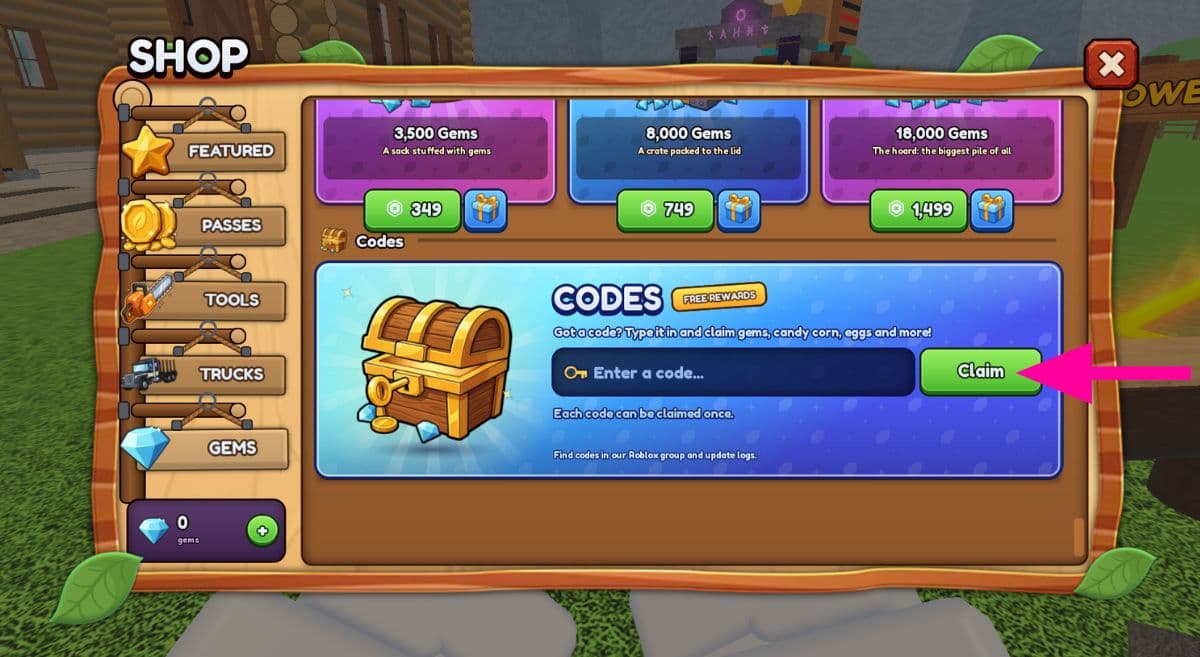
- Press R to open the Shop, and scroll to the bottom.
- There you will see the Codes Tab.
- Enter your Codes as listed, press the Redeem button, and enjoy your free rewards!
Where to Find New Chop A Forest Codes
You can bookmark this page and return when you're ready to collect more freebies. We'll keep the active codes and rewards organized here so you can get back to chopping instead of hunting through announcements. You can also keep an eye on the game's official Roblox Community page, as well as the official Discord Server for updates and announcements.
What Is Chop A Forest?
Chop A Forest is a Roblox simulator where your job is to cut down trees, collect logs, and turn your lumber into Coins. Those earnings let you purchase better tools and upgrade your equipment as you work toward the strongest classes and tools available. You can play solo or bring friends along, and your runs save, letting you return to your progress later. Whether you're building up your equipment or aiming to become the best lumberjack around, there's always another upgrade to work toward.
If you want to know if a game you play has freebies, check out our Roblox Game Codes. You can also check out our Lumberjack Simulator Codes.


