Updated: October 21, 2026
As of October 21, 2026, there are 4 active codes for Facecard: Makeup Showdown. These codes offer free Cash Cards, letting you add more creative flow to your makeup studio.
Facecard: Makeup Showdown is a dress-up simulator inspired by Dress to Impress, but it focuses solely on makeup. If you enjoy competition shows such as Glow Up, this game is perfect for you. Pick up a brush, contour, highlight, put on some lipstick, do your best to fit the theme, and let other players judge your work. You can also redeem Facecard: Makeup Showdown codes and take your looks to the next level more easily.
What Are All the Active Facecard: Makeup Showdown Codes?
Use all 4 active Facecard: Makeup Showdown codes to obtain free Cash Cards and use them to purchase piercings, eyelashes, and various other items that will help you prove you're the best makeup artist on the server. Want to test your skills in a similar game? Check out our list of Dress To Impress Codes to get freebies for the OG experience.
Facecard: Makeup Showdown Active Codes
| Code | Copy | Description |
|---|---|---|
| 10m NEW | Dramatic Doll Lashes NEW | |
| diditbetter | 2 Poses Homeless Smile & Holding It | |
| 1mvisits | 1k Cash Card | |
| release | 1.5k Cash Card |
Related: Dress to Impress Doll Codes
How Do You Redeem Codes in Facecard: Makeup Showdown?
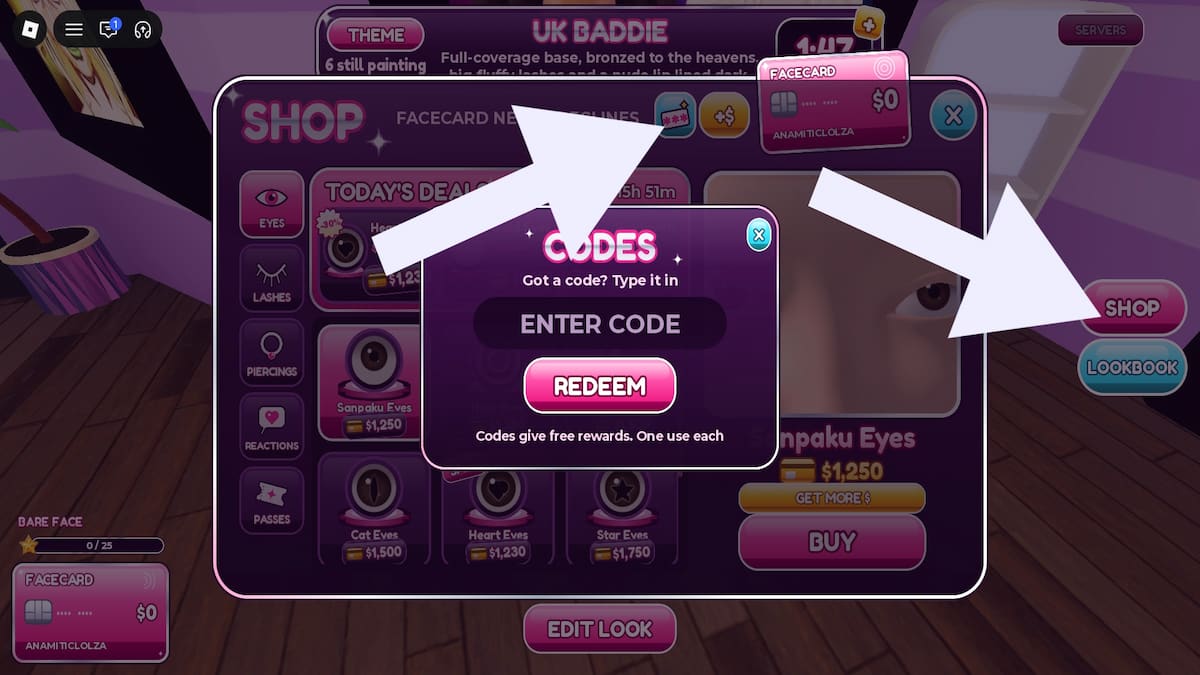
Redeem Facecard: Makeup Showdown codes by completing the steps below:
- Run Facecard: Makeup Showdown in Roblox.
- Click the Shop button on the right.
- Click the blue Codes button at the top of the window.
- Type a code into the text box.
- Hit Redeem to claim goodies.
Copy and paste your codes to avoid annoying errors that will render codes invalid. Keep in mind that you can redeem each code only once, and make sure you claim your freebies before they expire.
Where Do You Find New Facecard: Makeup Showdown Codes?
You can look for codes on the Facecard: Makeup Showdown Discord, but if you want to avoid the hassle, bookmark our list. That way, you'll have easy access to a complete list of all the available rewards.
What Do Cash Cards Do in Facecard: Makeup Showdown?
Cash Cards are the main currency in this game. You collect them by getting positive votes on your style or by redeeming codes. You can exchange them in the shop for beauty items like new lashes, eyes, and piercings.
Check out our Roblox Game Codes page for more Roblox goodies in titles such as Bey Rivals and more!