Robux is the virtual currency you use in Roblox to buy avatar outfits, accessories, game passes, private servers, in-experience items, and more. If you're new to Roblox, or you're a parent helping someone buy Robux safely, the most important rule is simple: only buy Robux through Roblox, the official Roblox app, console stores, or official Roblox gift cards.
The safest way to buy Robux in 2026 is through the Roblox website, the official Roblox mobile app, the Roblox app on PlayStation or Xbox, or an official Roblox gift card. For the best value, Roblox says purchases made on the web, computer, or with gift cards can give you up to 25% more Robux than some other methods, so those are usually the first options to check before buying through mobile or console.
Also remember that there is no such thing as a real Robux generator. Sites, videos, Discord messages, or social posts promising free Robux in exchange for your password, surveys, downloads, or account verification are scams. If you just want free in-game rewards, use official Roblox game codes instead of third-party Robux sites.
Best Way to Buy Robux in 2026
The best way to buy Robux for most players is through the Roblox website or a Roblox gift card. These methods are official, easy to verify, and usually give better Robux value than buying through some platform stores. Mobile and console purchases are still safe when made through the official Roblox app, Apple App Store, Google Play, PlayStation Store, or Microsoft Store, but the amount of Robux shown for the same price can vary by platform and region.
| Purchase method | Best for | Value note | Safety note |
|---|---|---|---|
| Roblox website / computer | Most players | Usually the best value; Roblox says web/computer purchases can give up to 25% more Robux. | Use roblox.com while logged into the correct account. |
| Roblox gift card | Parents, gifts, and players who do not want to save a card | Also eligible for better value when redeemed correctly. | Redeem only through the official Roblox gift card redemption page. |
| Mobile app | Quick iPhone, iPad, or Android purchases | Convenient, but package amounts can differ from web. | Use Apple App Store or Google Play purchase prompts only. |
| Console | PlayStation and Xbox players | Official, but pricing and packages may vary by store and region. | Use the PlayStation Store or Microsoft Store flow. |
| Roblox Plus | Regular Roblox spenders | Gives item discounts and other benefits, but the base plan does not include monthly Robux unless you choose a Plus Robux bundle. | Check the subscription terms before buying. |
Platform verification note: Before publishing, check the current Robux package amounts on the Roblox web store, iOS, Android, PlayStation, and Xbox in your target region. Roblox pricing and package display can vary by country, tax rules, and platform.
What Are the Official Ways to Buy Robux in 2026?
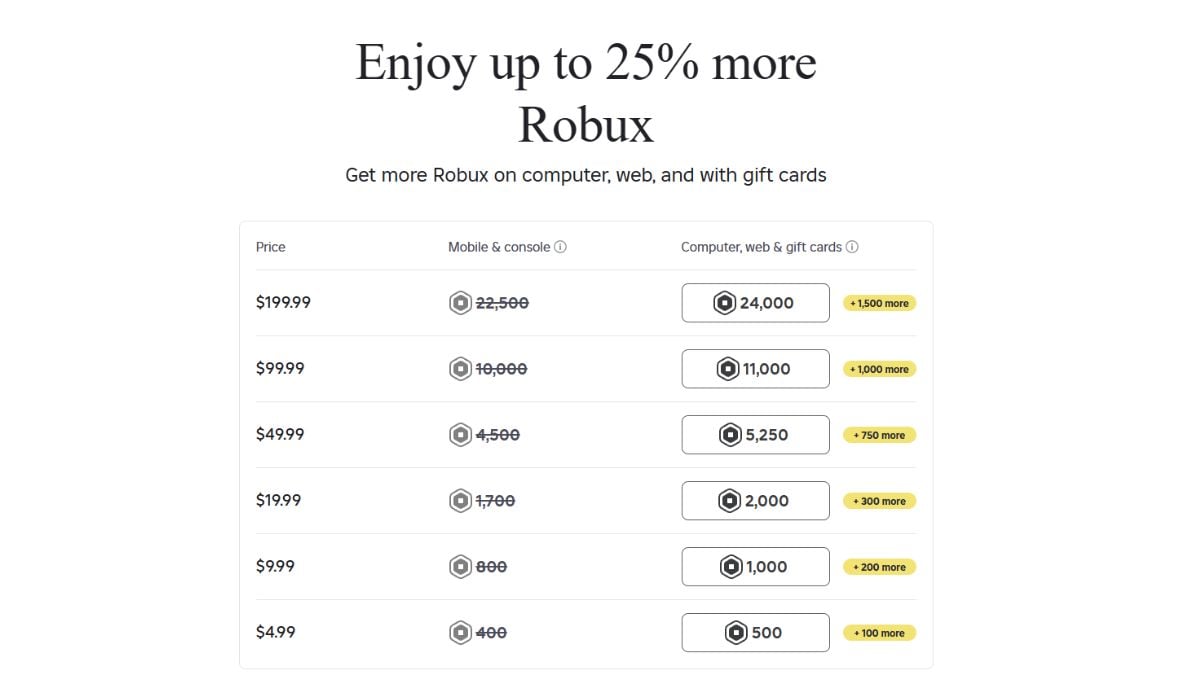
There are several official ways to buy Robux in 2026. Use one of these methods and avoid any third-party site that asks for your Roblox password or claims it can generate free Robux.
- Direct purchase through the Roblox website
- Roblox desktop/computer purchase flow
- In-app mobile purchases on iOS and Android
- Console purchases on Xbox and PlayStation
- Official Roblox gift cards
- Roblox Plus or Roblox Plus Robux bundles, if available on your account
You may get additional Robux when using a gift card or purchasing through the web or a computer. Because of regional pricing, taxes, and platform store rules, prices and Robux amounts may not look identical on every device.
How Do You Buy Robux on the Roblox Website?
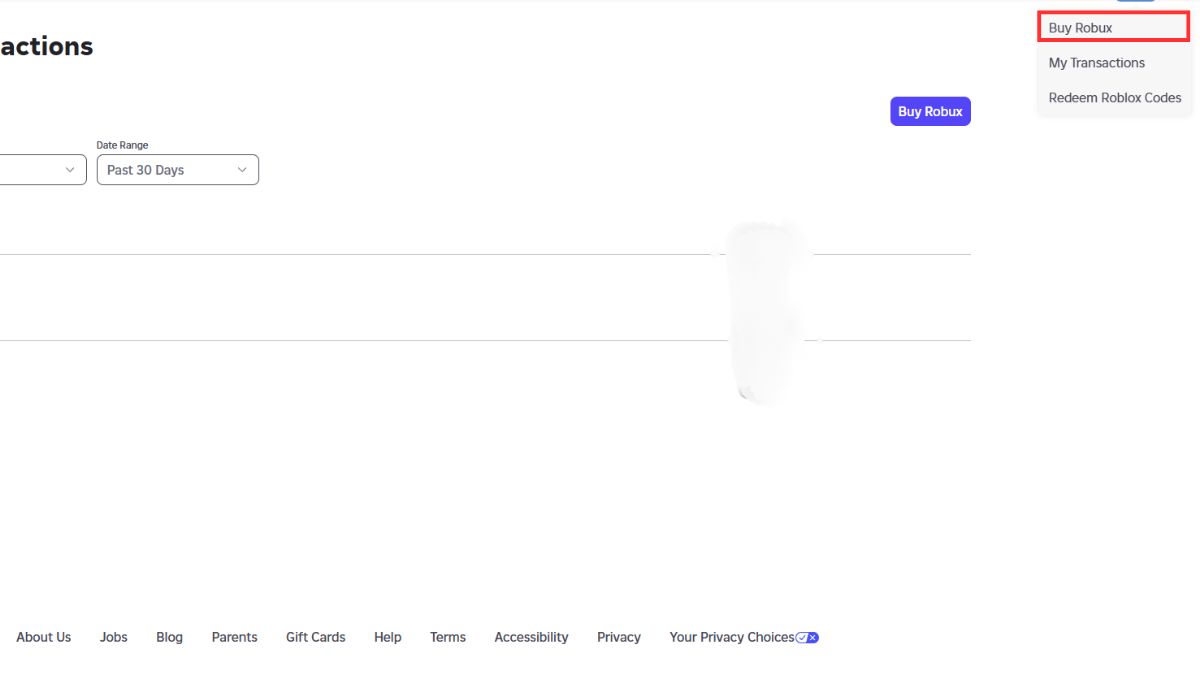

The Roblox website is usually the simplest and best-value way to buy Robux. To buy Robux on web:
- Log in to the correct Roblox account. Visit roblox.com and sign in before buying anything.
- Go to the Robux page. Click the Robux icon or open the official Robux purchase page from your account menu.
- Choose a Robux package. Compare the Robux amount and price before selecting a package.
- Choose your payment method. Depending on your region, you may see options such as credit/debit card, PayPal, prepaid card, gift-card credit, or local payment methods.
- Confirm the purchase. Follow the on-screen prompts. Once the purchase is successful, the Robux should be added to your account.
The best part about buying through the official Roblox website is that it is secure and may give more Robux than some app-store or console purchase flows. If you are buying for a child, double-check the username before completing the purchase, especially if several people use the same computer.
You can also check your transaction history by clicking the Robux icon and selecting My Transactions. This shows your recent Robux purchases, sales, and other account transactions.
What Payment Methods Can You Use on the Roblox Website?
Payment options can vary by country, but Roblox web purchases commonly support:
- Credit/debit cards
- PayPal
- Prepaid cards
- Roblox gift-card credit
- Regional payment methods, where available
For parents, gift cards and prepaid cards are often safer than saving a credit card to a child's account. They also make it easier to limit spending.
Robux Purchase Value Calculator
Use this calculator to compare how much value you get from a Robux purchase. Instead of converting Robux into cash, it compares the amount you spend with the number of Robux you receive. This is better for buyers because Robux do not have a fixed cash value for regular players and cannot normally be exchanged back into real money.
To use it, enter the price of the package and the Robux amount shown on your device. The calculator will show your Robux per currency unit, cost per 100 Robux, and an estimated comparison against a web/gift-card-style purchase that gives up to 25% more Robux.
Robux Purchase Value Calculator
Compare Robux package value by platform before you buy.
Robux per currency unit: —
Cost per 100 Robux: —
Estimated web/gift-card comparison: —
Value rating: Enter a package above
Creator DevEx note
This buyer calculator is not a DevEx calculator. Developer Exchange values apply only to eligible creators cashing out earned Robux under Roblox's DevEx rules. Do not use DevEx rates to estimate the value of Robux bought by regular players.
This calculator is for purchase comparison only. Robux do not have a fixed cash value for regular players and cannot normally be converted back into real money. Always check the live package amount on your account before buying.
How Do You Purchase Robux on Mobile?
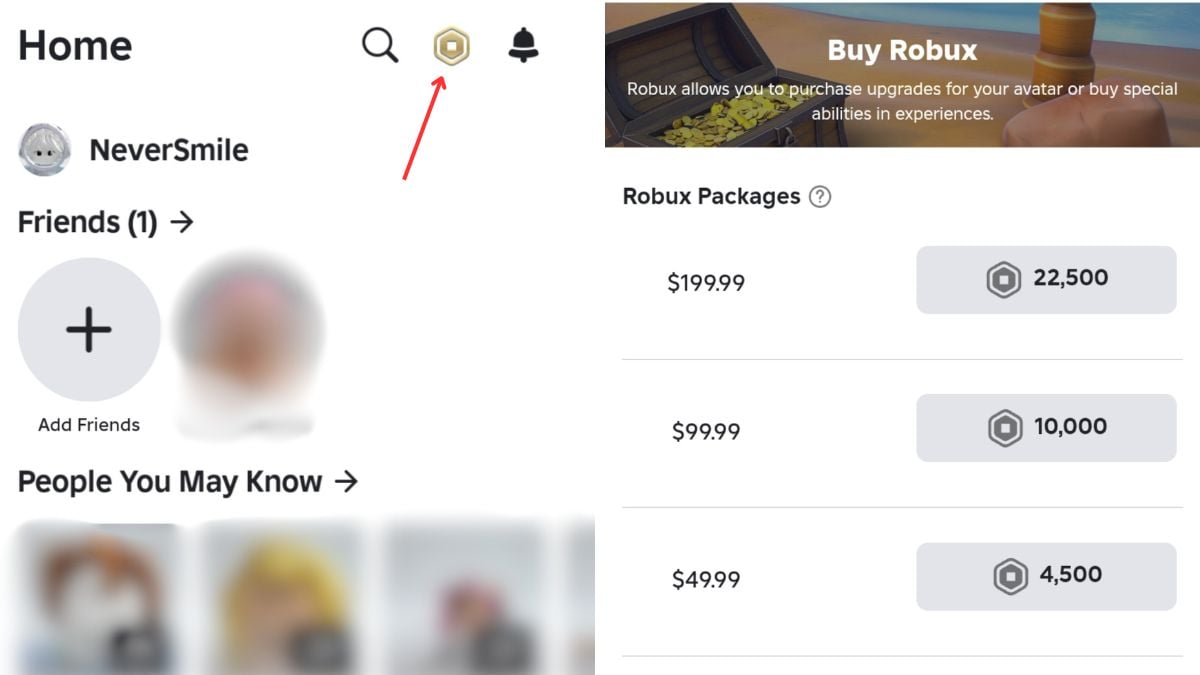
Buying Robux on mobile is convenient because the purchase uses your Apple App Store or Google Play payment method. However, before buying on mobile, compare the amount of Robux shown on your phone with the amount shown on the Roblox website. In some regions, web or gift-card purchases can give more Robux for the same spend.
Buying Robux on iOS (iPhone and iPad)
- Open the Roblox app. Make sure you are logged into the correct account.
- Tap the Robux icon. This opens the Robux purchase screen.
- Select a Robux package. Check the amount and price carefully before confirming.
- Confirm with Apple. Use Face ID, Touch ID, your Apple ID password, or your saved App Store payment method.
- Check your Robux balance. Your balance should update after the purchase is completed.
Platform verification note: Check the current iOS Robux packages before publishing. Package amounts can change, and the iOS display may not match the web store in every region.
Buying Robux on Android Devices
- Open the Roblox app. Sign into the account that should receive the Robux.
- Open the Robux purchase page. Tap the Robux icon inside the app.
- Choose a package. Compare the visible Robux amount and price.
- Confirm through Google Play. Use your saved Google Play payment method or another available payment option.
- Check your balance. If the balance does not update immediately, close and reopen the app, then check your transaction history.
Platform verification note: Check the current Android Robux packages before publishing and compare them with web/gift-card value.
Troubleshooting Mobile Robux Purchases
If your Robux do not appear after a mobile purchase, try these steps before buying again:
- Restart the Roblox app. Close it completely and reopen it to refresh your balance.
- Check your app-store receipt. Confirm that Apple or Google processed the purchase.
- Check Roblox transaction history. Make sure the purchase reached the correct Roblox account.
- Check your internet connection. A failed or delayed connection can slow down purchase confirmation.
- Update the Roblox app. An outdated app can cause display or purchase issues.
- Contact Roblox Support. If the purchase was charged but the Robux did not appear, contact Roblox Support with your receipt and account details.
How to Buy Robux on Console
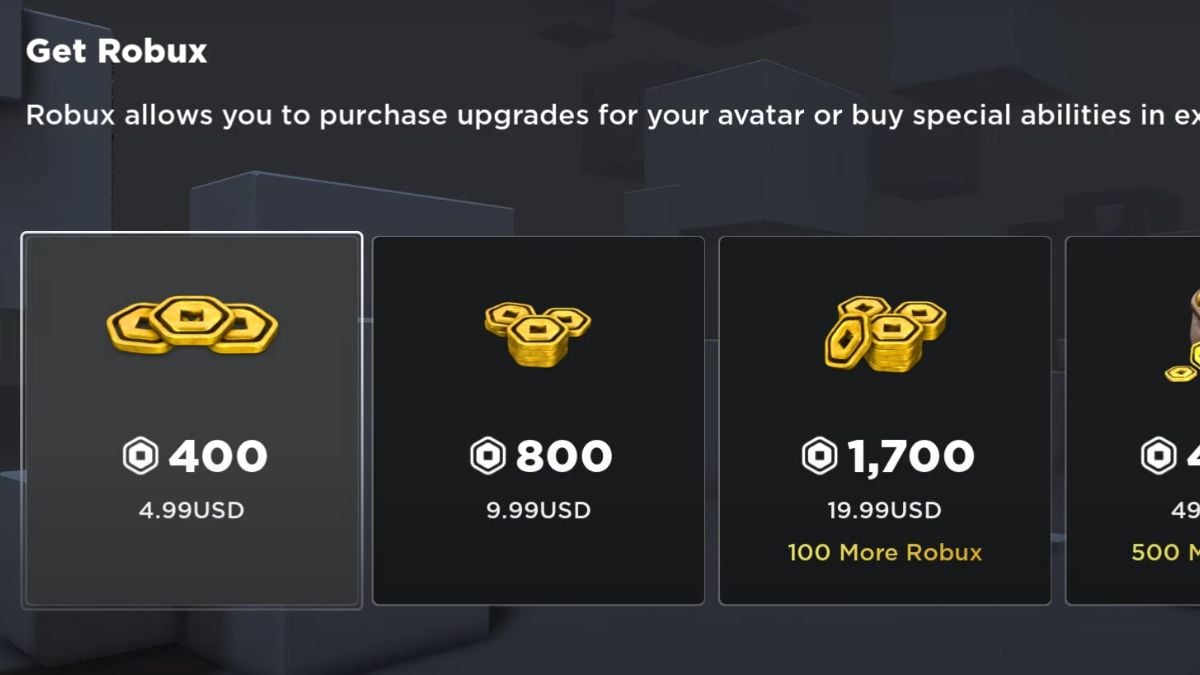
To buy Robux on PlayStation or Xbox, open the official Roblox app on your console and look for the Robux icon. Select the package you want, then complete the purchase through the PlayStation Store or Microsoft Store payment flow.
Console purchases are official and safe when made inside the Roblox console app, but pricing can vary by store, region, and tax rules. If you also have access to the Roblox website, compare the same package there before buying on console.
Platform verification note: Before publishing, confirm the latest Xbox and PlayStation package amounts and whether the console flow still matches the screenshots used in this article.
How to Use Roblox Gift Cards for Robux
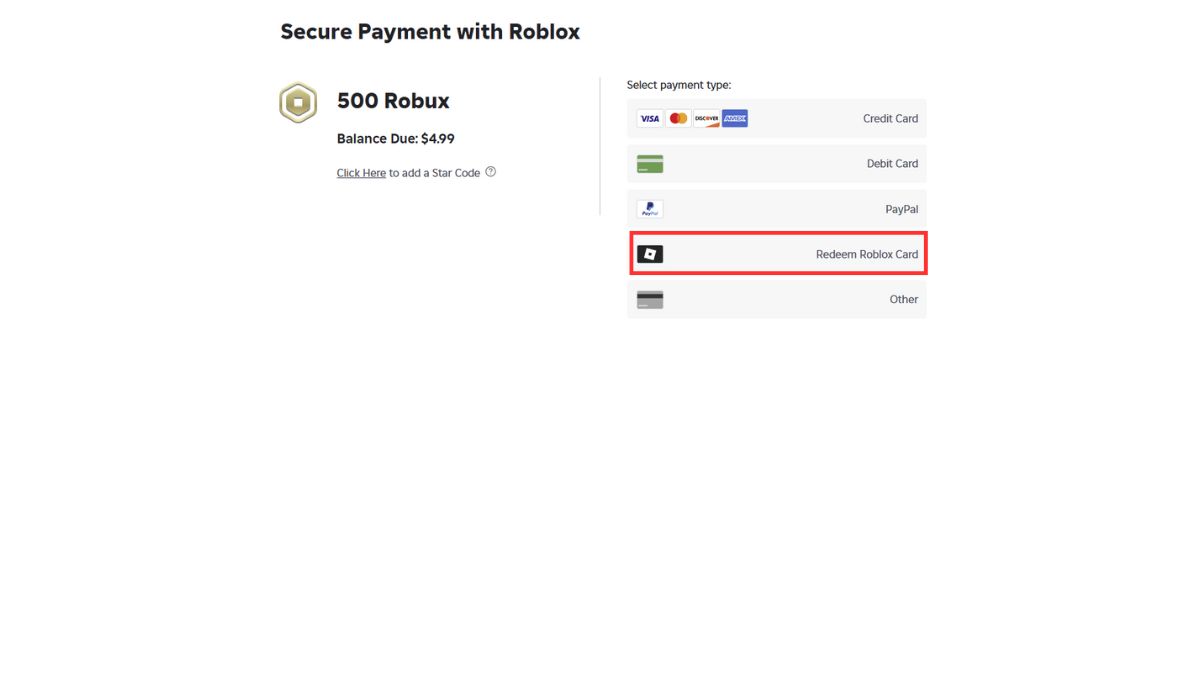
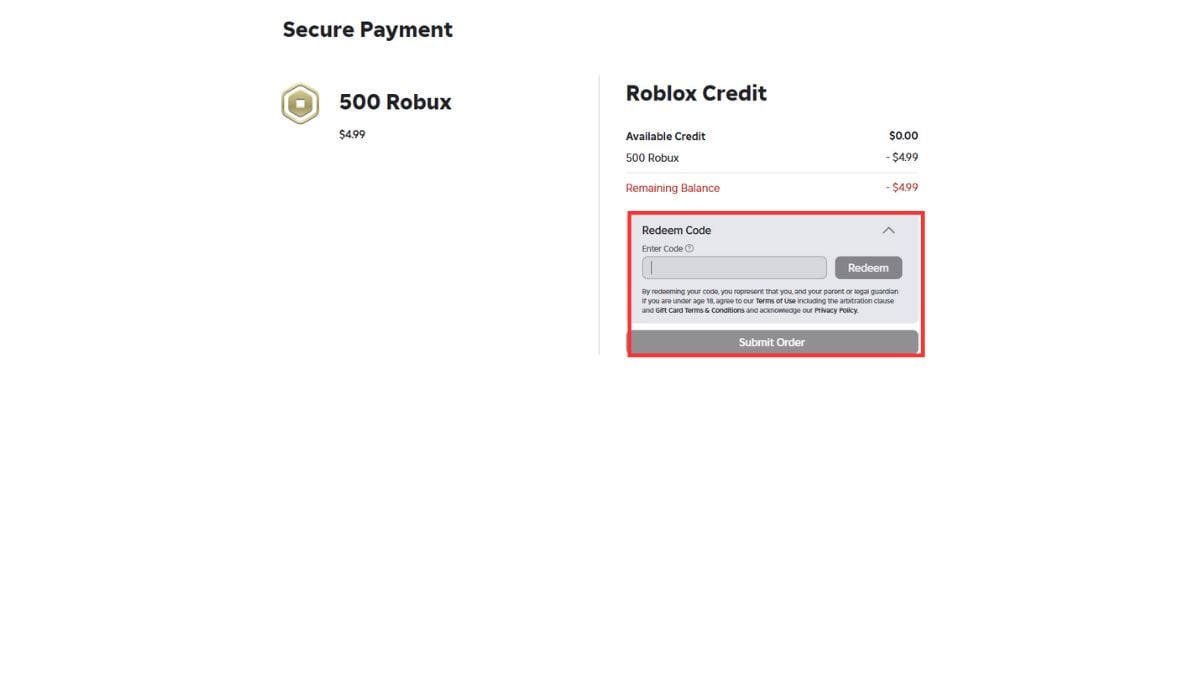
Roblox gift cards are one of the safest ways to buy Robux, especially for parents. You can buy them from trusted retailers, official online stores, or local shops depending on your country. Gift cards are useful because they avoid saving a payment card on the account and can help limit spending.
To redeem a Roblox gift card, go to the official Roblox gift card redemption page in a browser, log into the correct Roblox account, enter the code, and redeem it. Standard gift-card redemption is not usually done inside the regular mobile app or console app, so use a browser and make sure the correct account is logged in before entering the code.
- Go to the Roblox gift card redemption page in a browser.
- Log into the Roblox account that should receive the credit.
- Enter the gift card code.
- Click Redeem.
- Use the redeemed credit to buy Robux or eligible Roblox subscriptions.
Some gift cards may also include bonus virtual items. These items change over time, so check the gift-card page or retailer listing before buying if the bonus item matters to you.
Platform verification note: Confirm the current gift-card redemption flow and whether any app-specific exceptions apply in your region before adding screenshots or final instructions.
Is Roblox Plus Worth It in 2026?
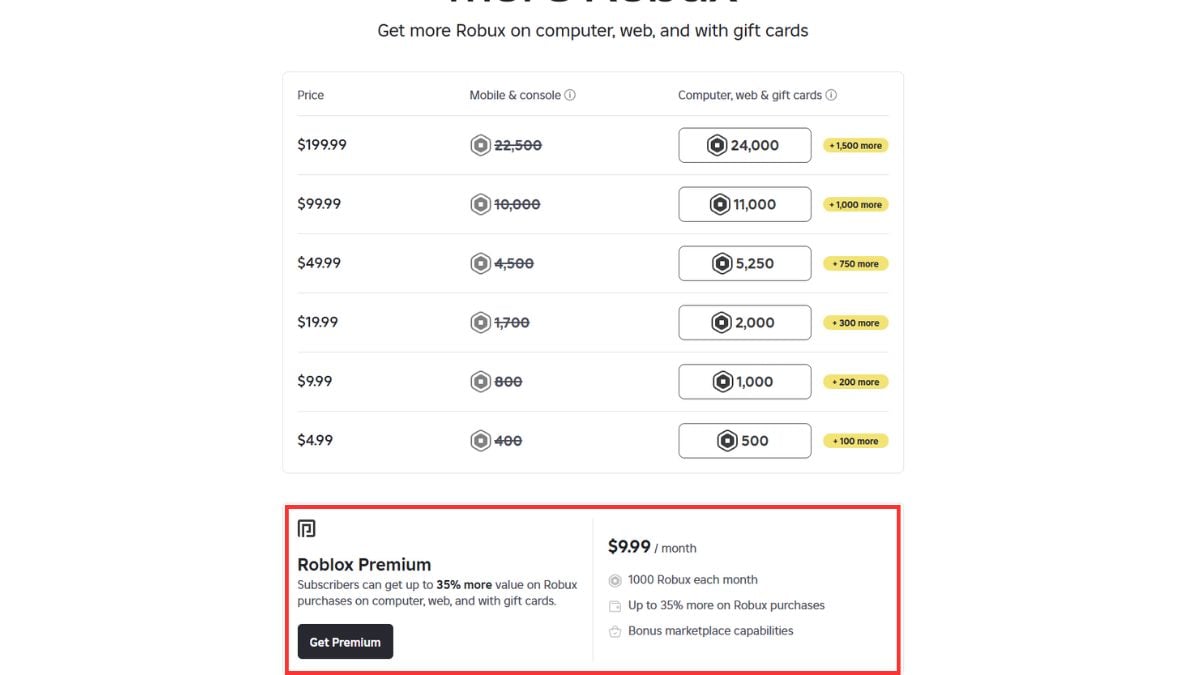
Roblox Plus is the current subscription to check in 2026. It replaced Roblox Premium for new buyers, which means Roblox Premium is no longer the main subscription recommendation for new users. Existing Premium subscribers may still have their old plan, but new users should look at Roblox Plus and Roblox Plus Robux bundles instead.
Roblox Plus can be worth it if you regularly spend Robux on avatar items, game passes, in-experience items, or private servers. The base Roblox Plus plan focuses on benefits like discounts and supported private-server perks. It does not work exactly like the old Premium plans, so do not assume the base plan includes monthly Robux unless you are specifically choosing a Plus Robux bundle.
Roblox Plus vs Roblox Premium
| Feature | Roblox Plus | Old Roblox Premium |
|---|---|---|
| Available for new purchase? | Yes, where available | No longer the new-user option |
| Monthly Robux | Only with Plus Robux bundles | Included in old Premium tiers |
| Best for | Players who spend regularly and want discounts/benefits | Existing subscribers who still have the old plan |
| Buying advice | Check whether you are buying benefits only or a Plus bundle with Robux. | Do not recommend as a new subscription path. |
Subscription verification note: Before publishing, check whether Roblox Plus, Plus 500, Plus 1000, and Plus 2000 are visible on your account and in your target region. Subscription availability and naming can vary by account and region.
How Parents Can Buy Robux Safely
If you are buying Robux for a child, the safest option is usually a Roblox gift card or a one-time purchase through the official Roblox website. This avoids leaving a payment method saved on the account and makes it easier to control how much is spent.
- Check the Roblox username before completing the purchase.
- Use a gift card or prepaid card if you do not want a card saved on the account.
- Talk to your child about fake free Robux sites and account verification scams.
- Review transaction history after buying Robux.
- Use parental controls and app-store purchase approvals where available.
How Can You Avoid Scams When Buying Robux?
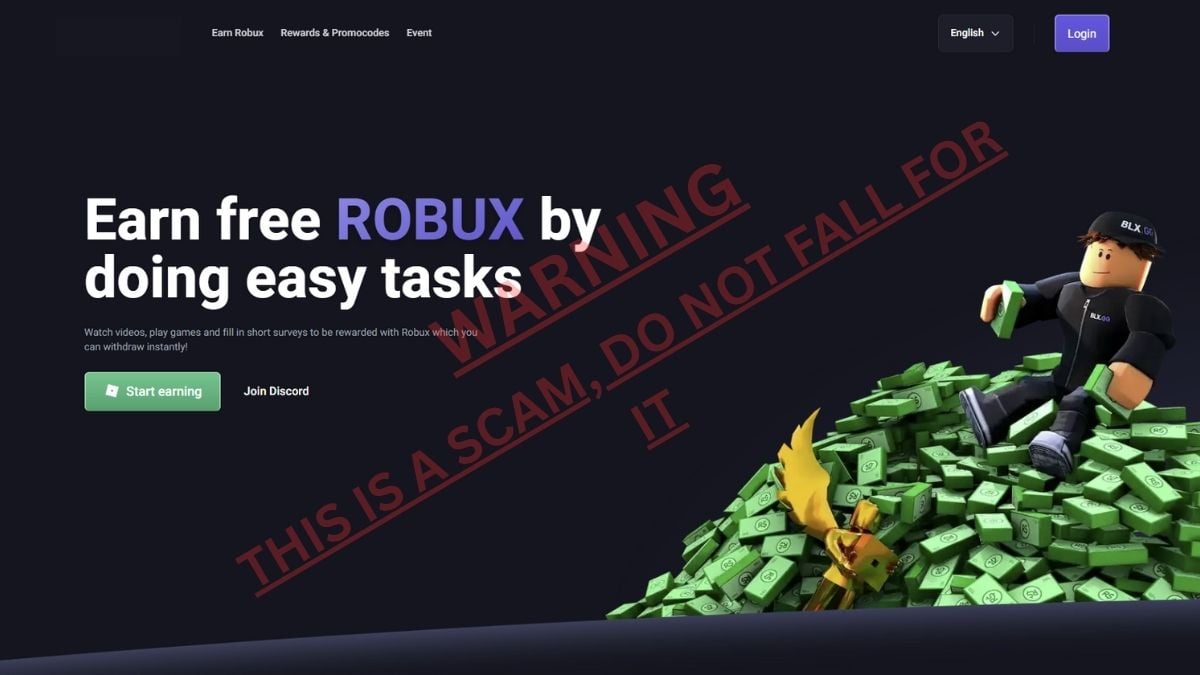
Robux scams are extremely common. The most dangerous ones claim that you can get free Robux by completing surveys, downloading apps, joining a Discord server, or entering your Roblox username and password. These are not official Roblox purchase methods.
Use this safety checklist before buying or claiming anything related to Robux:
- Only buy Robux through Roblox, official app stores, console stores, or trusted gift-card retailers.
- Never enter your Roblox password on a third-party Robux site.
- Do not trust Robux generators, survey walls, or download-to-earn Robux pages.
- Avoid VPN or country-switching tricks that promise cheaper Robux.
- Check that the account name is correct before buying.
- Report scams through Roblox if you see them inside an experience or message.
If your Roblox account has been scammed or charged without permission, contact Roblox Support immediately. Include the username, transaction details, screenshots if available, and a clear explanation of what happened.
Frequently Asked Questions About Buying Robux
What is the safest way to buy Robux?
The safest way to buy Robux is through the Roblox website, the official Roblox app, the Roblox app on PlayStation or Xbox, or an official Roblox gift card. Avoid third-party Robux sites and any page that asks for your Roblox password.
What is the best-value way to buy Robux?
The Roblox website, computer purchase flow, and Roblox gift cards are usually the best-value methods because Roblox says these methods can give up to 25% more Robux. Always compare the live package amounts before buying.
Can you still buy Roblox Premium?
Roblox Premium is no longer the new-user subscription option. Existing Premium subscribers may still have their old plan, but new buyers should check Roblox Plus and Roblox Plus Robux bundles instead.
What is Roblox Plus?
Roblox Plus is a Roblox subscription focused on benefits such as discounts and other account perks. The base plan is not the same as old Premium, so check carefully whether the subscription you choose includes monthly Robux or only benefits.
Can you redeem Roblox gift cards on mobile or console?
In most cases, you should redeem Roblox gift cards through the official Roblox gift card redemption page in a browser. Do not enter gift-card codes into third-party sites or unofficial apps.
Are free Robux generators real?
No. Free Robux generators are scams. They often try to steal accounts, collect personal information, or trick users into downloading unsafe files.
Can Robux be converted back to money?
Regular Roblox players cannot normally convert Robux back into real money. Developer Exchange is a separate creator program with its own eligibility rules and should not be used to value normal Robux purchases.
Why did I get fewer Robux on mobile than on web?
Robux package amounts can differ because of platform stores, taxes, regional pricing, and Roblox's web/computer/gift-card value differences. Compare the package shown on web with the package shown on your phone before buying.
Can you transfer Robux between accounts?
No, Robux are linked to the account where they are purchased. You cannot directly move a normal Robux balance from one account to another, so always check the username before buying.
How long does it take for purchased Robux to appear in your account?
Most Robux purchases appear quickly after the transaction is completed. If they do not show up, restart Roblox, check your transaction history, confirm your app-store receipt, and contact Roblox Support if the charge went through but the Robux did not arrive.
Can you get a refund for Robux purchases?
Robux purchases are generally treated as final digital purchases. If there was an unauthorized charge or a purchase problem, contact Roblox Support or the relevant platform store instead of filing random chargebacks, because chargebacks can create account problems.
Now, if you want to get free rewards in games, make sure to check out our Roblox Codes post here on Pro Game Guides. These are official in-game rewards and are different from Robux.