


Updated: October 23, 2026
As of October 23, 2026, there is 1 active Orbiter code you can use. Enter RELEASE for in-game currency and special cosmetic items.
I think we’ve all dreamed of becoming astronauts at some point in our lives. Building our own rockets, reaching for the stars, and, of course, dodging those pesky UFOs! In Orbiter, you can upgrade your rocket, explore places like the Moon and Mars, and uncover secrets scattered across the solar system. Okay, maybe space isn’t as safe as we imagined, but the latest active Orbiter codes can help you upgrade your ship, give it a fresh paint job, and show off special flight trails!
What Are All the Active Orbiter Codes?
Redeem the one active Orbiter code below to get a great starter pack filled with Cash, Gems, and a free paint job. First impressions matter, even with aliens. If launching things (more specifically poultry) into space is your cup of tea, why not check out our Chicken Rocket Codes as well?
Orbiter Active Codes
| Code | Copy | Description |
|---|---|---|
| RELEASE | 10k Coins, 300 Gems, Launch Day paint & flight trail |
Related: Launch Your Rocket Codes
How Do You Redeem Orbiter Codes?
Here's how to use Orbiter codes in just a few quick steps:
- Open Orbiter on Roblox.
- Click on the Shop icon in the lower right corner.
- Select the Codes tab.
- Input your code in the Enter code field.
- Hit REDEEM to get your free goodies.
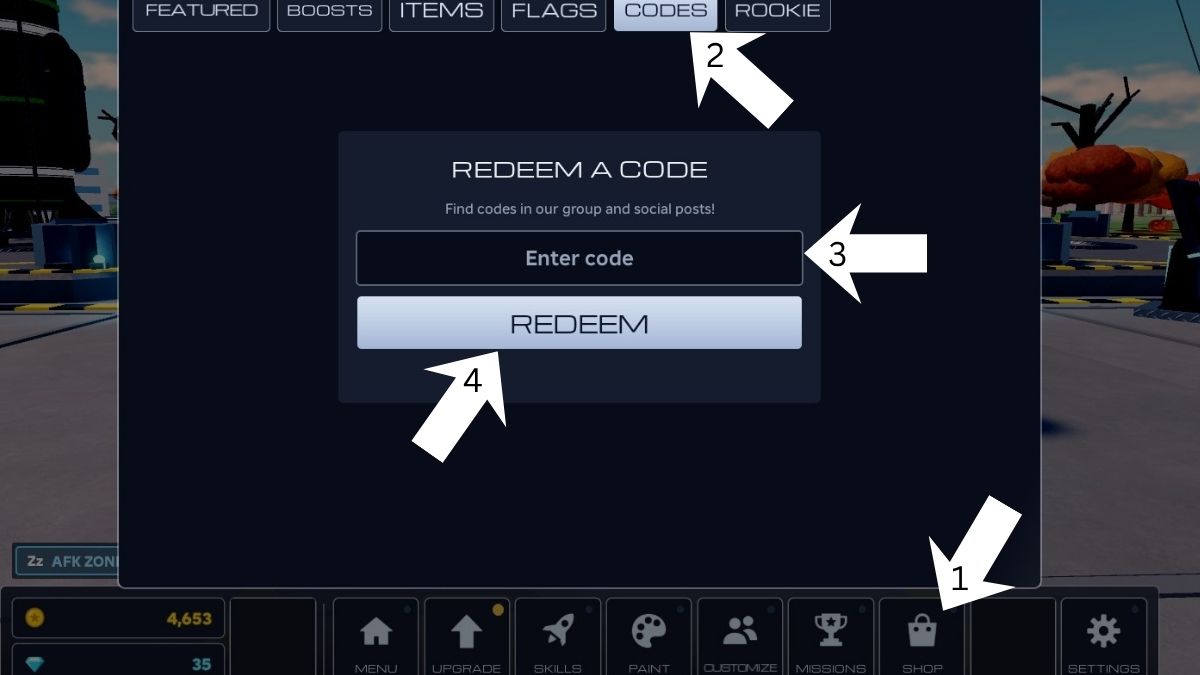
To avoid spelling and capitalization errors that will render your Orbiter codes invalid, simply copy and paste the codes directly from our site to ensure accuracy and claim your freebies without any hassle.
Where Do You Find New Orbiter Codes?
At the time of writing this article, the Orbiter devs don't have an official Discord. You can join their Community Page to stay up to date with future rewards. You can always bookmark our page and check back regularly because we will post codes as soon as an update drops!
What Do Coins and Gems Do in Orbiter?
Both in-game currencies can be used to unlock a variety of upgrades for your ship and character. Expand your fuel capacity to venture deeper into space, upgrade anything from your hull to the engine, and explore new customization options. You can even use Gems to upgrade your little helper bots, ensuring they’re always ready to assist with maintenance.
Visit our Roblox Game Codes page to claim even more rewards for titles such as Anime Realms X and more.


