


Updated: November 9, 2026
Stack A Butter Squishy has 3 active codes as of November 9, 2026. Use STACK, BUTTER, and SQUISHY for free Cash and more!
When someone asks if you enjoy ASMR, the correct answer is: No, what, never heard of it. But, if you enjoy ASMR along with rolls, AFK earning, Pets, and a weather system, then Stack A Butter Squishy is the perfect Roblox experience for you! We've also got some free in-game money that you can grab with Stack a Butter Squishy codes.
What Are All the Active Stack A Butter Squishy Codes?
There are currently 3 active Stack A Butter Squishy codes. We'll keep checking for new ones and update this list as soon as they become available. Indulge in more ASMR with our Unbox ASMR codes!
Stack A Butter Squishy Active Codes
| Code | Copy | Description |
|---|---|---|
| STACK NEW | 500 Cash NEW | |
| BUTTER NEW | 500 Cash NEW | |
| SQUISHY NEW | Kangaroo Pet NEW |
Related: Stack the Blocks Codes
How Do You Redeem Stack A Butter Squishy Codes?
Use the following method to redeem Stack A Butter Squishy codes:
- Launch Stack A Butter Squishy in Roblox.
- Go to the in-game Shop.
- Scroll down until you see Enter codes for rewards!
- Enter an active code into the text box.
- Press Redeem to claim your rewards.
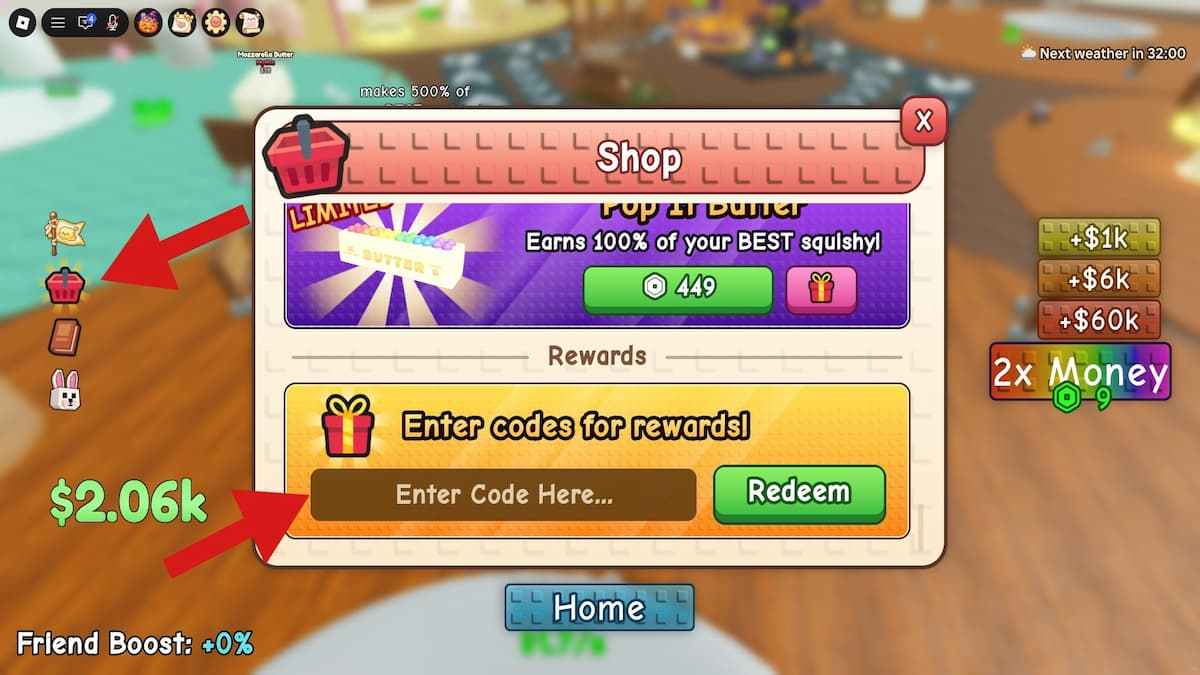
Check every Stack a Butter Squishy code carefully before redeeming it, since incorrect spelling or capitalization can make it fail. Copying and pasting codes directly from our active list is the easiest way to avoid mistakes.
Where Do You Find More Stack A Butter Squishy Codes?
The best place to find new Stack A Butter Squishy codes is the game's official Roblox page and the developer's community channels. Keep an eye on Team Lychee!'s announcements, especially during updates and special milestones, as these are common occasions for new freebies. You can also bookmark this page, as we'll regularly check for new codes and add them as soon as they're released.
How Do I Get New Pets In Stack A Butter Squishy?
Beside the regular buying, you can get new Pets in Stack A Butter Squishy by trading with other players! The official Discord even has an entire channel dedicated to trading. The way to do it is to approach another player in the game and press E to initiate trade. At that point, you'll need to wait for the other person to reply, which is why arranging trades over the Discord beforehand is a good idea.
Check out our Roblox Game Codes page and Roblox Promo Codes post for even more free rewards across your favorite Roblox experiences.


