Updated: October 19, 2026
We found 3 active SWAT Manager codes for you to redeem as of October 19, 2026. Use TEARGAS, SHIELDUP, and NIGHTOPS to make tons of cash, get extra research points, and add more weapons to your armory.
When criminals are running rampant and the police force is stretched too thin, it’s time to call in the big guns. SWAT Manager puts you in the boots of a SWAT Commander running the entire division, including patrol, incident response, unit recruitment, vehicle and weapon procurement, and other on-field and station duties. Your units need backup, and SWAT Manager codes have been dispatched to their location!
What Are All the Active SWAT Manager Codes?
Building a reputable SWAT department from the ground up takes time and effort, but redeeming the 3 active SWAT Manager codes will help you handle high-risk crimes and earn your fellow citizens' trust. Invest Research Points and Cash in upgrades to prepare your squads for any threat level. Also visit our Secure the Checkpoint Codes guide to try a similar law enforcement experience with freebies.
SWAT Manager Active Codes
| Code | Copy | Description |
|---|---|---|
| TEARGAS NEW | 9.8k Cash and 50 RP NEW | |
| SHIELDUP NEW | 5.9k Cash NEW | |
| NIGHTOPS NEW | 1x Elite Personnel Rifle (Requirement: Department Level 5+) NEW |
SWAT Manager Inactive Codes
| Code | Copy | Description |
|---|---|---|
| FRESHGEAR | Cash Boost (10 mins), 50 RP |
Related: San Diego Roleplay Codes
How Do You Redeem SWAT Manager Codes?
Redeem your SWAT Manager codes in just four easy steps:
- Launch SWAT Manager on Roblox.
- Press the Store button.
- Type in a code into the Enter Code field.
- Press Redeem to claim your rewards.
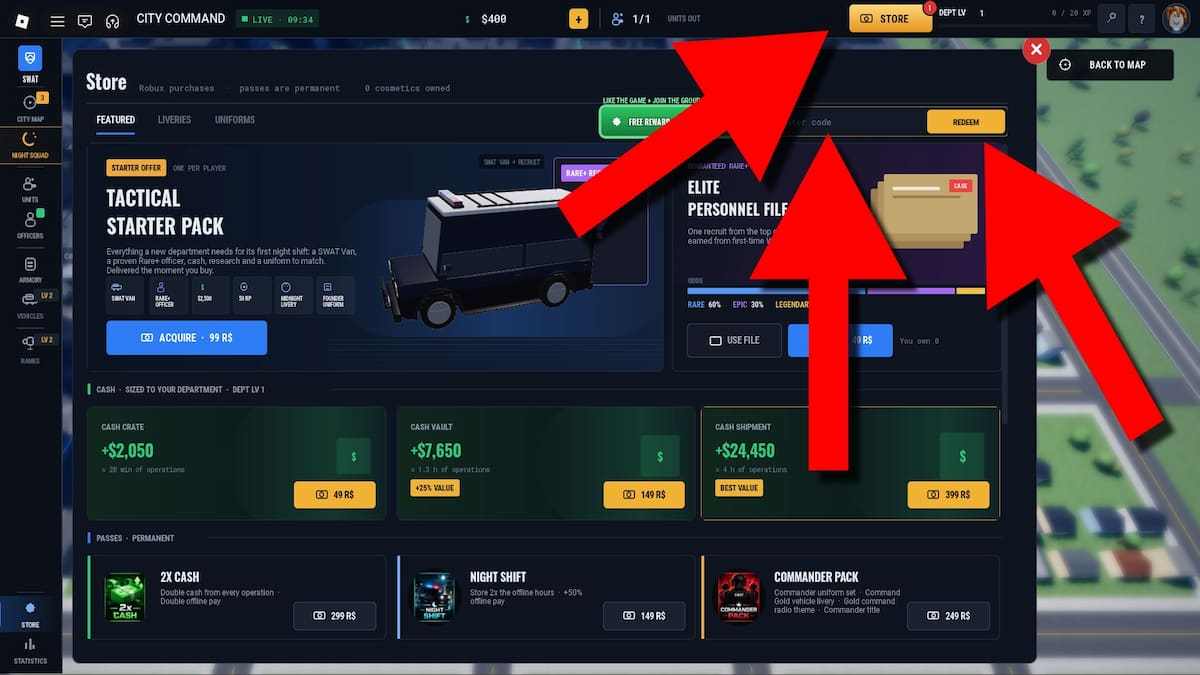
Double-check every code to ensure no spelling errors slip through, or copy a code from our list and paste it directly into the game.
Where Do You Find More SWAT Manager Codes?
The SWAT Manager Discord server and the Speedy Robbers Roblox group are the two official social channels where you'll find all the latest codes. If you don't want to spend time sifting through posts and messages, bookmark this article (Ctrl+D) and check back daily to grab fresh codes from our list.
How To Level Up and Grind Cash in SWAT Manager?
To increase your HQ level and earn money as quickly as possible, invest in Research and take on Operations within your Team Power. If you have available officers, dispatch them to complete Jobs at the station to earn extra cash and gain XP. Finally, join Global Raids to earn even more money and gain XP faster.
Check out our Roblox Game Codes section for the latest freebies for all your favorite games, including Secure the Checkpoint.