
How to fix Ubisoft Connect stuck on initializing

Someone make it work!

Like any online game launcher, Ubisoft Connect will experience various issues. Some might say UC experiences more than the regular amount. If you're struggling with playing games, here's how to fix the Ubisoft Connect stuck on initializing error.

Recommended Videos

How to fix the stuck on initializing error for Ubisoft Connect

For anyone who plays games through Ubisoft Connect, you'll know that it's a launcher with a lot of issues (I don't think I've started a game of Siege on the first try ever). To get to play fun shooter games with a bunch of cool maps and modes like XDefiant, you'll have to fix any problems you have with the launcher.

If you are getting stuck on initializing error for Ubisoft Connect, there are a few things you can do to try and solve it. First, shut down Ubisoft Connect entirely before reopening it. Go as far as to End Task it in the Task Manager.

If that's not working, then uninstall and reinstall the app. Ubisoft has an entire reinstallation guide, so make sure to follow it to a T so that everything works correctly. Test the launcher, and if the issue persists, you have to go a step further.
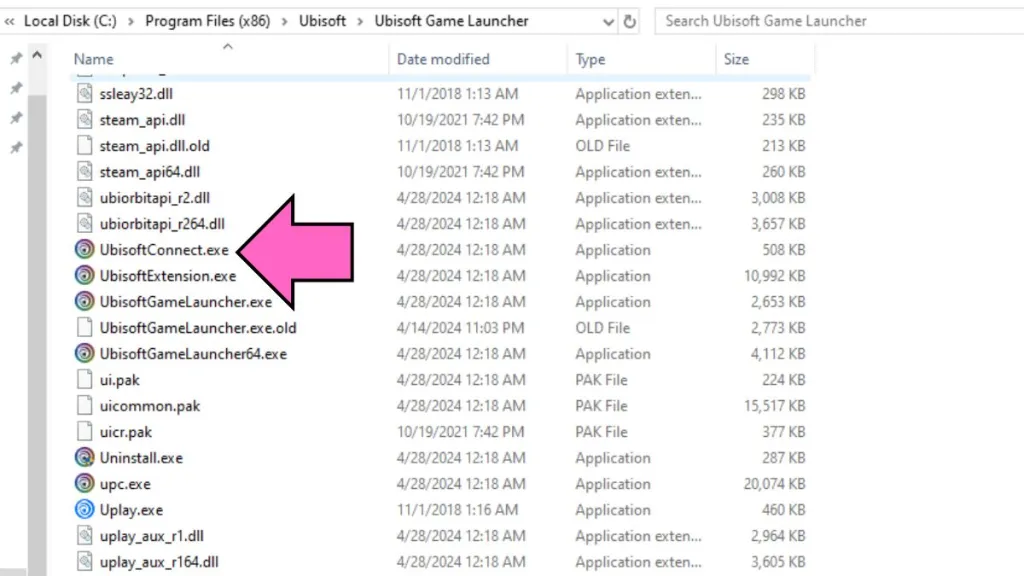
  • Ubisoft Connect launcher in program files
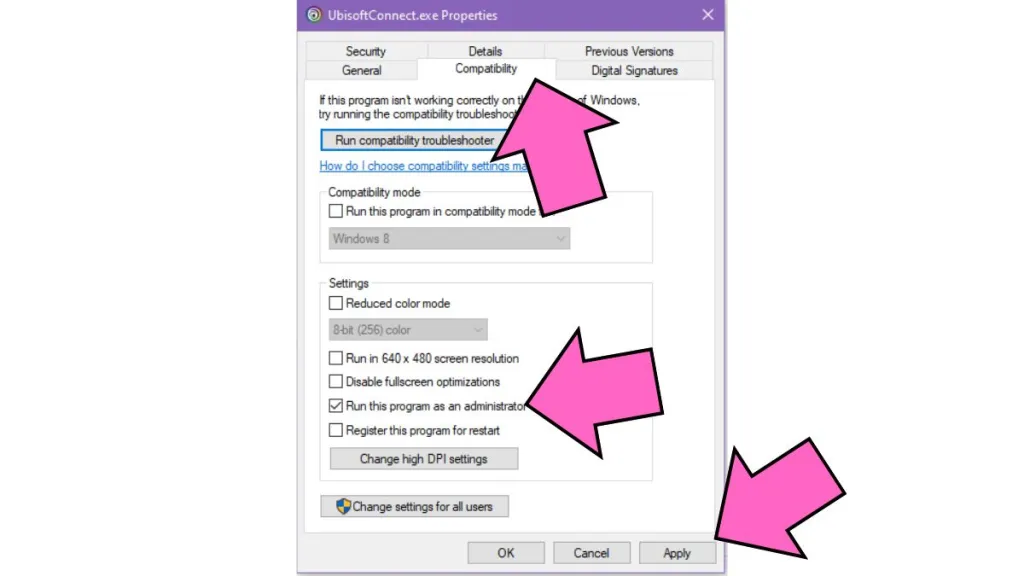
  • How to run Ubisoft Connect as administrator

A solution that I've seen work for many people is running Ubisoft Connect as administrator. To do so:

  • Go to C:\Program Files (x86)
  • Find the Ubisoft folder
  • Open the Ubisoft Game Launcher folder.
  • Right click UbisoftConnect.exe
  • Select Properties
  • Click on the Compatibility tab
  • Select run this program as an administrator.
  • Click Apply and then OK

Keep in mind that if you use a VPN, this could cause issues with Ubisoft Connect working properly. However, some say VPN worked to solve their issues, so it seems to be a fifty/fifty whether it is causing issues or solving them.

The last solution is to contact Ubisoft customer support. If anyone can help you, it should hopefully be them.

If you are a fan of Ubisoft games, check out How to enable 120fps mode in XDefiant on Pro Game Guides.

Follow us on Twitter and Facebook to get updates on your favorite games!

About the Author

Hristina Matic assigning editor Pro Game Guides

Hristina Matić

Assigning Editor

Hristina Matić is the Assigning Editor at Pro Game Guides, responsible for editorial oversight and content quality across the publication. She holds a Master's degree in English Language, Literature and Culture from the University of Belgrade and has built her foundation in content and editorial work across gaming media before joining PGG, where she has grown into a senior editorial role. A horror specialist first and foremost, Hristina has put hundreds of hours into Dead by Daylight, Outlast, The Last of Us, and Until Dawn, games she returns to repeatedly and knows at a level most guides writers don't. That depth of genre knowledge translates directly to her Roblox coverage, where she focuses on the platform's expanding horror and survival scene: titles like 99 Nights in the Forest, Hunty Zombies, and Paradox (DOORS). She also covers multiplayer action titles including Marvel Rivals, R.E.P.O., and PEAK.

Topics covered: Roblox TDs, Horror Games, Dead by Daylight, Multiplayer Games, Marvel Rivals

Find Hristina Matić on: Twitter

Forgot password
Enter the email address you used when you joined and we'll send you instructions to reset your password.
If you used Apple or Google to create your account, this process will create a password for your existing account.
This site is protected by reCAPTCHA and the Google Privacy Policy and Terms of Service apply.
Reset password instructions sent. If you have an account with us, you will receive an email within a few minutes.
Something went wrong. Try again or contact support if the problem persists.