


Getting Secret or Celestial-type Brainrots like 67 is a huge hassle in Escape Tsunami for Brainrots, as you must fight with other players for it while evading the incoming waves. To avoid this scenario, it is better to use a Private server to play on, a private server where you can get much rarer Brainrots without struggle.
Update 09 June, 2026 - Replaced one non-working private server with a new one
All Active Escape Tsunami for Brainrots Private Server (PS) Links
Below, I have mentioned a few private server links for Escape Tsunami for Brainrots. Players can use these links to play the game privately with friends or on their own. On mobile or PC, simply click the button to enter the game. Console players, on the other hand, must first ask one of their buddies on the above platform to join, then send a party invite.
How do you buy Escape Tsunami for Brainrots Private Server?
If you are having a great time using the private servers above, you can always get one for yourself using the method explained below.
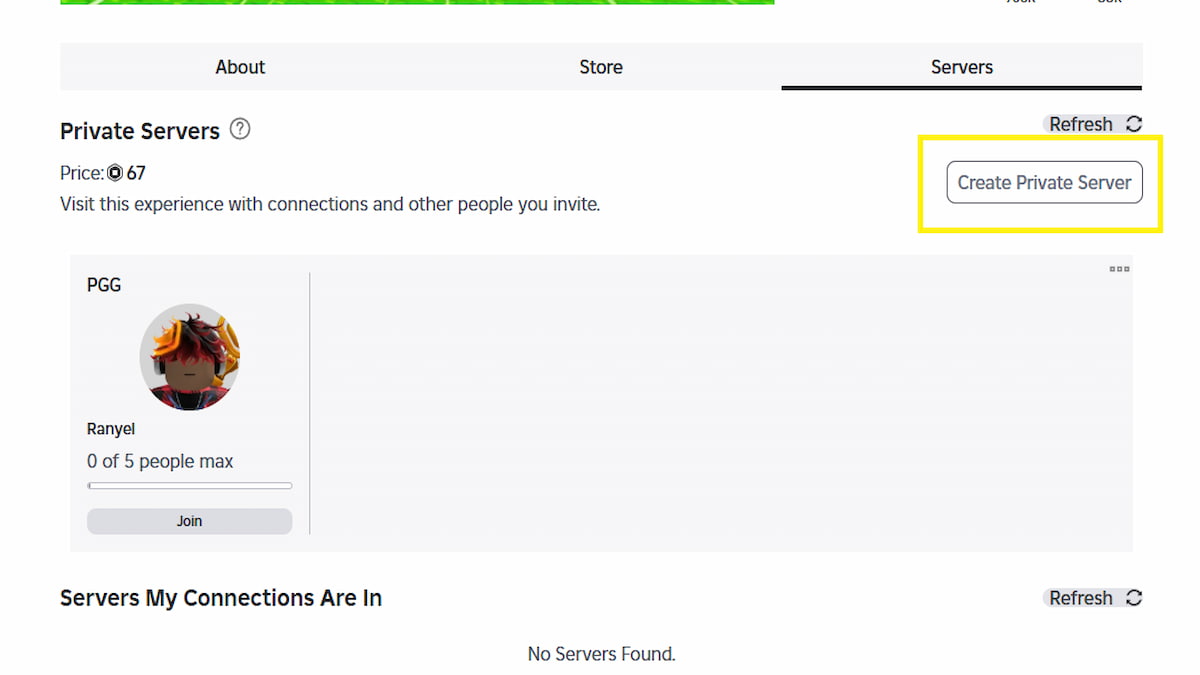
- Open Escape Tsunami for Brainrots on your browser or any platform of your choice
- Scroll a little below the play button to find three tabs - About, Store, and Servers.
- Select the last Server option.
- Press the Create A Private Server option on the right, then pay 67 Robux to start creating a server.
- Give your server a name, adjust settings like Connection Invites, and then copy the Private Server URL.
- Voila! Hit the play button to jump inside your private server.
Remember, this is a monthly subscription, not a permanent one. Ensure your account has at least 67 Robux to keep renewing and enjoying the service.
How to get more Private Server Links for Escape Tsunami for Brainrots
You can get more Private Server Links for Escape Tsunami for Brainrots by exploring the official Escape Tsunami for Brainrots Discord server. Here, players often post messages in the main general chat channel to find other like-minded players to party with. Look for players like you and chat with them to team up and play together.
Escape Tsunami for Brainrots Server FAQ
A total of five users can play together on a server in Escape Tsunami for Brainrots. To make room for more people, the admin has to either kick existing users or migrate to a new server.
If you are asking about gameplay, there is absolutely no difference between a public and a private server in Escape Tsunami for Brainrots. You can find the same shop, upgrades, wave speed, and spawn rates across both. Basically, both are the same.
Yes, it's absolutely worth your time and money to purchase a private server, as it allows you to grind and easily get your favorite high-rarity Brainrot without having to fight other players in the lobby. Instead of sharing the Brainrots, you can get everything for yourself for a minimal amount.
Yes, it's absolutely worth your time and money to purchase a private server, as it allows you to grind and easily get your favorite high-rarity Brainrot without having to fight other players in the lobby. Instead of sharing the Brainrots, you can get everything for yourself for a minimal amount.
For more on Escape Tsunami for Brainrots, check out Escape Tsunami For Brainrots Codes or Escape Tsunami for Brainrots Admin Abuse Event Schedule & Countdown


