Updated: May 3, 2026
We added the latest active code — Aurora.
Trying to start an arcade business from the ground up is challenging even virtually, but with Build an Arcade codes, making the first investment will be easier. Add machines that no other arcade has, and decorate your business with lots of plants and flowers to make it stand out even more.
All Build an Arcade Codes List
Make the most of Build an Arcade codes and claim your VIP customers and maids. One will boost your income while the other will take care of your arcade. Want to run another Arcade simulator game? Check out our Arcade Store Simulator Codes article for more free rewards.
Active Codes
Build an Arcade Active Codes
| Code | Copy | Description |
|---|---|---|
| Aurora | Norther Dapper NEW | |
| 200KLikes | Couple Leprechauns | |
| 190KLikes | Speedrunners | |
| Update20 | 3 VIP Customers | |
| 180KLikes | Prismatic Potion | |
| 170KLikes | Speedrunners | |
| 5KCommunity | Prismatic Potion | |
| 160KLikes | Prismatic Potion | |
| 700KMembers | Summon 7 VIPs | |
| 4KCommunity | Large Money Potion | |
| 150KLikes | Prismatic Potion | |
| Update16 | Large Luck Potion | |
| 130KLikes | Prismatic Potion | |
| 25MVisits | 2 Midas | |
| Layouts | Large Luck Potion | |
| 500KMembers | 5 VIP Customers | |
| 400KMembers | 4 VIP Customers | |
| 20MVisits | 2 Midas | |
| 100KLikes | 10 VIP Customers | |
Build an Arcade Inactive Codes
| Code | Copy | Description |
|---|
Expired Codes
- 80KLikes
- Update12
- 300KMembers
- 70KLikes
- 50KLikes
- Snowman
- Xmas
Related: Roblox Arcade Island: Roblox Arcade Codes
How to Redeem Build an Arcade Codes
Make sure to follow the steps below so that you can redeem your Build an Arcade codes without any issues:
- Join the Our Arcade Roblox community group.
- Run Build an Arcade on Roblox.
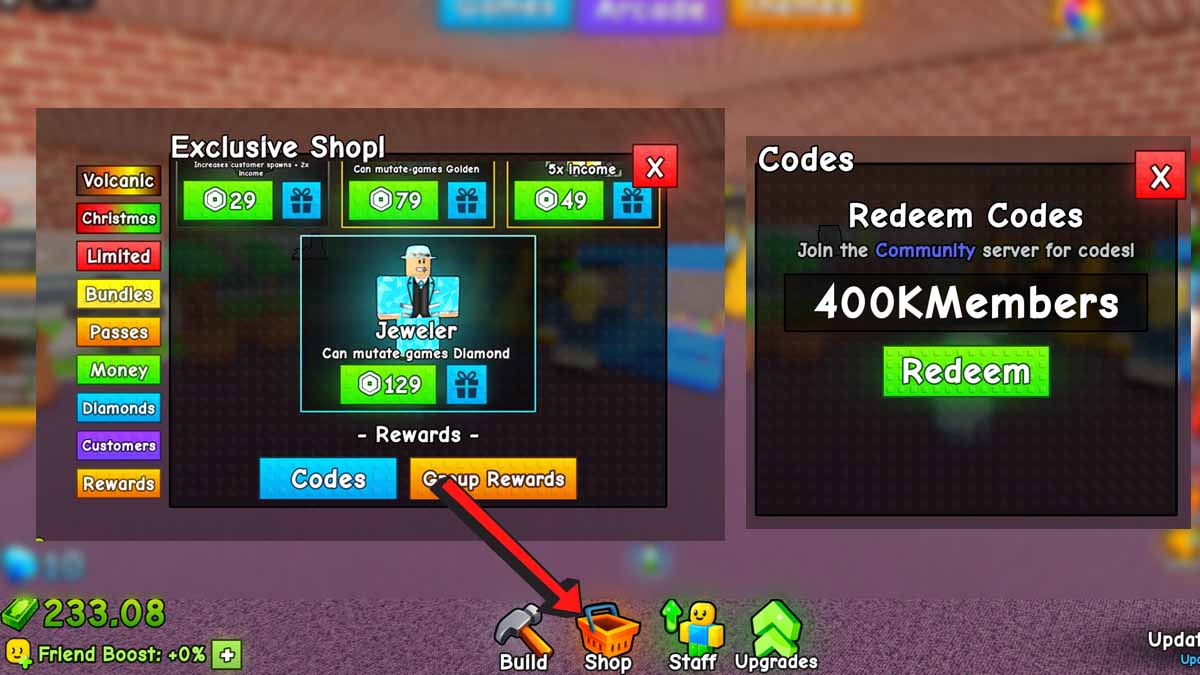
- Click on the Shop icon at the bottom of the screen.
- Scroll down until you find the Rewards section.
- Click on Codes.
- Type in your code into the text field.
- Hit Redeem and get your goodies.
How to Get More Codes
This article is your go-to hub for all the latest Build an Arcade codes, neatly organized in one list. We hunt down new codes every single day, so do yourself a favor and bookmark this page (Ctrl + D) and swing by often—fresh free goodies are always waiting for you here. Of course, if you prefer to do the hunt on your own, then make sure to visit the Build an Arcade Discord server.
Build an Arcade FAQ
Build an Arcade is a Roblox game that simulates what it is like to own and run your own arcade business. You buy and place machines, earn money from customers, and clean and repair the machines so that they work properly and continue to earn you money.
You can either clean or repair them manually by approaching the machine and holding E until it's fixed, or make it easier for yourself and hire help, a mechanic, or a maid to take care of your machines while you focus on expanding your business.
As there isn't a button to automatically teleport to the decoration shop, you will have to teleport to the machine shop first and go to the left. There will be a building where you can purchase your decorations.
There is so much more to claim; dive into our massive Roblox Game Codes library and our Roblox Promo Codes hub to get even more rewards for your favorite games and more.