


Updated: April 4, 2026
New codes like FreeGems are now available in our list below!
When playing Soda Simulator you will want to increase your Fizz as quickly as possible. This clicker-style Roblox experience has you generating Soda Power, upgrading your drinks, and unlocking new areas as you progress. Luckily, Soda Simulator codes can give you a head start with Coins, Gems, and Boosts, helping you progress faster and unlock better upgrades without too much grinding.
All Soda Simulator Codes List - Roblox
Progressing normally in Soda Simulator is done by clicking diligently to build your Fizz, and selling the Fizz for Coins in order to be able to purchase stronger flavors and Boosts. More Coins and upgrades can be earned through equipping Pets, unlocking new areas, and ranking up, but this can take a lot of time especially early on. A far more efficient way to increase your Fizz and streamline your Coin earnings is by redeeming Soda Simulator codes. If you are a fan of Roblox clicker games make sure to check out our Clicker Simulator Codes guide for more freebies!
Soda Simulator Active Codes
| Code | Copy | Description |
|---|---|---|
| FreeGems | 150 Gems |
Related: Sapphire Clicker Codes
How to Redeem Codes in Soda Simulator
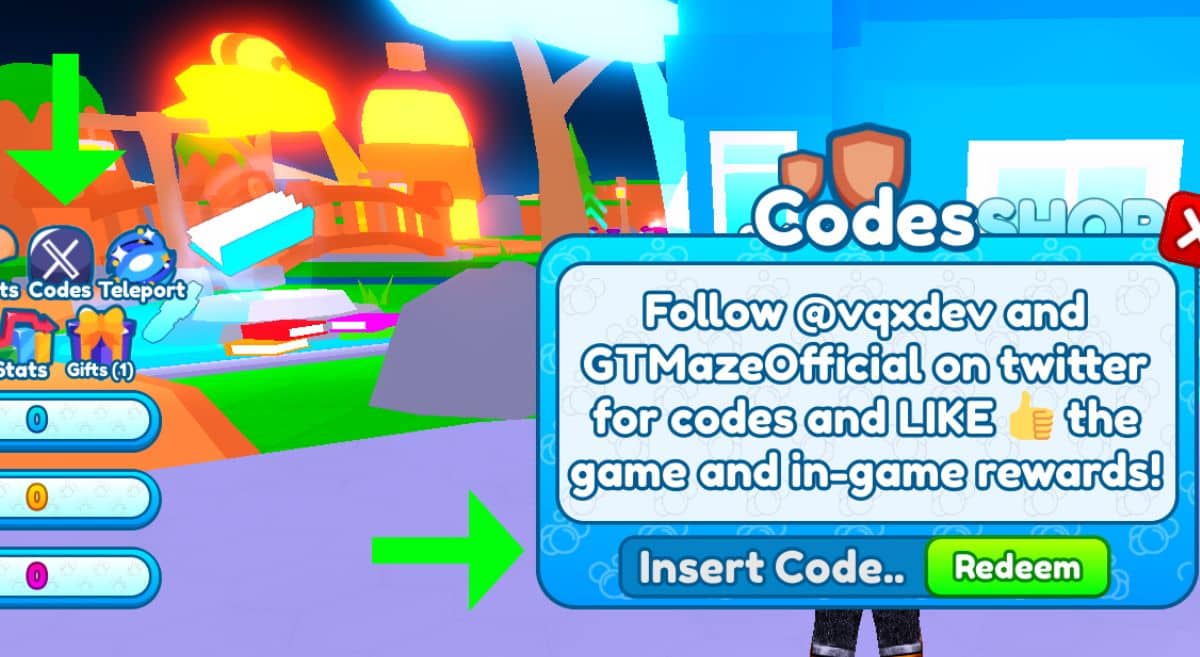
To claim your rewards just follow these simple steps listed below, and watch your Coins and Gems appear instantly:
- Open Soda Simulator in Roblox.
- Click on the Codes icon located above your Fizz Meter.
- You should now be able to enter your codes in the Insert Code section.
- Click on the Redeem button and enjoy all the new freebies!
How Do I Get More Codes?
To always be ready to claim your rewards and climb the ranks faster, first make sure to bookmark this page as we update it as soon as new Soda Simulator codes become available. Alongside this, it is a good idea to keep an eye on the game's official channels, primarily the official Soda Simulator Discord Server and the developer's X page.
Soda Simulator FAQ
Soda Simulator is a classic Roblox clicker where you build up your Fizz by clicking your Soda Bottle, selling the Fizz for Coins, and upgrading your production while competing with other players for the highest rank. Unlock better Sodas, Pets, and Boosts while exploring new regions or buying new Islands.
Codes tend to be case sensitive so make sure to paste them exactly as shown to avoid errors. If the code has been entered correctly the likely reason it is coming back as incorrect is that it has already been redeemed on your account once before or it has already expired.
Ranks are progression milestones that unlock various perks. For example, unlocking the Soda Scientist rank will allow you to trade with other players.
Trading is possible once you reach the Soda Scientist rank. After that you can trade with other players to optimize your collection or earn extra resources.
If you want to know if a game you play has freebies, check out our Roblox Game Codes post and our Roblox Promo Codes page.


