


You can use Shiftlock ID Decals like Kraken Eyes, Magical Staff, Punch, White Broken Heart & Temple Mascot to use inside the Strongest Battlegrounds to look cool and aim easily in each background.
In the Strongest Battlegrounds, the default Shiftlock can sometimes be less helpful while aiming or activating an ability due to its dull white color. To avoid this, you can always replace the default one with vibrant, cool decals that are suitable for all backgrounds/maps. So, here is a list of 50 Shiftlock ID codes for you to use inside the Strongest Battlegrounds.
All Active and Cool Shiftlock ID Codes
Below, you can find a list of 50 different decal codes for you to use as the new Shiftlock in the Strongest Battlegrounds. Most of these are symbols from popular anime, video games, and internet memes. Try each one and settle on the one that looks cool and feels easy on the eye while fighting.
| Shift Lock Decal Name | Code |
|---|---|
| AOT | 124411697763209 |
| Among Us | 117296168536540 |
| Angel Wings | 137680896471279 |
| Ash Ring | 113513504514314 |
| Black Figure | 101292267271626 |
| Black Heart | 11722865980 |
| Blackflash | 129798943968794 |
| Chinese Pie | 12472046162 |
| Cosmic Garou | 131352161368521 |
| Crying Emoji | 110312595891409 |
| Cute Girl | 74498370522728 |
| Cute Kitty | 11779925287 |
| Danger Skull | 11722153703 |
| Dazzling Stars | 11716557686 |
| DBZ | 123538343865945 |
| Demon Aura | 99913624572213 |
| Dragon's Roar | 77928697319918 |
| Fairy Tale Symbol | 130499812243487 |
| Gojo v1 | 89697426987219 |
| Gojo v2 | 122019960757732 |
| Green Emerald | 105532421272560 |
| High Cross | 11767037107 |
| Hitman 047 | 135299451413402 |
| Inverted Spidy | 112458206808185 |
| Itachi Ring | 118516581702648 |
| Kitty Paws | 11722554017 |
| Kraken Eyes | 87642604695954 |
| Life Heart | 136349630363409 |
| Lifeform | 113528024845531 |
| Little Goku | 11836165463 |
| Live Cactus | 137680896471279 |
| Love Heart | 136349630363409 |
| Magical Staff | 137870760510575 |
| Nami San | 112837590203183 |
| Neptune Ring | 82113401829625 |
| Ninja Chakra | 11723817205 |
| Pan Holes | 118245165705001 |
| Pokemon Card | 91823647 |
| Punch | 111843920739596 |
| Red Evil Eyes | 110312595891409 |
| Saturn Ring | 134501588323155 |
| Skull | 55511722 |
| Suprise Kitty | 97291822 |
| Temple Mascot | 117965789087452 |
| Tetris | 12345678 |
| The Fallen | 108478110930816 |
| Tiger's Wrath | 93201812284737 |
| Timer Clock | 121252420415947 |
| White Broken Heart | 15331784439 |
| Wolf's Howl | 126383803497590 |
How to enable Shiftlock in the Strongest Battlegrounds?
By default, the Shiftlock mode will be turned off in the Strongest Battlegrounds, and you must turn it on to use it inside the game. To do this, press Esc on a PC. Switch to the Settings tab, then scroll to the View & Control tab. Here, you can find the Shiftlock Switch option right in the middle. Turn it on to enable the Shiftlock feature in the Strongest Battlegrounds. Remember, we are talking about the Roblox App Settings, not the Settings in Strongest Battlegrounds.
How to equip a Shiftlock ID in the Strongest Battlegrounds
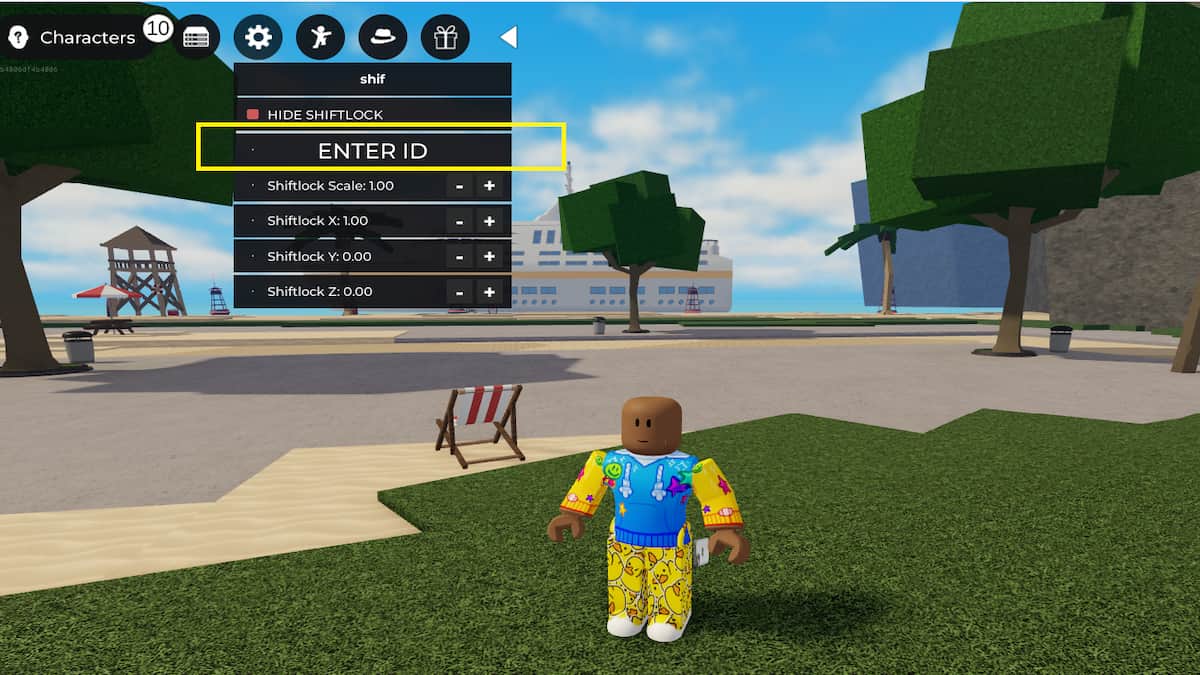
After enabling the Shiftlock in the Strongest Battlegrounds, it's time to equip customized decals for your Shiftlock. Open the experience, then tap the Settings icon in the top-left corner of the screen. In the top search bar, type in "Shift Lock." Now, in the list of options, select Change Shiftlock and paste one of the codes to use them. Also, ensure the Hide Shiftlock option is set to red, not green, so they are visible on your screen.
For more on Roblox, check out How to Use Skill Builder (V2) in The Strongest Battlegrounds or 5 Tips & Tricks for The Strongest Battlegrounds Combat


