Updated: July 23, 2026
There are 0 active Havoc codes as of July 23, 2026. We’ll keep our eyes peeled for future code drops, and we'll add new freebies to our list immediately for your convenience. Make sure to stop by every day to grab the latest codes and enjoy exclusive freebies!
Havoc throws you into the most intense PvP gunfights in the Roblox FPS sphere, and it pulls no punches. All the gear you carry can be gone in an instant, and all it takes is one well-placed bullet to take you back to the home screen. Havoc codes aren’t just a commodity; they’re a necessity.
What Are All the Havoc Codes?
As of July 23, 2026, you can grab 0 working codes for Havoc. As soon as new codes drop offering cash and gear upgrades, we'll add them to our list below, so make sure to bookmark this article (Ctrl+D) and visit us daily. While we await new codes, visit our Rivals Codes article to grab the latest rewards in an equally awesome FPS game!
Havoc Active Codes
| Code | Copy | Description |
|---|
Havoc Inactive Codes
| Code | Copy | Description |
|---|---|---|
| RELEASE2026 | Free Cash | |
| BABABABALOALA | Free Cash | |
| STOCKMARKET | 500k Cash |
Related: BloxStrike Codes
How Do You Redeem Codes in Havoc?
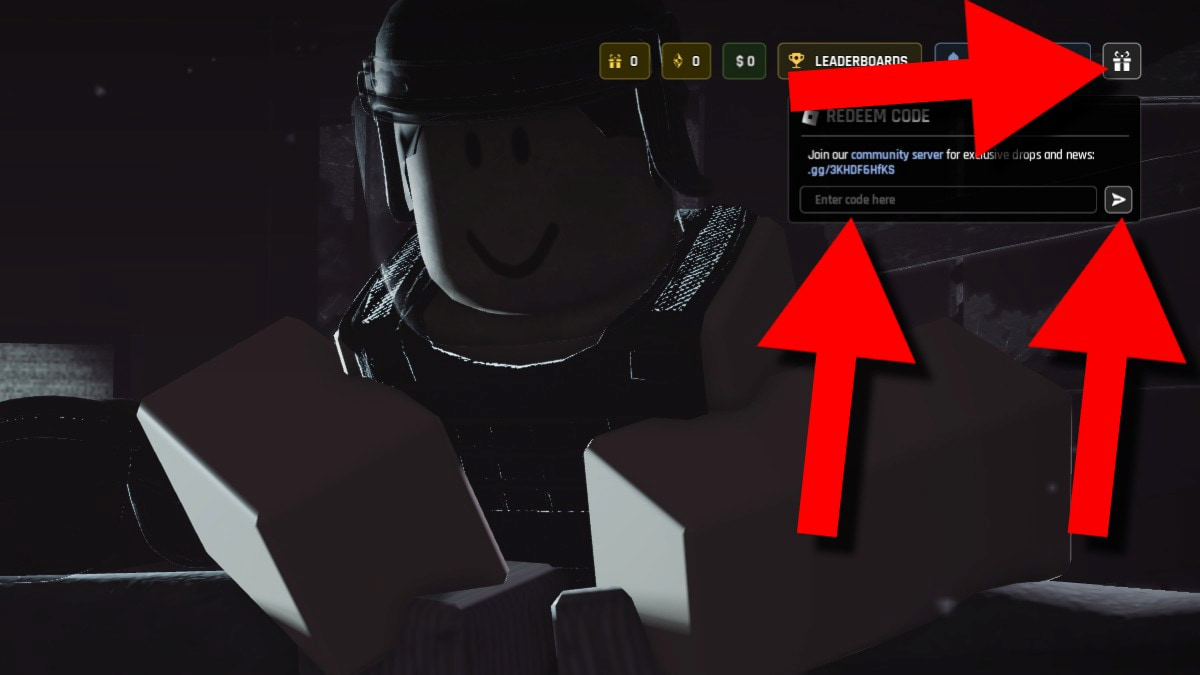
Redeeming codes in Havoc is easy: all you need to do is click on the gift box icon. Check out all the steps below:
- Run Havoc on Roblox.
- Press the gift icon in the top-right corner.
- Type your code into the Enter code here section.
- Press the arrow button to redeem your code.
If you get the 'Invalid Code' error message, that means that your code contains a spelling error that's getting in your way. Double-check your code a few times, or copy the code from our active list and paste it directly into the text box. However, getting the 'This code has expired' message means that you're too late to redeem it.
Where Do You Find New Havoc Codes?
The official Havoc Community Discord server is the best place to find new Havoc codes, as the developers use it as a primary way to communicate with players. You can also take part in polls, sign up for giveaways, and learn about upcoming events and updates beforehand to stay ahead of the competition. Looking for a simpler solution? Save this article and check back often!
What Does Cash Do in Havoc?
Cash is used to buy and repair gear in Havoc, helping you build a stash of valuable equipment. Every piece of gear you take on raids can be mighty useful, but in order to bring it all back, you must reach the extraction point alive. If not, you'll lose all the money and equipment you currently have on you.
Visit our Roblox Game Codes section to grab the latest and greatest rewards in PartyBox and other exciting games!