There are 40 usable Console Commands in Shindo Life that can be used from the in-game Type Commands function input box present at the bottom left of the page. You can use the commands to execute various functions like creating a squadron to start bell training.
In Shindo Life, you can do a wide variety of useful tasks like changing your in-game name, leaving a squadron, & customizing your Puppet Art. So, if you are wondering what the other commands are or how to use them in the game, here is a detailed guide.
What are the various Secret Commands in Shindo Life?
Below, you can find all the various common & secret commands in Shindo Life. Go through the list and examples to easily understand how to use them in the game.
| Command | Description | Example |
|---|---|---|
!1v1 [username] [username] | Starts a 1v1 training session between two players. | !1v1 Player1 Player2 |
!acc [username] | Accepts a squad invitation. | !acc PlayerName |
!accd [username] | Accepts a duel invitation from another player. | !accd PlayerName |
!begin | Starts the selected training session. | !begin |
!bell | Starts Bell Training. | !bell |
!beserk | Automatically attacks nearby enemies using melee, Z, and Q abilities while answering your Tailed Spirit's questions. | !beserk |
!cancel | Cancels your current mission. | !cancel |
!ccmds | Closes the commands menu. | !ccmds |
!cdog | Changes the color of Okami's dog for 25 Robux. | !cdog |
!cmds | Displays the list of available commands. | !cmds |
!cpads | Creates a Custom Pad (CPAD) training session. | !cpads |
!despawn | Removes the currently spawned map from the War Server. | !despawn |
!duel [username] | Sends a duel request to another player. | !duel PlayerName |
!end | Ends the current training session. | !end |
!endgame | Ends the current War Server game. | !endgame |
!ffoff | Disables Friendly Fire. | !ffoff |
!ffon | Enables Friendly Fire. | !ffon |
!game elim | Starts an Elimination game in the War Server. | !game elim |
!game tdm | Starts a Team Deathmatch game in the War Server. | !game tdm |
!inf | Displays information about the current training session. | !inf |
!inv [username] | Invites a player to your squad. | !inv PlayerName |
!kick [username] | Kicks the specified player from your squad. | !kick PlayerName |
!ktrain [username] | Starts Kunai training with the specified player. | !ktrain PlayerName |
!leave | Leaves your current squad or deletes it if you're the squad leader. | !leave |
!name | Changes your in-game roleplay name. | !name Naruto |
!pushup | Starts the Push-Up exercise training. | !pushup |
!reward | Gives rewards for the completed training. | !reward |
!rogue | Makes your character a Rogue. | !rogue |
!spawn [mapname] | Spawns the specified map in the War Server. | !spawn Ember |
!spawn team | Spawns the selected team into the War Server. | !spawn team |
!spirit | Opens the Tailed Spirit customization menu to change its appearance and color. Requires an active Tailed Spirit mode and two spins to reroll colors. | !spirit |
!spirit off | Exits the Tailed Spirit customization room. | !spirit off |
!squad | Creates a new squad. | !squad |
!team1 | Assigns players to Team 1 in the War Server. | !team1 |
!team2 | Assigns players to Team 2 in the War Server. | !team2 |
!Tentacion | Activates Tentacion Mode for Tailed Spirits. Generation 3 Tailed Spirits teleport you to the Tentacion Boss Arena to unlock Stage 4. Requires the Tailed Spirit to be Level 2000. | !Tentacion |
!tm | Starts Team Deathmatch (TDM) training. | !tm |
!topad | Teleports you to the CPAD training area. | !topad |
!treejump | Starts the Tree Jump exercise training. | !treejump |
!unrogue | Removes your Rogue status and restores your village affiliation. | !unrogue |
!village [village name] | Changes the symbol on your headband to the selected village (Ember, Haze, Nimbus, etc.). | !village Ember |
How to use the Secret Commands in Shindo Life
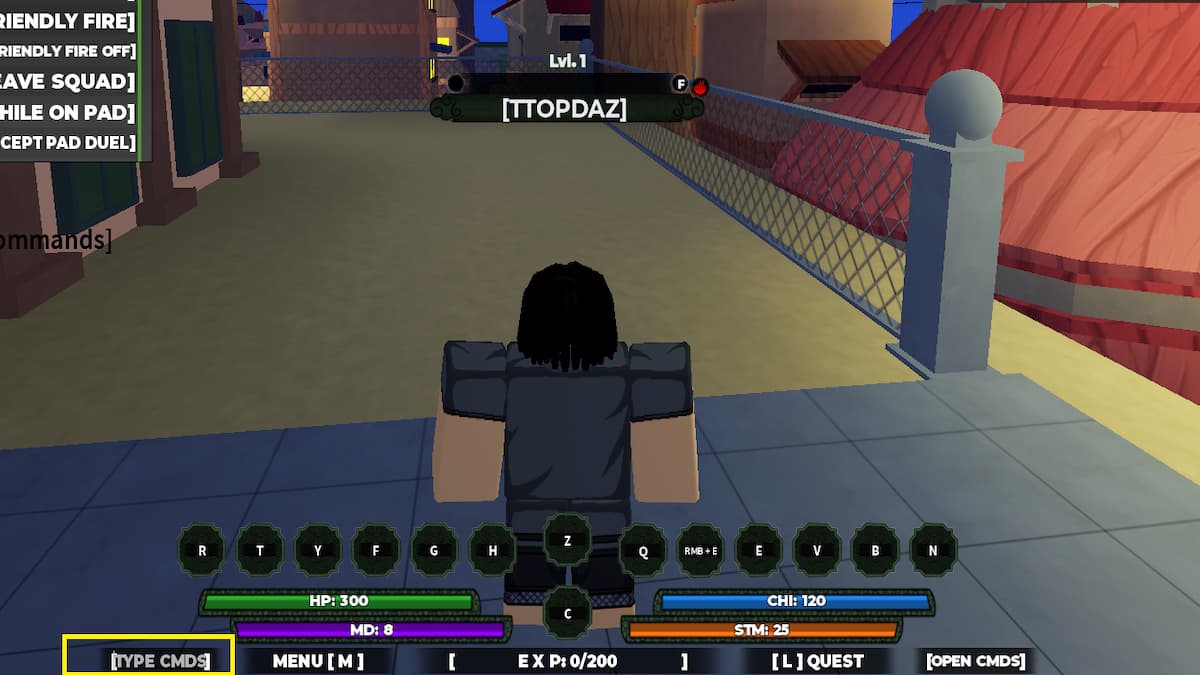
Players can use the Secret Commands in Shindo Life by using the Type Command function box at the bottom left of the menu. If you look at the image above, you can find the console command function box highlighted. Remember, sometimes the Type Command may not be available due to a glitch or bug. In such instances, you can use the default chatbox to execute the command, as this was the original way to execute the functions in the game.
For more Shindo Life, check out Shindo Life Tips and Tricks - Roblox or Shindo Life Bloodline Tier List