Updated: February 25, 2026
We added all the latest active codes—FIREFIREFIRE and more below.
Use all the active Clash Royale codes and become the ultimate strategist in this epic battle of wits as you collect and upgrade your cards. Defeat opponents by bringing down their towers and earn trophies and other rewards along the way.
All Clash Royale Codes List
With Clash Royale codes, you can get cool emotes, banner decoration, and banner frames. Claim all the active codes as soon as possible and defeat your opponents with style. If you want more freebies in this title, check out our Clash Royale QR Codes article for more rewards.
Active Codes
| ROYALEAFFAIR | Royale Affair Emote | |
| FIREANDICE!! | Banner Decoration and Banner Frame | |
| TRUSTYTURRET | Hero Musketeer Emote | |
| WHENHOGSFLY! | Flying Royal Hogs Emote | |
| REINABARRIGA | Snoring Dragon Banner Set | |
| FIREFIREFIRE | Feral Breathing Emote |
Expired Codes
- There are no expired codes right now.
Related: Clash Royale Creator Codes
How to Redeem Clash Royale Codes
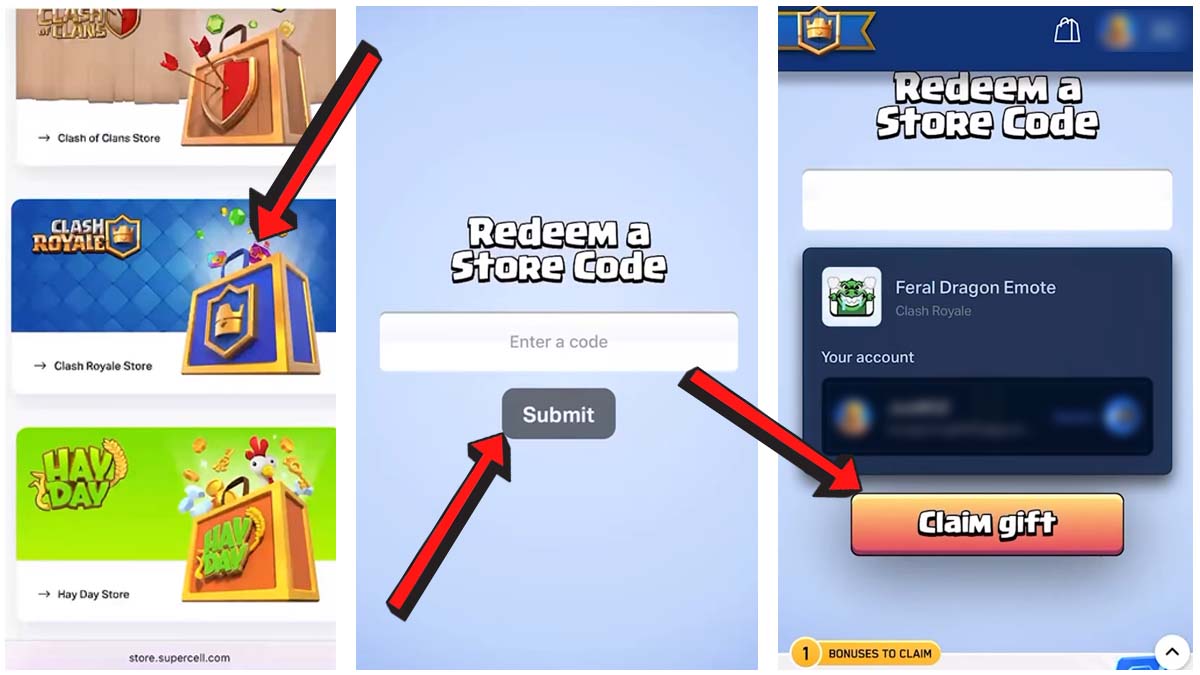
To get your cool decorations, make sure to follow the steps below to redeem your Clash Royale codes:
- Go to the Supercell Store.
- Pick the Clash Royale Store.
- Scroll down until you find the Redeem a Store Code section.
- Type in your code into the text field.
- Hit Submit.
- Tap on Claim gift to have it sent to your account.
- Run Clash Royale on your device and claim your reward.
How to Get More Codes
The fastest way to get the latest codes for Clash Royale is to bookmark this page and come back to the list from time to time. But if you want to do the search yourself, then make sure to check all the socials for the game:
- YouTube (@supercell)
- Facebook page
- Instagram (@supercell)
- X (@supercell)
Clash Royale FAQ
Clash Royale is a real-time multiplayer strategy game where you collect and upgrade cards that feature characters from the game, build battle decks, and defeat opponents by knocking down their towers to earn yourself the title of the smartest strategist out there.
Build a deck of 8 cards (troops, spells, defenses). During battle, deploy cards using elixir to attack enemy towers and defend your own. Win by destroying the King’s Tower or having more damage by time’s end. Game matches are fast and strategic; think about elixir cost and countering enemy cards.
Supercell ID lets you save and sync your account across devices, switch between accounts easily, and recover progress if you change devices. It is free and strongly recommended.
If you're looking for even more codes for your other favorite titles, check out our General Game Codes post and our Roblox Promo Codes page.