Updated: March 30, 2026
We added the latest active codes, like 476767, 823423, and more, below.
Climbing through the wild levels is seriously addictive, and using those Go Up for Brainrots Fortnite codes is even more addictive than you can imagine. In this Fortnite Creative map by Ferins, you dodge crazy obstacles and search for legendary characters as you move up each floor, and the whole experience is really fun. I noticed that if you split your cash between quick power-ups and boosting your jump height for later, you’ll get much farther.
All Fortnite Go Up for Brainrots Codes List
With codes come cool rewards that will help you climb greater heights, so make sure to claim those Fortnite Go Up for Brainrots freebies as soon as possible! Now, if you are looking for more Fortnite funds, check out our Fortnite Climb and Jump Tower Codes post for more rewards.
Active Codes
- 476767—Redeem for Free rewards
- 823423—Redeem for Free rewards
- 481148—Redeem for Free rewards
Expired Codes
- There are no expired codes at the moment.
Related: Go Goated Fortnite Codes
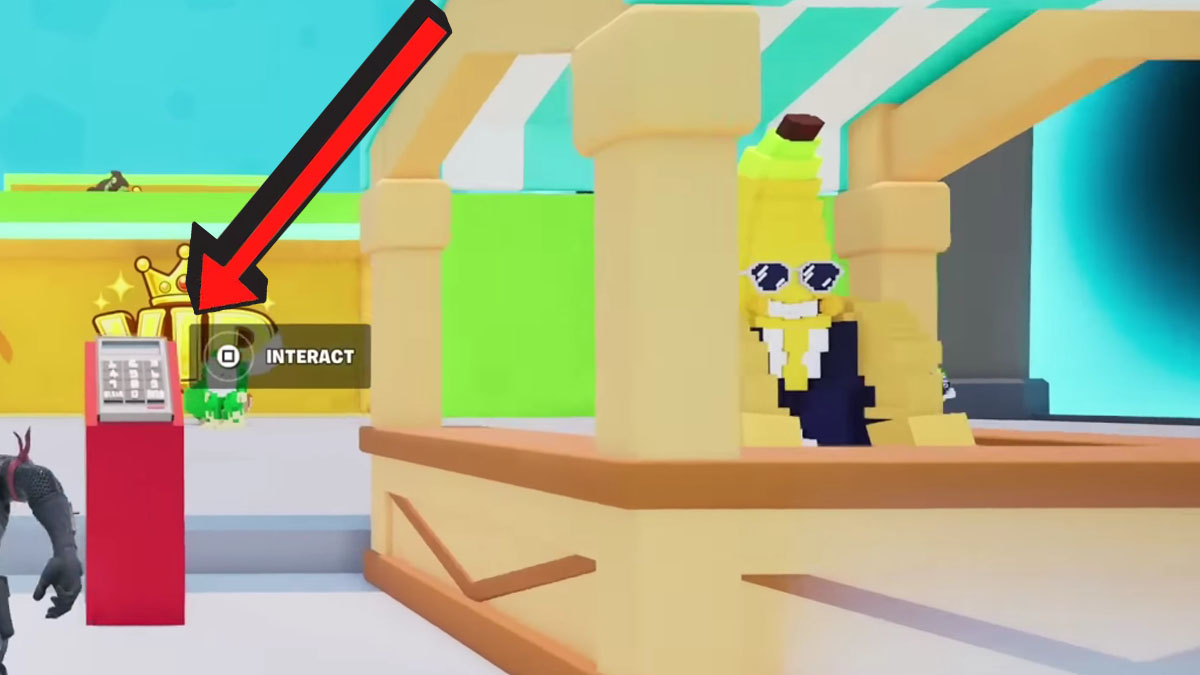
How to Redeem Fortnite Go Up for Brainrots Codes
Follow these easy steps to redeem Fortnite Go Up for Brainrots codes:
- Run Fortnite Go Up for Brainrots on Fortnite.
- Approach the codes panel in the lobby and interact with it.
- Paste the code into the text box.
- Click ENT to claim rewards.
How to Get More Codes
Check out the map creator's official social media account for more rewards. We have the links below; click them to get more insight into the game and earn more rewards:
Also, consider bookmarking this article, since we will keep the list up to date for you. That way, you'll be able to come back in a matter of seconds whenever you need more rewards.
Fortnite Go Up for Brainrots FAQ
Go Up for Brainrots is a Simulator/Tycoon-style map on Fortnite. The goal is to increase your jump power to reach higher floors, collect all available Brainrots, and navigate past obstacles to reach the very top of the map.
The island code is 7875-7934-3852.
Rebirthing resets some of your progress in exchange for extra cash or permanent multipliers. This allows you to earn resources faster and eventually reach heights that were previously impossible.
Check our General Game Codes section for more rewards for your favorite games, and if you enjoy Roblox games, check out our Roblox Promo Codes post for even more goodies.