Updated: Jun 29, 2026
There are currently 2 active Roblox Paint and Hide codes available as of June 29, 2026. The codes will provide you with a substantial amount of coins, with the code SUMMER! granting you 3k coins right away! Grab all active codes to revamp your wallet and go on a spending spree.
Your hide-and-seek skills are about to be put to the test! Using paint and intricate poses, you can quickly create a perfect hiding spot. Careful, though, because one well-placed paint shot from the seeker's gun can reveal you in a second. To stay two steps ahead, you'll need to redeem Roblox Paint and Hide codes and get the best gear.
What Are All the Active Roblox Paint and Hide Codes?
As of June 29, 2026, there are 2 Paint and Hide codes. Redeeming these codes is the quickest and easiest way to fill your coffers with hundreds of coins, and they'll come in handy as you master the game's intricacies and memorize the maps. Keep coming back to this article, as we'll keep it up-to-date with all the latest rewards! Since you're a fan of hide-and-seek style games, check out our Hide From The Villain Codes to grab rewards in an equally tense Roblox experience!
Roblox Paint and Hide Active Codes
| Code | Copy | Description |
|---|---|---|
| PAINT! NEW | 1.5k Coins NEW | |
| SUMMER! NEW | 3k Coins NEW |
Roblox Paint and Hide Inactive Codes
| Code | Copy | Description |
|---|---|---|
| 1MILL! | Reward |
Related: Paint and SEEK Codes
How Do You Redeem Roblox Paint and Hide Codes?
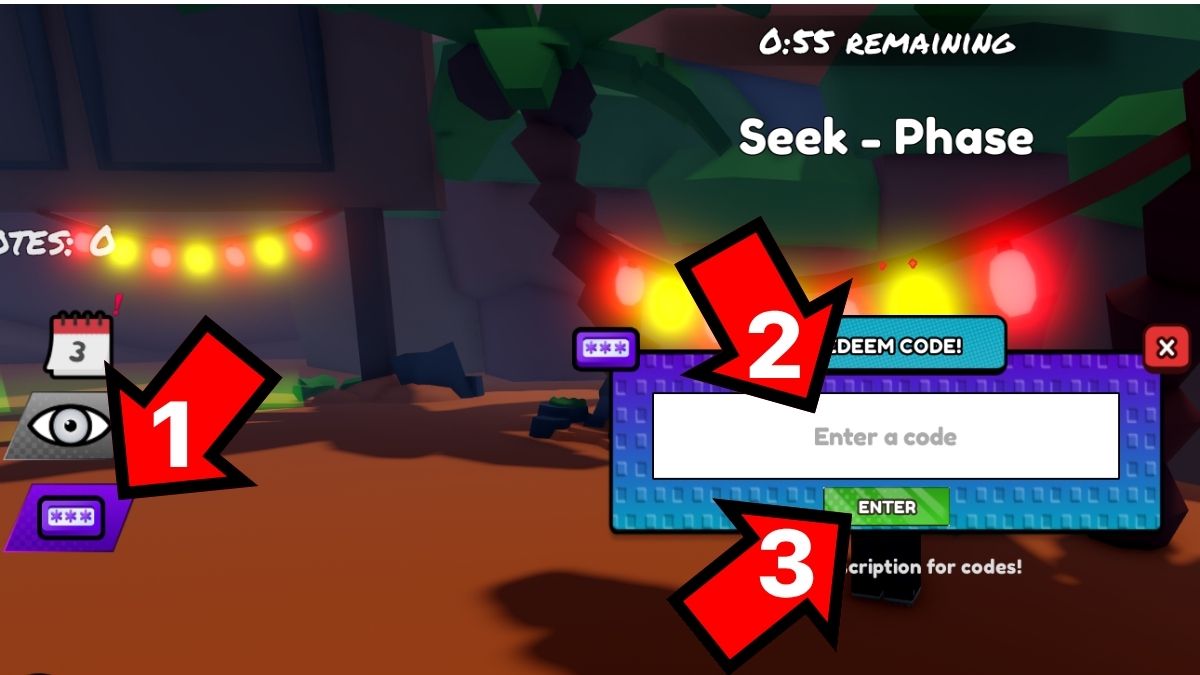
To redeem Roblox Paint and Hide codes, you must click on the purple button on the left. Here's how to get your rewards in a jiffy:
- Launch Paint and Hide in Roblox.
- Press the purple button (1) on the left side of the screen.
- Type a code into the Enter a code text box (2).
- Press Enter (3) to collect your rewards.
If you tried redeeming a code but nothing happened, it's most likely because the code wasn't entered correctly. Check your spelling beforehand to make sure there are no hidden spaces or misplaced letters. If that doesn't work, the code has most likely expired, or you've already redeemed it earlier.
Where Can You Find New Roblox Paint and Hide Codes?
You can find all the latest Paint and Hide codes on the Paint & Hide Discord Server and the Trix Co. Roblox group. If you're strictly interested in codes and you don't want to spend time digging through socials, bookmark this guide and come back to it at least once a day. We’ll keep things fresh and add new codes as soon as they drop!
Why Are Coins Important in Roblox Paint and Hide?
Coins are an essential currency in Roblox Paint and Hide, as they can be used to buy crates and clothing items between matches. Crates provide you with weapon skins to better conceal your weapon when you're a seeker, while clothing items help camouflage you while you're hiding. Try out different outfit combinations to figure out which outfits suit which map best.
Our Roblox Game Codes post should be your next destination if you need codes for other popular games, including Roblox Spray Paint and more.