




Not sure how to hide your armor in Hytale so that only your character's costume is visible? Hytale boasts an impressive amount of options for customization, allowing you to fine-tune every aspect of your character's look. That's exactly why some players want to toggle headgear off in-game. Why spend an hour creating your character when you can't see it while playing? Luckily for you, this guide explains how hide Helmet in Hytale.
How to Toggle Headgear and Armor in Hytale
Shortly after the Early Access launch, one of the most requested features from the community was the ability to hide gear so that your custom character is always visible. Initially, the developers were against the idea, stating that it would “break immersion.” However, the community was so adamant and vocal about it that the developers quickly changed their stance and introduced the feature into the game. Here’s how to hide armor and helmets in Hytale.
- While in-game, open your character screen.
- Next to each piece of armor (Helmet, Cuirass, Gauntlets, Pants), you’ll spot an eye-shaped icon.
- Hover over the icon, and it will display “Toggle Helmet/Cuirass/Gauntlets/Pants visibility.”
- Simply click the icon, and now instead of the armor piece, you'll see that castum part of that character (the icon will turn into a closed eye).
- You can hide every piece of armor, or choose to hide only the ones you prefer.
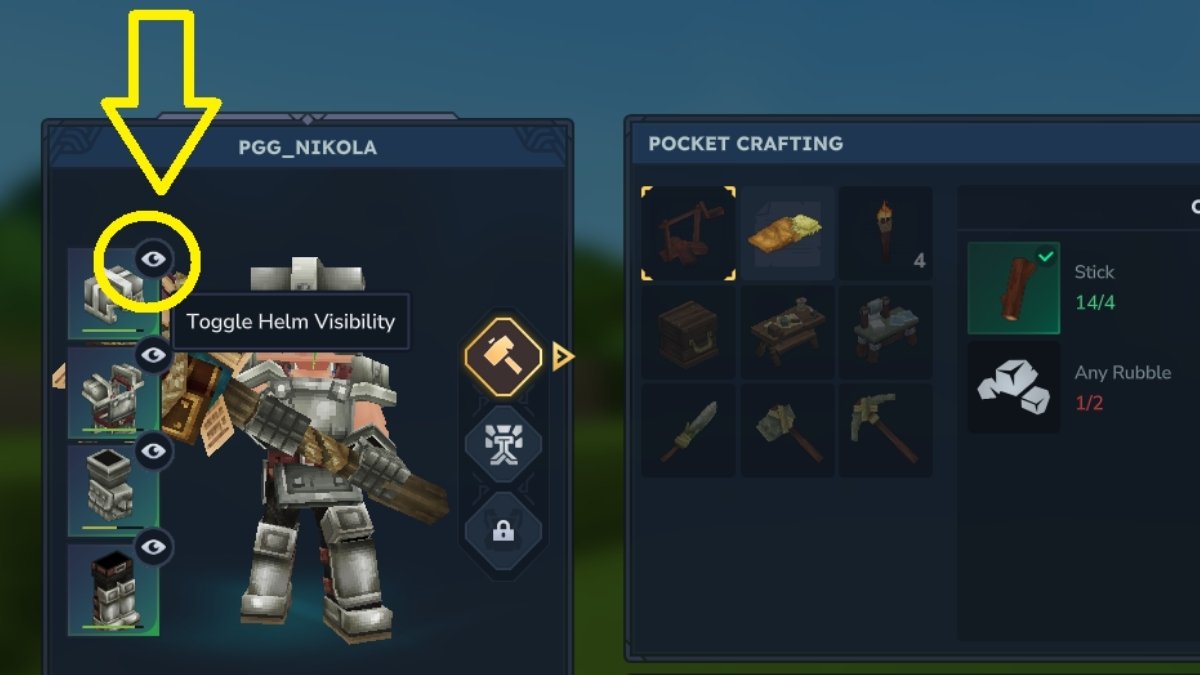
And that’s it - it’s that easy. This way, players who value immersion can choose to play with their armor visible, while those who care more about customization can hide armor pieces (while keeping their gameplay stats intact) and enjoy seeing their character at all times.
RELATED: All Hytale Cooking Recipes List
The best part is that you can mix and match: for example, you can choose to show only your character’s face while keeping the rest of the armor visible, striking a balance between immersion and customization.
Hytale Armor Visibility FAQ
Yes, Update 2 has introduced the ability to toggle Helmet visibility on and off.
By opening your character screen and clicking on the Eye icon next to the equipped gear you want to hide.
Yes, the change is purely cosmetic for players who want to see their custom characters while keeping the benefits of powerful gear.
Yes, server hosts can enable or disable this feature to enforce rules for PvP or immersion purposes.
For now, that’s not possible. However, if the developers introduce some form of weapon skins, they may add this feature at some point in the future.
And that's about all you need to know about Hytale armor hiding feature. If you want to learn more about Hytale, be sure to check out our dedicated Hytale hub, where you’ll find guides, recipes, tier lists, walkthroughs, how-tos, and more. And, of course, once the developers add more content on the topic, we will promptly update the article with the latest information.
 Nikola is a Senior Staff Writer at Pro Game Guides with over 13 years of experience in gaming journalism. He has been playing video games since his father bought him an NES and a Sega Mega Drive in the early 1990s. Over the years, he has mainly become a PC gamer with a love for narrative-driven RPGs, real-time strategy games, and psychological/survival horror titles. Still, he enjoys any game that’s worth his time.