Updated: October 27, 2026
Redeem 3 active 2 Player Raid Tycoon codes as of October 27, 2026, to get Cash, Gems, and Guard Tickets right away! The latest code is HALLOWEEN!
Become part entrepreneur and part saboteur in 2 Player Raid Tycoon! Build your base from the ground up by collecting cash, building assembly lines, and purchasing all sorts of weaponry. You’re always a target for nearby players, and they won’t hesitate to break into your base, eliminate you, and take off with your cash. With 2 Player Raid Tycoon codes, you can finally fight back!
What Are All the Active 2 Player Raid Tycoon Codes?
In addition to Gems, Guard Tickets, and income boosts, the 3 active 2 Player Raid Tycoon codes will give you substantial cash rewards. The cash rewards scale with your level, so it's best to wait until you've leveled up a bit before redeeming them to earn more. Once you've gained some entrepreneurial experience, visit our ChinaSide Tycoon Codes guide and start a successful dropshipping business with the help of extra freebies.
2 Player Raid Tycoon Active Codes
| Code | Copy | Description |
|---|---|---|
| HALLOWEEN NEW | 480 Cash, 20 Gems, and X2 Cash for 3min NEW | |
| VERITY | 1 Airstrike, 1 Guard Ticket, 25 Gems, and 2x Cash for 5min | |
| LAUNCH | 1k Cash, 1 Guard Ticket |
2 Player Raid Tycoon Inactive Codes
| Code | Copy | Description |
|---|---|---|
| SCP173 | 960 Cash, Guard Ticket, 10 Gems, and x2 Cash for 3 min | |
| TY7500 | 5.94k Cash, 25 Gems, and x2 Cash for 3 min | |
| TY5500 | 480 Cash, 1 Airstrike, 1 Guard Ticket, 5 Gems, and x2 Cash for 5min | |
| TY4500 | 240 Cash, 1 Airstrike, 1 Guard Ticket, 5 Gems, and x2 Cash for 5min | |
| TY3000 | 480 Cash, 50 Gems, x2 Cash (3 minutes) | |
| THX1500 | Free Cash, 20 Gems, x2 Cash (2 minutes) | |
| WELCOME | 1k Cash, 20 Gems |
Related: Military Army Tycoon Codes
How Do You Redeem 2 Player Raid Tycoon Codes?
Redeem all the active 2 Player Raid Tycoon codes by following our instructions below:
- Launch 2 Player Raid Tycoon on Roblox.
- Complete the tutorial.
- Press the Store button on the left side of the screen.
- Type in your code into the Enter code field.
- Press Redeem to claim your rewards.
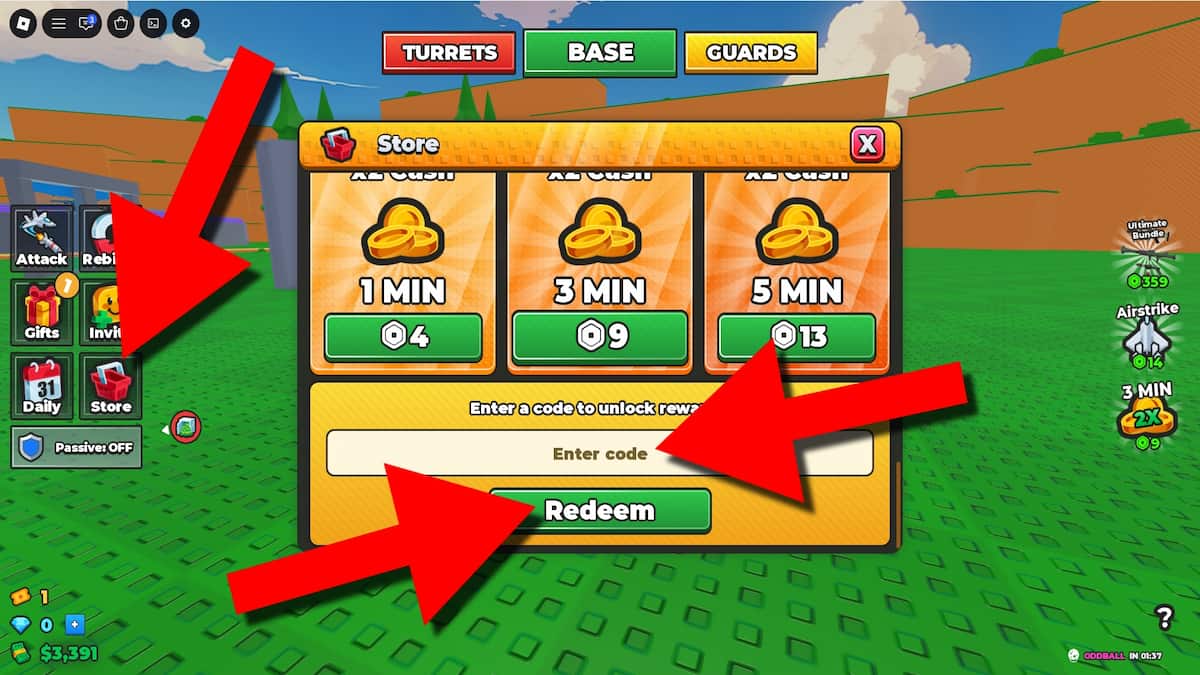
Double-check every code for spelling mistakes before redeeming it, as even one wrong letter can make it fail. To avoid errors, copy the codes directly from our list and paste them into the game.
Where Do You Find New 2 Player Raid Tycoon Codes?
You can find new 2 Player Raid Tycoon codes in the 2 Player Raid Tycoon Discord server and the STRAY FRAME Roblox group. Developers typically use these socials for updates, announcements, events, and potential code drops. You can also bookmark this guide (Ctrl+D) to access the latest codes list, so you won’t have to keep searching through every post by the hour.
What Do Gems Do in 2 Player Raid Tycoon?
Gems let you buy more Guard Tickets, which function as rolls in 2 Player Raid Tycoon. One Guard Ticket lets you spin one of 10+ Guard types, with the rarest ones having the best health and firepower. You can also spend Gems to buy extra Spins at the Lucky Wheel for a chance to win more cash, Tickets, Gems, and multipliers.
Keep reaping rewards in all your favorite games by visiting our Roblox Game Codes section, or switch from raiding factories to the hotel industry with the latest Quickdraw Codes.