Updated: June 22, 2026
The latest code is LIONSINNED. Claim it for free Gems and other freebies!
If you want to dominate the arena and crush your opponents, using Anime Overdrive codes is the ultimate way to jumpstart your legendary journey! This game is an epic, high-octane battle card game featuring various anime characters as ready-to-deploy cards. It combines deep strategy with flashy, cinematic combat that keeps your heart racing every turn. If you grew up loving Yu-Gi-Oh! or any classic deck builder, you are going to absolutely love this game. It takes that classic card-dueling DNA and injects it with a crazy, modern energy. Build your deck, summon your heroes, and prove you have the heart of the cards!
All Anime Overdrive Codes List
Anime Overdrive codes are going to be your go-to when it comes to starting in this game. They will provide extra Gems ready for you to claim, so hurry and get those codes before they expire! Want a less intense card game where you do nothing but collect? Then check out our Anime Card Collection Codes post for more rewards!
Anime Overdrive Active Codes
| Code | Copy | Description |
|---|---|---|
| LIONSINNED NEW | Gems NEW | |
| UPDATE2 | Gems | |
| UPDATE1.5 | Gems | |
| UPDATE1 | 150 Gems and 20 Raid Essence |
Anime Overdrive Inactive Codes
| Code | Copy | Description |
|---|---|---|
| RELEASE | 75 Gems |
Related: Card Collectors Codes
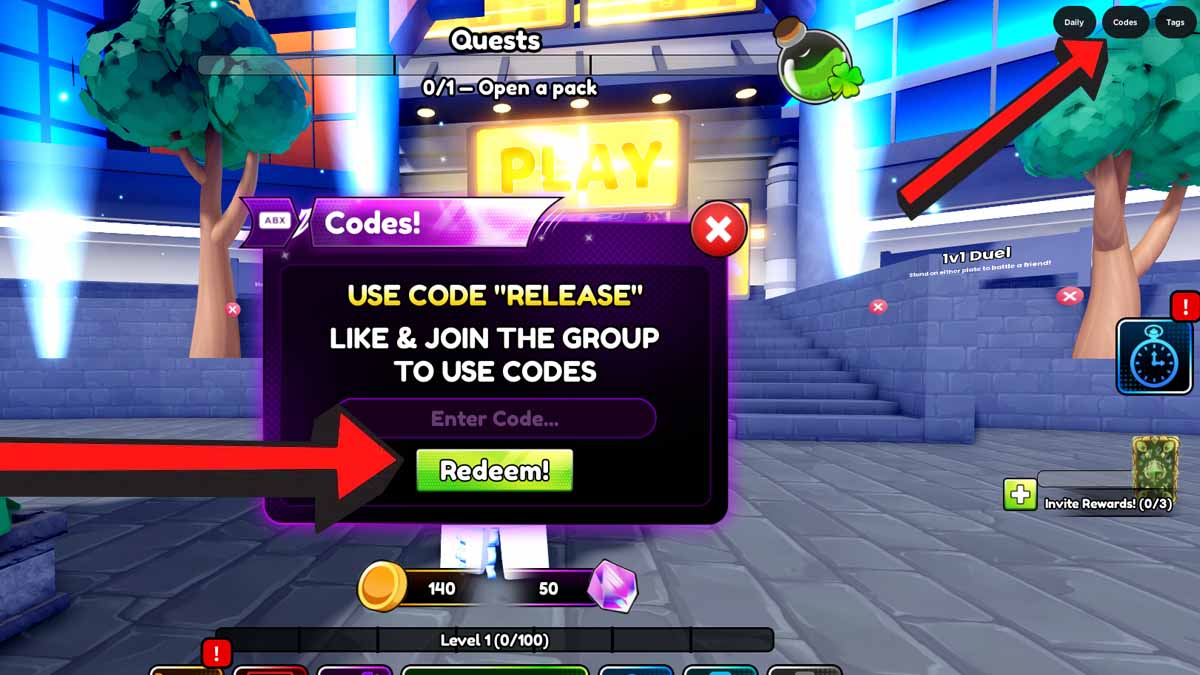
How to Redeem Anime Overdrive Codes
To redeem your Anime Overdrive codes, make sure to follow our guide below:
- Like the game and join the Sunflare Games group.
- Run Anime Overdrive on Roblox.
- Finish the tutorial.
- Click Codes in the upper-right corner of your screen.
- Paste your code into the text block.
- Hit Redeem! to get your goodies.
How to Get More Codes
Pro players know that keeping up with the Anime Overdrive Discord, Sunflare Games Roblox group, X (@SunflareGamesx) account, YouTube (@AnimeOverdriveX) account, and TikTok (@animeoverdriveoffical) account is key for news, but for pure code efficiency, this guide is your best friend. We track every single drop so you don’t have to. Bookmark the page now and check in regularly to keep your inventory stocked with freebies.
Anime Overdrive FAQ
Placing a taunt unit will make it impossible to attack other units until all taunts on your side are defeated.
Wildcards can be used to upgrade a card of the same rarity.
Each turn, you get 2 additional energy. (First turn: 2, Second turn: 4, etc.)
Visit our Roblox Game Codes section to find codes for games such as Gohan 悟飯, Badminton Allstars, Catch and Cook, Build a Ring Farm, and many more!