


There are 10 display titles in Unscathed, namely Owner, Co-Owner, Admin, Manager, Super OG, Content Creator, OG, Developer, Lead Developer, Moderator, and the newly added Day 1 title. Titles are cosmetic only, show next to your username in-game and on the Discord server, and have no effect on combat or luck. Most are awarded directly by developers, with OG and Super OG going to early playtesters and Content Creator requiring a direct application through Discord. Titles equip automatically and cannot currently be changed in-game.
Titles in Unscathed are cosmetic markers that are displayed next to your username both in-game and on the official Discord server. They carry no combat stats or luck bonuses. Staff titles identify who holds moderation authority, event titles permanently mark early adopters, and OG-style titles serve as visible proof of how early you were part of the community. With most titles handed out directly by the development team, only a few are obtainable by regular players. So, here's everything we know about all the titles in Unscathed.
How Do You Get Titles in Unscathed?
Most titles are awarded directly by the developers. You cannot unlock them through gameplay, Robux purchases, or in-game grinding. The titles that players can realistically obtain are provided below and with ways on how to get them:
| Title | Rarity | How to Get |
|---|---|---|
| Owner | Secret | Not obtainable. Reserved for developers Bacha and Noodle only |
| Co-Owner | Secret | Not obtainable. Reserved for the Co-Owner role at Happy Goof Games |
| Admin | Exclusive | Not obtainable. Staff-only title for team members with server admin permissions |
| Content Creator | Legendary | Contact the developer team on the official Discord with your channel and audience metrics |
| Super OG | Legendary | Awarded to the earliest wave of playtesters who stayed active through the closed beta |
| OG | Epic | Awarded to closed-playtest participants who joined before the public reveal |
| Developer | Rare | Not obtainable. Developer team only |
| Lead Developer | Rare | Not obtainable. Developer team only |
| Moderator | Rare | Not obtainable. Staff-only title |
| Day 1 | Uncommon | Auto-granted to any player who joins Unscathed within the first 24 hours of release |
How Do You Equip Titles in Unscathed?
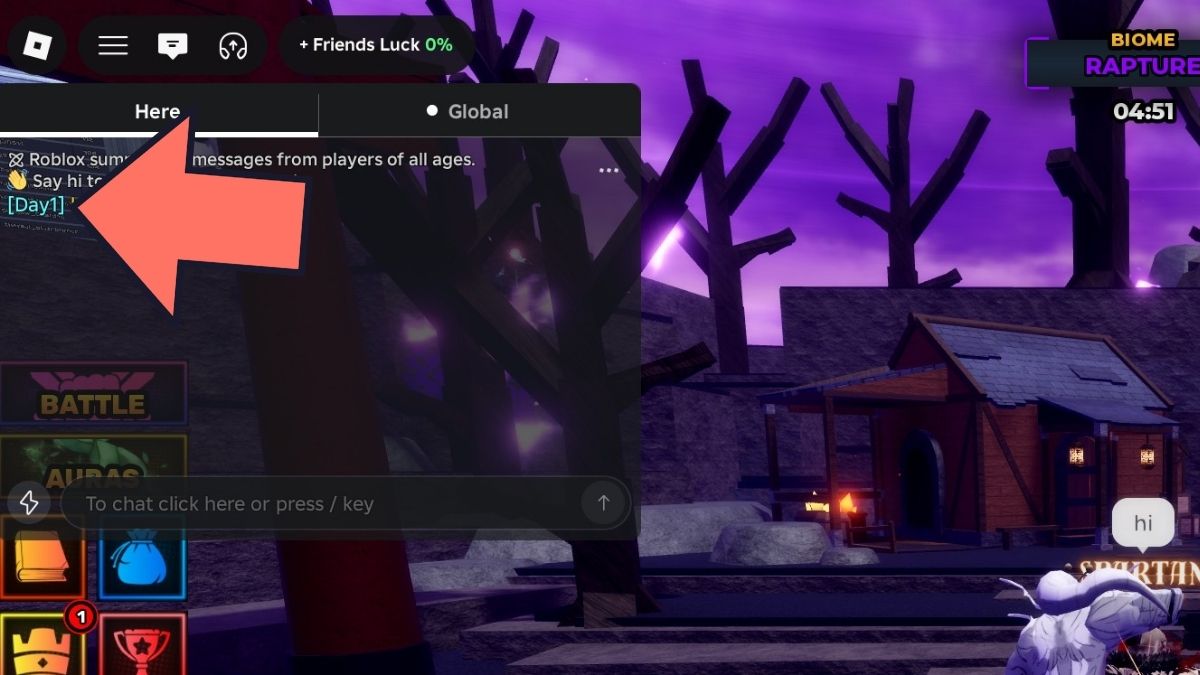
Titles equip automatically. There is no manual equipping process required. Once a title is awarded to your account, it attaches directly and displays next to your username without any action on your part.
To check which title you currently have equipped, drop a message in the in-game chat. Your title will appear next to your username when the message sends.
How To Change Your Title in Unscathed?
There is currently no way to change your active title in-game. Whichever title your account holds displays automatically, and no title-swapping system exists at this time. The development team has indicated this functionality could be added in a future update, but it has not been implemented yet.
Frequently Asked Questions (FAQs)
No. Titles are purely cosmetic and have zero effect on combat stats, luck, drop rates, or any other gameplay system. Their only function is displaying next to your username in-game and on the Discord server.
No. Both titles were locked to specific early access windows. OG for the closed playtest before the public reveal, and Super OG for the earliest active players through the closed beta. Those windows have passed and neither title is still obtainable.
Join the official Unscathed Discord server and reach out to the development team with your channel or platform metrics such as subscriber count, average viewership, or relevant audience data. The title is awarded to approved creators who covered Unscathed pre-launch.
For more on Unscathed Roblox, check out Roblox Unscathed Discord, Trello & Wiki Links or Roblox Unscathed Progression & Farming Guide on Pro Game Guides!


