Players can get a Private Server for Slayers 2 by purchasing the VIP Gamepass for 60 Robux (Normal) or 40 Robux (Roblox +). You can then use the private server to grind for ores, blue lilies, and other commonly spawned items.
The best way to experience an RPG adventure game like Slayers 2 is to play on a private server, where random players won't interrupt or block you while you quest or explore. So, if you are wondering how to get a Private Server for Slayers 2 and use it correctly, here is a detailed guide.
Roblox Slayers 2 Private Server Guide
By default, you cannot create or access a private server in Slayers 2 through Roblox, as the feature is disabled. However, a VIP gamepass costs 60 Robux for normal players and 40 Robux for Roblox+ users. This gamepass not only provides players with the Evil Art Bag, Clan Bag & other Shop Promos, but also lets them play on private servers with friends.
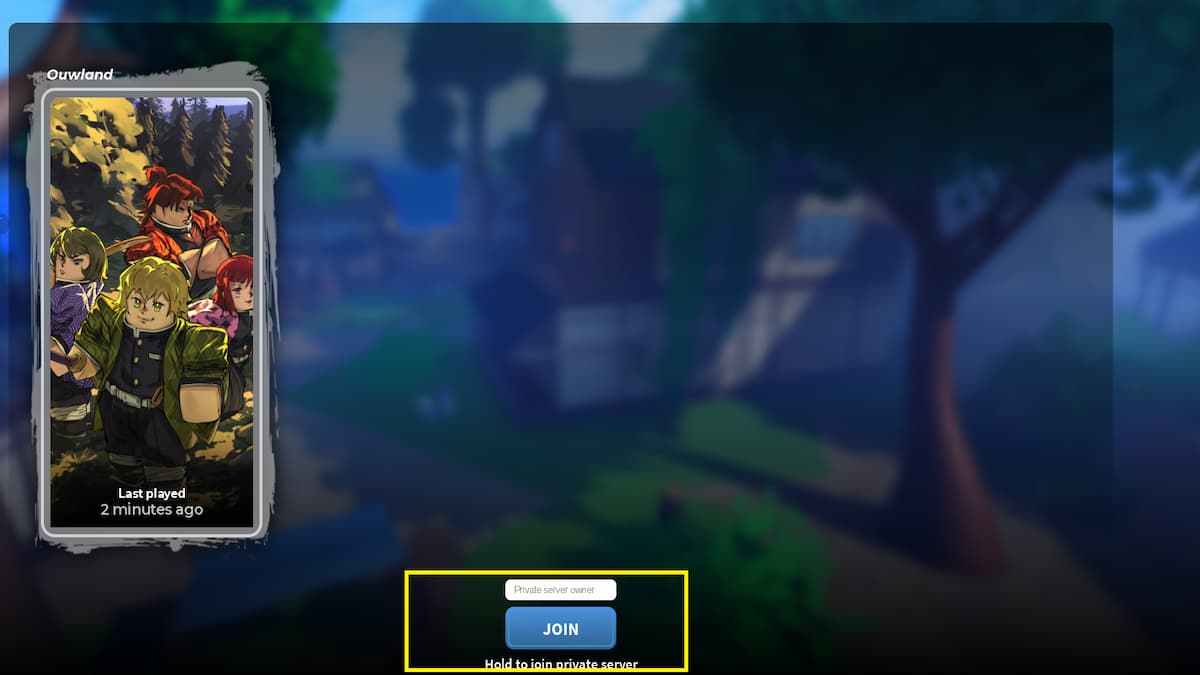
Visit the game shop and purchase the VIP gamepass to unlock the Private Server feature. To do this, open the game and reach the main menu. Press the Play button and choose your character slot. In the server selection menu, type the name of the server and press the Join button. If you are the owner, type your username; if you want to join a server owned by your friends, type their Roblox username. This feature doesn't let you join random player servers using just their username, since you must be friends with them first. Remember, Roblox usernames are case-sensitive. So, type the exact username to avoid issues.
What is the use of a Private Server in Slayers 2?
As mentioned earlier, a private server in Slayers 2 lets you grind without the hassle or disruption of random players who may sabotage your boss fight or block your path for no reason. I personally recommend using Private Servers for fishing, grinding for ores, or commonly spawned items like Blue Lillies or even Horse Mounts.
For more on Slayers 2, check out All Slayers 2 Items List - Weapons, Accessories & More or All Titles in Slayers 2 & How to Get Them