


To get Double Jump in Clover Time, you need to find and talk to the NerU NPC and complete his training, which includes performing push-ups, sit-ups, and jumping jacks. After you complete the quests, you’ll gain Double Jump and get the following Max Stat buffs: +75 Health, +35 Stamina, +50 Mana. See our full guide to learn how to find the Neru NPC and how to complete the required quests.
Requirements: Must be Level 5
Double Jump in Clover Time is a handy skill, especially against bosses and in PvP combat. If you want to get Double Jump in Clover Time but don’t know how to get it, this guide is for you. Read on to learn exactly where you have to go, who you have to talk to, and what you have to do to get the Double Jump skill in Clover Time.
How to Get Double Jump in Clover Time
To get Double Jump in Clover Time, you need to complete some easy training tasks from the Neru NPC who is sitting on a rock under the Demon Skull. Go to any Finral NPC and teleport to the Demon Skull. From the spawn point, go right and go under the Demon Skull, and you will see the Neru NPC.
You must be Level 5 to be able to accept the quest from Neru.
Once you accept the training, you’ll have to complete
- 8 Sit-ups
- 6 Push-ups
- 10 Jumping Jacks
As soon as you accept the training, a mini-game will appear on your screen. For all three training tasks, you will have to stop the yellow moving marker within the green area. You get two lives for completing all three training tasks. If you fail any one, you will have to restart from zero.
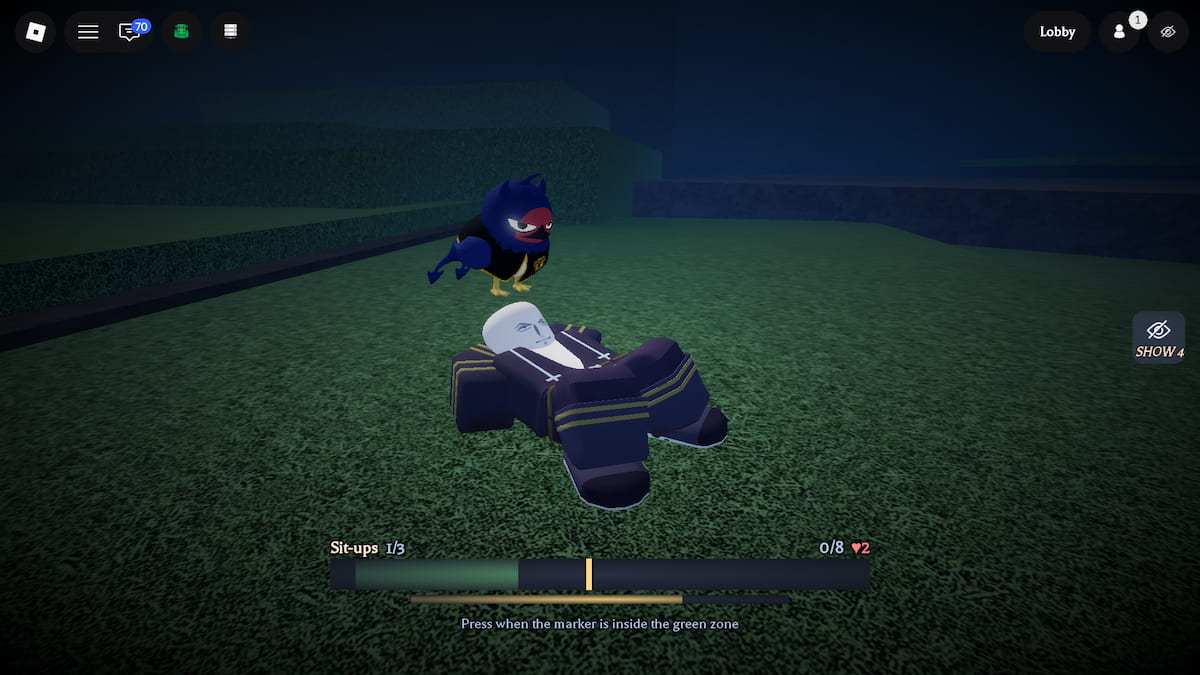
Successfully complete all three training tasks, and you’ll get Double Jump, +75 Max Health, +35 Max Stamina, and +50 Max Mana.
Clover Time FAQs
The Neru Quest is a Level 5 quest that you can start by talking to the Neru NPC near the Demon Skull. Completing this quest increases your Max Stats and gives you Double Jump.
The Neru Pet can be obtained from the Big Chests or by claiming the Exclusive Rewards. To get the pet for free, go to the Rewards menu and click on the Exclusive tab. If you are a Tester, Content Creator, or played Clover Time on Launch Day, you can claim the Neru Pet and plenty of other rewards. If you are not eligible for any of these conditions, you’ll have to grind for Big Chests to get the Neru Pet.
No, the Neru Pet does not have any stat buffs when you equip it. It is a purely cosmetic pet that sits on your head when you stand and flies over you when you get moving.
While you're here, make sure you redeem the latest Clover Time Codes and check out our detailed Clover Time Grimoires Tier List.


