


Updated: October 15, 2026
There are currently 0 active MM2 of The Locust codes as of October 15, 2026. We hope new codes drop sooner rather than later, because we're itching for extra freebies!
The door behind you is locked, the nest is crawling with danger, and something enormous knows you're here. MM2 of The Locust throws you into a creepy game of cat-and-mouse where making it out alive is a much better prize than becoming dinner, so make sure to redeem the latest MM2 of The Locust codes to ensure your survival.
What Are All the Active MM2 of The Locust Codes?
There is are no working codes at the moment of October 15, 2026, but we hope we'll get some new code drops with a future update. If you enjoy getting chased around dark maps while desperately trying to survive, you might also want to check out our Roblox Murder Mystery 2 Codes!
MM2 of The Locust Active Codes
| Code | Copy | Description |
|---|
MM2 of The Locust Inactive Codes
| Code | Copy | Description |
|---|---|---|
| Community! | +100 Keys |
Related: MM2 Values List
How to Redeem MM2 of The Locust Codes
Ready to cash in your free Keys? Here's the quick route:
- Open MM2 of The Locust on Roblox.
- Select the Codes section in the top right corner of the screen.
- Once the Codes Tab pops-up, simply enter your Codes as listed, press the Redeem button, and enjoy your freebies!
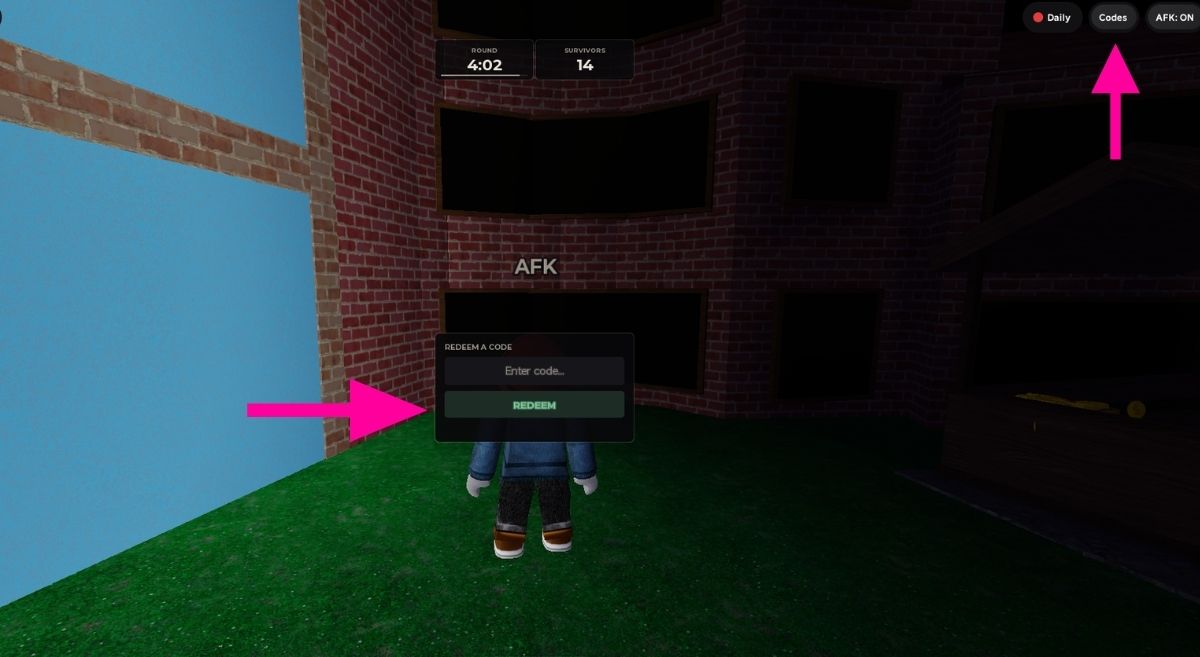
If nothing happens, make sure the code hasn't been mistyped.
Where to Find New MM2 of The Locust Codes
This game is still in pre-alpha, so new codes could easily accompany the things the developers are working on, especially new maps, equipment, improvements, and community milestones. Keep an eye on the game's Roblox Community and Discord Server when updates roll around. And if you don't fancy crawling through announcements looking for a code yourself, bookmark our page and swing back regularly. We'll keep the latest freebies waiting right here!
What Is MM2 of The Locust?
MM2 of The Locust takes the familiar murder-mystery formula and dumps it into a monster-filled survival scenario. You've ended up inside the Locust's nest, and there isn't exactly a guided tour waiting for you. Your objective is to navigate the environment, avoid getting caught, and figure out how to escape before the creature gets its claws on you!
If you want to know if a game you play has freebies, check out our Roblox Game Codes. You can also check out our How to farm coins in Roblox Murder Mystery 2? guide!


