Claim your CASER Codes and complete your weapon collection!
Image via Gates Of Shades
Updated: October 29, 2026
As of October 29, 2026, there are 9 active CASER codes you can claim. One of them is a limited-time Halloween event code, so don’t wait! Redeem BIGUPDATE, XBOOST, and more before they expire.
Recommended Videos
Open cases to collect a huge variety of weapons and skins. Not happy with your drop? Use the upgrader to improve your items and roll for something even better! Trade and sell your skins until you build your dream collection. Test your luck, take risks for better rewards, and jump into epic PvP case battles to compete with others for the best drops. If you're lacking resources, the CASER codes will come in clutch.
What Are All the Active CASER Codes?
Redeem the 9 active CASER codes to get free Coins. Use them to get more crates and increase your chances of getting rare skins. We'll keep adding new codes as soon as they appear, so save this page to stay up to date. For more crate-opening fun, check out our Case Paradise Codes article to grab the latest rewards.
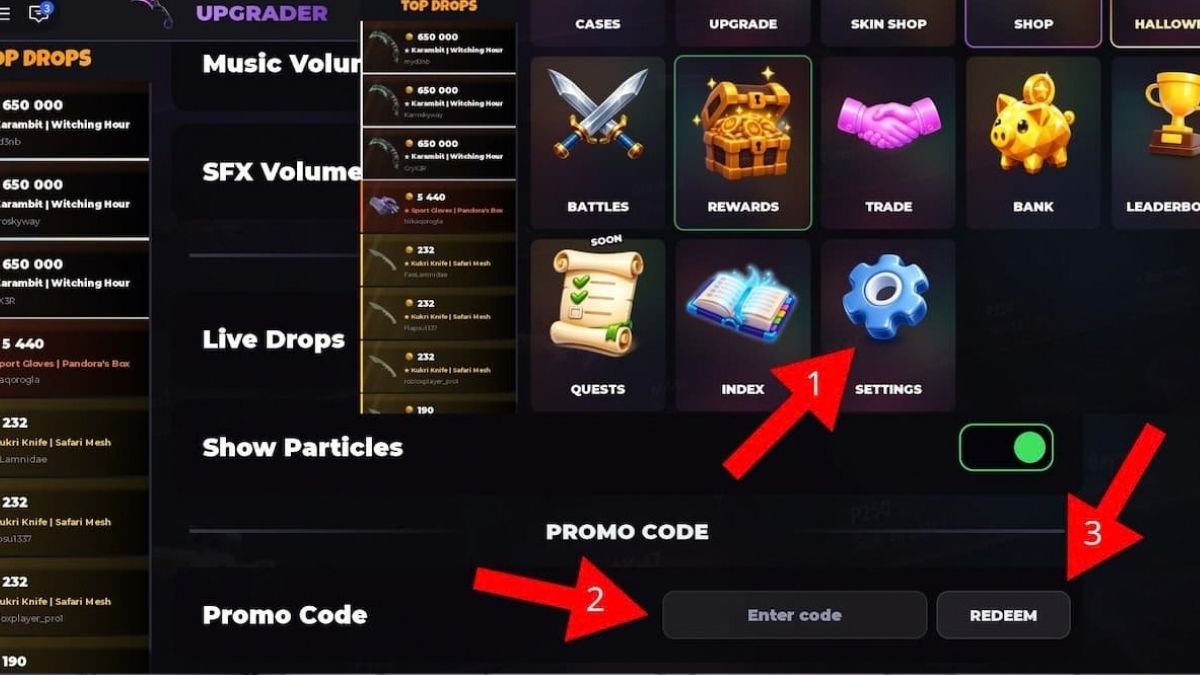
Scroll all the way down and click on the last Settings Icon.
Scroll down until you see the Promo Code area.
Add your code in the Enter Code box.
Click Redeem and enjoy your rewards.
Image by Pro Game Guides
To avoid spelling mistakes, simply copy and paste the codes from our list directly into the Enter Code box. Do this as soon as possible to avoid dealing with expired codes.
Where Do You Find New CASER Codes?
You can find new codes and updates on the official CASER Discord Server. Be sure to bookmark our page and check back regularly; we’ll post new codes as soon as they’re released.
What Do Coins do in CASER?
Coins are the main in-game currency used for purchasing cases, skins, and various upgrades. Coins are also essential for PvP, as you’ll use them to open better cases and gain an edge over your opponents.
Get Roblox codes and news as soon as we add it by following our PGG Roblox Twitter account!
About the Author
Luka Ilic
Roblox Writer
Luka Ilic is a Roblox writer at Pro Game Guides specialising in deep guides for some of the platform's most complex titles. His favorite beat is Sailor Piece, where he has written guides for secret race questlines, raids, item farming locations, and more. Beyond Sailor Piece, he covers a wide range of Roblox genres, from horror experiences like The Morgue Shift to roguelikes like An Average Campaign, where his background as a dedicated roguelike player translates directly into understanding the build and progression systems he writes about. Zombie survival, fashion games, anime RPGs, and tower defense all fall within his beat. He has been gaming since he was four years old, which at this point is less a fun fact and more an explanation for why he takes Roblox raid guides this seriously.