Updated: June 17, 2026
There is only 1 active Own a Pizza Tycoon code as of June 17, 2026. The code PIZZA gives you a 500 cash boost to instantly upgrade your kitchen and expand your restaurant! We keep a close eye on social media and update the list below daily to ensure you always get the latest rewards!
In Own a Pizza Tycoon, Monkey Red Studio has mixed classic tycoon mechanics with fast-paced cooking fun. After getting fired by a boss who doubted your pizza-making skills, you'll start from a single oven and a small stack of cash. Grabbing the newest Own a Pizza Tycoon codes will give you a massive advantage as you build your dream restaurant and help you prove your boss wrong faster.
What Are the All Own a Pizza Tycoon Codes?
As of June 17, 2026, there is exactly 1 active Own a Pizza Tycoon code ready to claim. This code is your ticket to a free cash boost that will help you get a head start. We track social media daily to keep this list up to date, so go ahead and bookmark the page for easy access to all the rewards! If you're tired of Italian cuisine and want to test your skills in another game, check out our Make Sushi and Prove Dad Wrong Codes post for more freebies.
Own a Pizza Tycoon Active Codes
| Code | Copy | Description |
|---|---|---|
| PIZZA | 500 Cash |
How Do You Redeem Codes in Own a Pizza Tycoon?
Redeeming Own a Pizza Tycoon codes is easy; just click on the Codes icon on the left. These are the exact steps you need to follow:
- Like and favorite the game and join the Monkey Red Studio community first.
- Run Own a Pizza Tycoon on Roblox and complete the tutorial.
- Click on the Codes icon on the left side of your screen.
- Paste your code into the text box.
- Hit Redeem to get your cash.
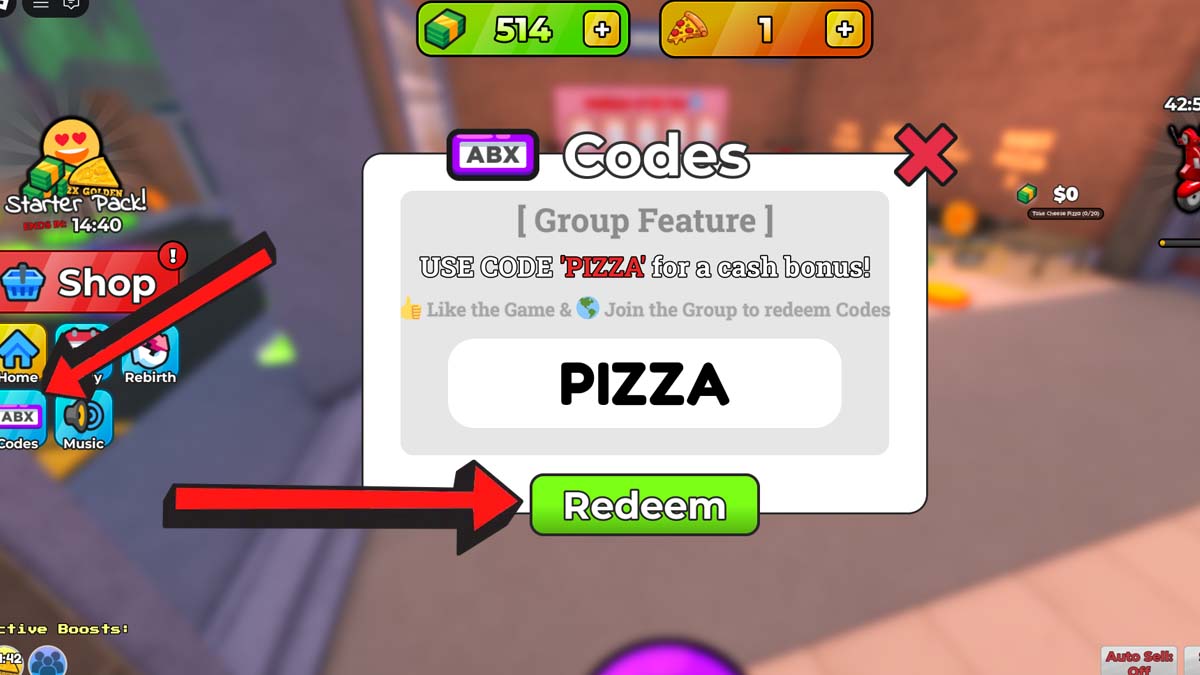
Having trouble with the code? Be sure to copy it exactly as listed; otherwise, it won't work. If it's entered correctly but still fails to give you the freebies, the development team has likely pulled the code from circulation.
Where Do You Find New Own a Pizza Tycoon Codes?
New updates drop directly on the Own a Pizza Tycoon Discord Server, so you can search for codes there. However, digging through chat logs takes you away from managing your restaurant. Skip the hassle and bookmark this article instead! We monitor their community channels daily to pull every new code so you can focus entirely on your business.
What Does Cash Do in Own a Pizza Tycoon?
Cash is the main currency in Own a Pizza Tycoon, and it is essential for upgrading your restaurant. You spend it on better equipment, new kitchen stations, and expanding your dining room. Every upgrade you purchase helps you serve more customers, which ultimately brings in even more money. It’s all about smart reinvestment.
Looking to score big? Our Roblox Game Codes master list is the absolute best place to find top rewards for the games you love most, including Launch a Wheel, Blackrooms, and more!