Updated: September 14, 2026
As of September 14, 2026, there is 1 active Roblox WikiRace code you can redeem. Use LAUNCH to get a cool Player Card and Trail and spice up your races with dazzling cosmetics.
Roblox WikiRace turns your favorite pastime (Wikipedia doomscrolling) into a race, challenging you to reach the destination page using only the internal links on each page. If you want to win races and reach the top of the leaderboard, you’ll need to think on your feet and approach each race strategically. Roblox WikiRace codes can’t help you sharpen your reflexes, but you can get tons of cool skins!
What Are All the Active Roblox WikiRace Codes?
The 1 active Roblox WikiRace code will adorn you with an exclusive Launch Party Player Card and a Confetti Trail, letting other players know you've been a dedicated Wiki racer since day one. If you're a fan of word games in a similar vein, visit our Roblox Collect The Alphabet Codes page and bone up on your ABCs!
WikiRace Active Codes
| Code | Copy | Description |
|---|---|---|
| LAUNCH NEW | 1x Launch Party Player Card, 1x Confetti Trail NEW |
Related: +1 Speed Keyboard Escape
How Do You Redeem Codes in Roblox WikiRace?
Down below, you’ll find all the information you need to redeem Roblox WikiRace codes:
- Launch WikiRace in Roblox.
- Approach an empty computer or desk.
- Press the ticket icon in the bottom-left corner.
- Type your code into the Enter code field.
- Press Redeem to claim your rewards.
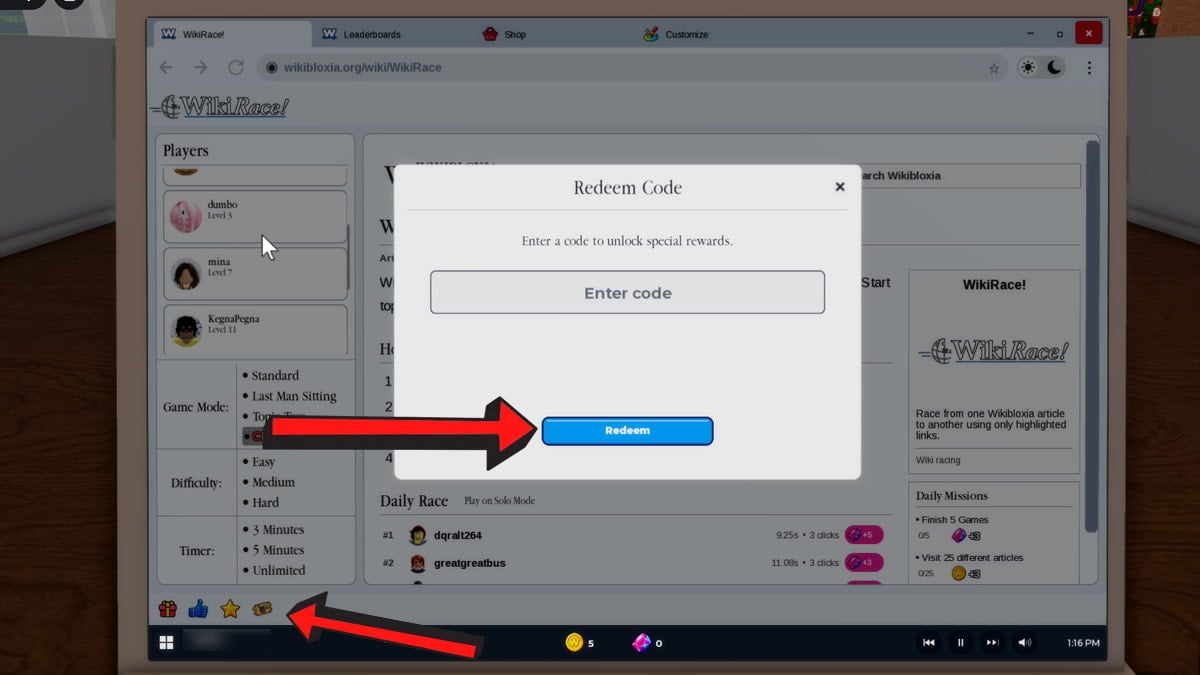
Copy and paste the codes directly into the game to avoid spelling mistakes, incorrect symbols, and other common redemption errors. If you're adamant about typing out each code, double-check all codes beforehand and refer to our list above to make sure they're still active.
Where Do You Find New Roblox WikiRace Codes?
Roblox WikiRace doesn't have a dedicated Discord server or Roblox group for codes. You can find new codes by checking the main hub across from the message board, where you'll find detailed logs for every update so far. There’s no way to get any notifications for new codes, but you can bookmark this article (Ctrl+D) and check back daily to find the latest codes on our list.
What Do Gems Do in Roblox WikiRace?
Gems are a currency in Roblox WikiRace that let you buy rare items in the Shop, such as trails, laptops, stickers, themes, cards, and cursors. Coins serve the same purpose, but certain cosmetics can only be bought using gems, so it's good to have a couple hundred of them on you at all times.
Visit our Roblox Game Codes section to gain access to a huge collection of the latest codes for all your favorite games, including Gokudo.