



Updated: November 9, 2026
As of November 9, 2026, Start an AI Company features 1 active code. Be sure to claim UPDATE right away to grab 3,8k Cash and a New Robot, giving your tech startup the hardware and funds it needs to thrive.
Tycoon games on Roblox usually stick to a predictable script, but this one introduces some unexpected hustle. Start an AI Company tasks you with developing advanced intelligence software, deploying robotic labor, and executing risky operations. It requires split-second reactions to escape as automated doors slam shut during a raid. If you want a quick leg up on the competition, remember that Start an AI Company codes are here to help with extra cash.
What Are All the Start an AI Company Codes?
You can redeem 1 active code right now in Start an AI Company. Grab your extra starting cash and a brand-new robot to keep production running while you plan your next heist. Don't forget to bookmark this page for future updates and reward codes! Ready for your next Roblox Tycoon with codes? Check out our Restaurant Tycoon 3 Codes post then!
Start an AI Company Active Codes
| Code | Copy | Description |
|---|---|---|
| UPDATE | 3.8k Cash and a New Robot |
Related: The Company Codes
How Do You Redeem Start an AI Company Codes?
Getting your bonus cash and helper robot in Start an AI Company is simple; just follow the instructions below:
- Run Start an AI Company on Roblox.
- Finish the tutorial or skip it.
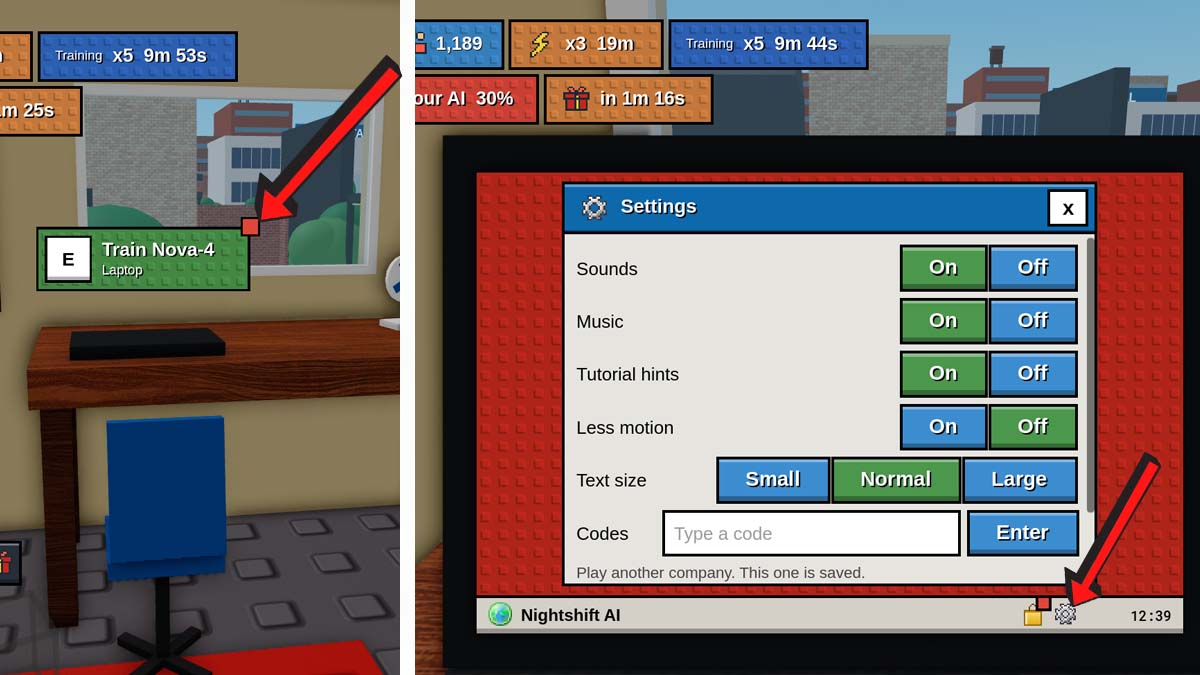
- Then head to your laptop in your room.
- Click on the gear icon at the bottom of the laptop screen.
- Paste a code into the text box.
- Hit Enter to get your free cash and more.
Always copy and paste your codes directly from our site to avoid any accidental typos. Developer codes can expire quickly in Roblox, so redeem your rewards right away to claim your bonus cash!
Where Do You Find New Start an AI Company Codes?
While there isn't an official Discord server to join, developers post new reward announcements directly on the Start an AI Company game page. Bookmark our guide so you can grab fresh, working codes the moment they drop without having to search around!
What Does Cash Do in Start an AI Company?
In Start an AI Company, Cash is your main currency for expanding your tech empire. You use Cash to purchase upgrades, unlock new hardware, build helper robots, train neural networks, and expand your workspace from a small bedroom into a full-scale corporate tech campus.
Explore our main Roblox Game Codes list to claim starting boosts, extra cash, and exclusive items for Ragdoll MMA and dozens of other popular experiences across the platform!