


Updated: October 09, 2026 - Replaced 3 non-working links with new ones.
Our Steal A Brainrot Private Server Links guide features a collection of active private server links from reliable community members, so you can enjoy the game with friends without compromising your privacy. The guide also explains how to buy your own private server and invite others to join.
We have updated all private server links to ensure they are active and working. We'll monitor how future Roblox changes affect private server usage.
Important: Roblox has changed how private servers work. As popular Roblox creator KreekCraft pointed out, shared server links no longer work the way they used to. The server owner must be online and actively let you in. This means trading servers, AFK servers, and community hub servers no longer work the same way. Roblox introduced these changes alongside the Roblox Plus subscription, which offers paying members free private servers.
To obtain mythical and Brainrot rarity characters in Steal A Brainrot, playing on a private server is the best approach. Without random players or strangers stealing your character, you can add rare Brainrots to your base more easily and boost your overall production.
All Active Steal A Brainrot Private Server (PS) Links
Below are multiple working private server links for Steal A Brainrot. Click a link to connect on PC or mobile. Due to recent Roblox changes, the server owner must be online for the link to work. Console players cannot join via links and must receive a direct invite from the server owner through the configuration settings.
| Link | Host |
|---|---|
| Link 1 | Misz |
| Link 2 | Gaana |
| Link 3 | Mathiass |
| Link 4 | Pappali |
| Link 5 | Batha |
| Link 6 | hehelaudeptrai |
| Link 7 | adrawerman |
| Link 8 | KellySiglar |
| Link 9 | Case |
| Link 10 | Detective |
How do you buy a Steal A Brainrot Private Server?
To purchase a private server for Steal A Brainrot, follow the steps below. Note that Roblox Plus subscribers can access paid private servers at no extra cost as of April 30, 2026.
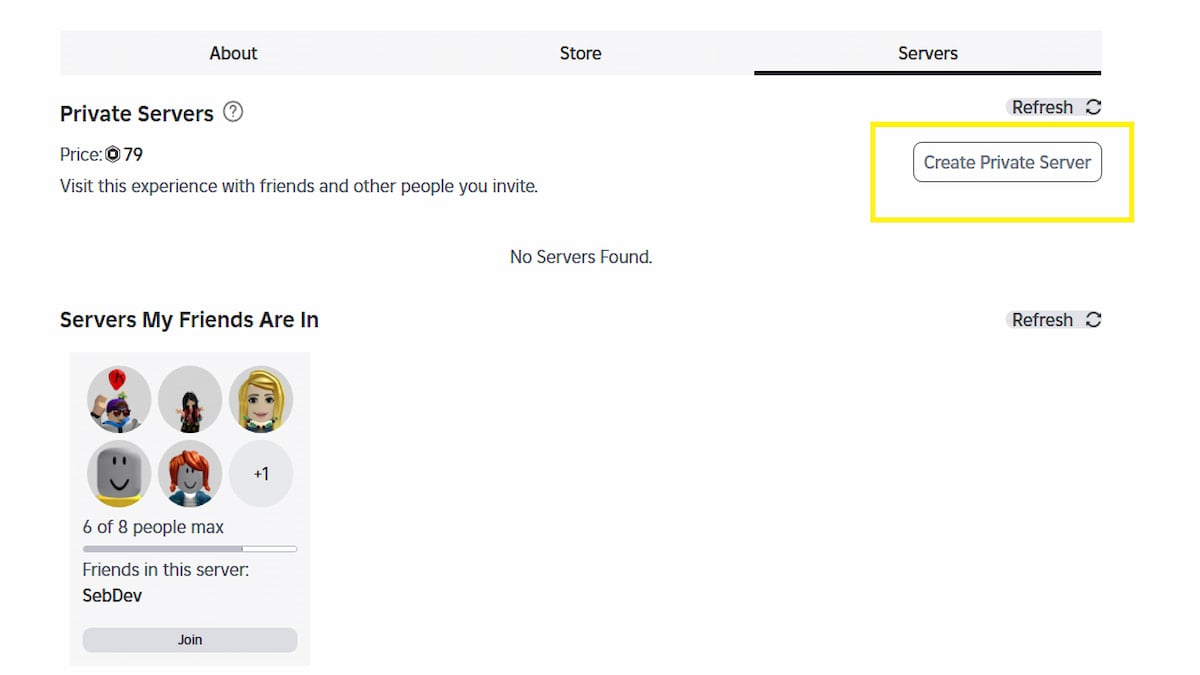
- Open Steal A Brainrot on Roblox.
- Scroll down until you reach the Socials section.
- On the right side of the screen, press the 'Create Private Server' option.
- Pay 79 Robux, then customize the server details.
- Finally, generate the URL and share it with your friends to start playing.
Remember, this isn't a permanent purchase; it's a monthly subscription that must be renewed each month to keep using it.
Steal a Brainrot Private Server FAQs
The maximum size of a Private Server in Steal A Brainrot is eight, meaning up to eight players or users can play together. This is identical to the public server and can be accessed using the Private Server Link generated during server creation.
Yes, private servers are worth it if you want to farm Mythical and Brainrot rarity characters without other players interfering. Keep in mind that due to recent Roblox changes, the server owner must be online for others to join via a shared link.
No, there is no difference in gameplay between a private server and a public one. Everything, from Brainrot spawn rarity to item prices, is the same on both servers. So you can grind on a private server without worry!
If the above servers are full or the owner is offline, you can find more active private servers through the Steal A Brainrot Discord server. Players and community members regularly share working server links there. Simply use these links to access the game and play privately.
For more on the game, check out All Character Stats in Steal A Brainrot or Complete Steal A Brainrot Beginner's Guide.


