In a sandbox game like Hytale, players need to learn all the controls and shortcut keys to avoid wasting time searching through inventories or struggling to build and explore efficiently. So, if you are a beginner and confused about certain keybinds, here is a complete guide listing all the Hytale Controls.
Below, you can find the list of all Controls and Keybinds in Hytale, divided into categories such as Actions, Movements, and other significant activities in the game.
General
Setting
Value
Crouch Behavior
HOLD
Sprint Behavior
HOLD
Walk Behavior
HOLD
Movement
Action
Key
Move Forwards
W
Move Backwards
S
Move Left
A
Move Right
D
Jump
SPACE
Crouch/Slide/Roll
LEFT CTRL
Sprint
LEFT SHIFT
Walk
LEFT ALT
Fly Up
SPACE
Fly Down
LEFT CTRL
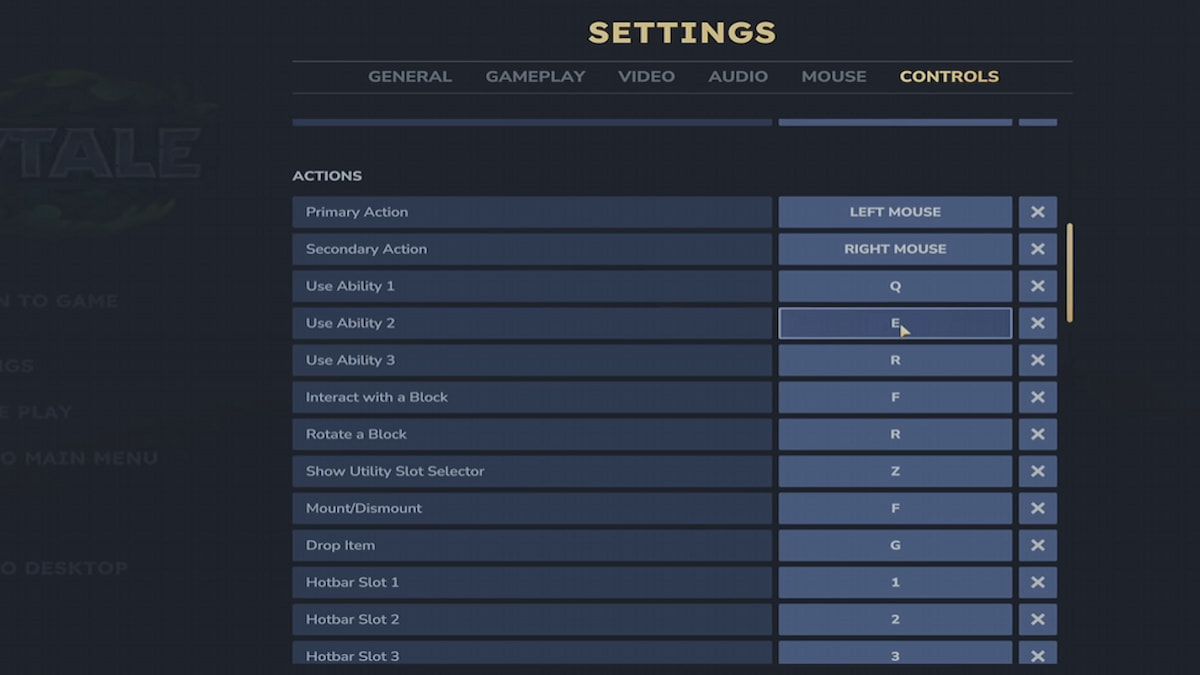
Actions
Action
Key
Primary Action
LEFT MOUSE
Secondary Action
RIGHT MOUSE
Use Ability 1
Q
Use Ability 2
E
Use Ability 3
R
Interact with a Block
F
Rotate a Block
R
Show Utility Slot Selector
Z
Mount/Dismount
F
Drop Item
G
Hotbar Slot 1
1
Hotbar Slot 3
3
Hotbar Slot 4
4
Hotbar Slot 5
5
Hotbar Slot 6
6
Hotbar Slot 7
7
Hotbar Slot 8
8
Hotbar Slot 9
9
Switch Camera Mode
V
Activate Camera Rotation
C
Toggle Chat
RETURN
Creative
Action
Key
Pick a Block
MIDDLE MOUSE
Switch Game Mode
O
Menus
Action
Key
Open Inventory
TAB
Open Machinima Editor
N
Open Map
M
Open Creative Tools
B
Show Player List
P
Builder Tools
Action
Key
Toggle Builder Tools Legend
L
Legend - Previous Page
J
Legend - Next Page
K
Undo
Z
Redo
Y
Add/Remove Favorite Material
—
Paint Brush Tool
KEYPAD 1
Sculpt Brush Tool
KEYPAD 2
Selection Tool
KEYPAD 3
Paste Tool
KEYPAD 4
Line Tool
KEYPAD 5
Change Sculpt Brush Modifier
LEFT SHIFT
Use Paint Mode For Brush
U
Select Block From Set
Q
Paste Preview
T
Miscellaneous
Action
Key
Switch HUD Visibility
F8
Toggle Fullscreen
F11
Take Screenshot
F12
Command
/
Debug
Action
Key
Decrease Speed Multiplier
F1
Increase Speed Multiplier
F2
Toggle Creative Collision
F3
Toggle Fly Camera
F4
Toggle Fly Camera Control Target
F5
Toggle Debug Screens
F7
How to change Controls in Hytale
To change Controls in Hytale, follow the instructions below.
Image by Pro Game Guides
Launch Hytale and jump inside any game.
Press Esc to open the pause screen.
Click the Settings button to open the Settings menu.
Navigate to the Controls section to open all the Keybinds.
Select any particular Keybind to unequip it, and then press your desired key to bind with it.
Hytale Controls & Keybinds FAQs
Can You Change Keybinds?
Yes, you can change your keybinds in Hytale. Go to Settings, then open the Controls tab to make the necessary changes based on your requirements.
How to drop an Item in Hytale?
By default, you can use G to drop an item in Hytale. However, you can always change this keybinding at any time.
Can you play Hytale using a Controller?
Unfortunately, Controller support for Hytale is not currently available. The developers, however, plan to add such support for players in future updates.
Follow us on Twitter and Facebook to get updates on your favorite games!
About the Author
Vignesh Raja
Staff Writer
Vignesh Raja is a full-time staff writer at Pro Game Guides, formerly a semi-professional Apex Legends player. He specializes in Roblox one-piece-inspired games, focusing on Sailor Piece and Blox Fruits build optimization, tier lists, and meta breakdowns from a competitive grinding perspective.
Topics covered: Roblox codes, Roblox guides, Roblox games tier lists, One Piece games