Updated: August 11, 2026
We added a new code for Stadium Simulator 2! Redeem TROPHIES and more!
Stadium Simulator 2 codes will make constructing stands, stocking food stalls, fixing leaky pipes, and designing custom kits much easier. Compete against 100 real-life football clubs on your climb from the bottom to continental glory.
All Stadium Simulator 2 Codes List
Stadium Simulator 2 codes reward you with fans, capacity, and other goodies that give you a head start. You can skip some of the early grind and get straight to building the football stadium of your dreams. Want to build your own city? Dive into our Mini City Tycoon Codes list to get the necessary building tools.
Stadium Simulator 2 Active Codes
| Code | Copy | Description |
|---|---|---|
| TROPHIES | 200 Tickets and +20% Capacity Boost (2 hours) NEW | |
| 10KFAVS | 10,000 Fans and 10,000 Tickets | |
| NEWSTADIUM | 15,000 Fans and 15,000 Tickets |
Stadium Simulator 2 Inactive Codes
| Code | Copy | Description |
|---|---|---|
| 1MVisits | 25,000 Fans | |
| 250KVisits | Free rewards | |
| Release | 1k Fans | |
| 250Likes | 500 Capacity | |
| 350Likes | 350 Capacity | |
| 1KFavs | 400 Capacity | |
| 100KVisits | 4k Fans |
Related: Mega Luxury Jet Tycoon Codes
How to Redeem Codes in Stadium Simulator 2
Here is how you can redeem the latest Stadium Simulator 2 codes:
- Join the Seriously Dude Official Roblox group.
- Run Stadium Simulator 2 in Roblox.
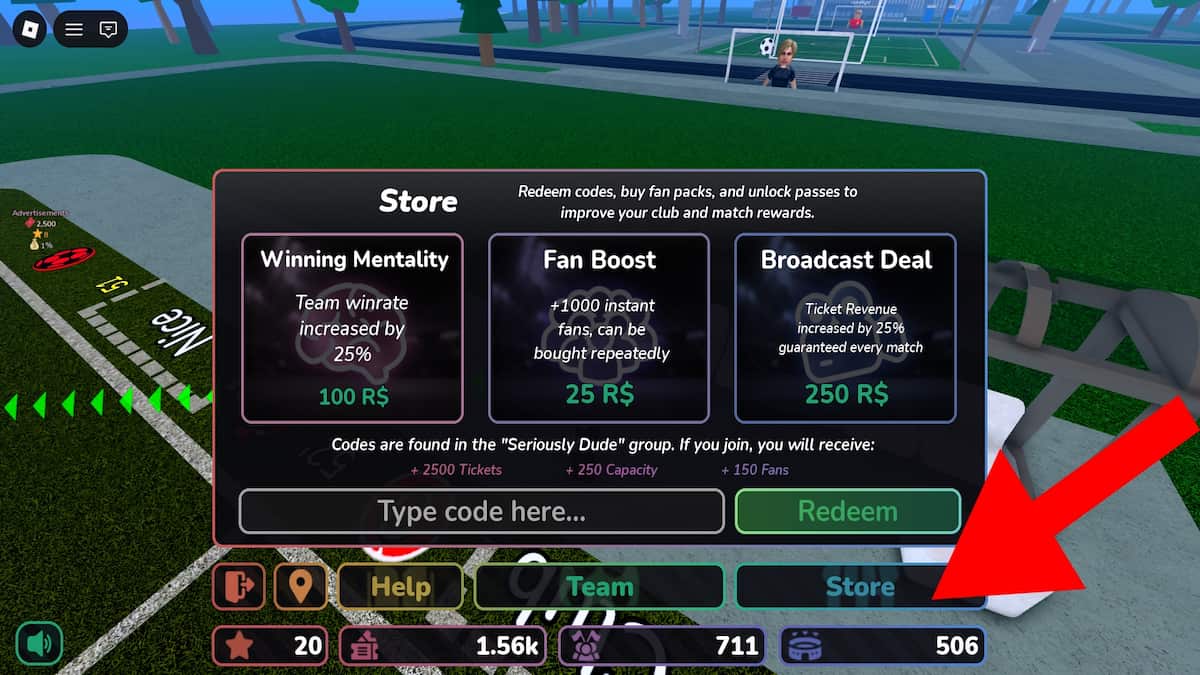
- Press the Store button at the bottom of the screen.
- Type a code into the text box.
- Click Redeem to get goodies.
How to Get More Codes
Developers usually drop new codes during milestone celebrations (like hitting a player count goal) and game updates. The codes are posted on their official Stadium Simulator 2 Discord. Joining the server is a good way to find all codes and engage with the community, but it's not the quickest and easiest option. A faster way to get all freebies is via our list. Save it in your bookmarks and check back frequently!
Stadium Simulator 2 FAQ
Stadium Simulator 2 is a Roblox tycoon/simulator title where you take over an abandoned football ground and build it into a world-class stadium. You manage revenue, win matches to grow your fanbase, and rise through five leagues: National, Championship, Premier, Continental, and Champions Divisions.
Yes! You can fully customize your club's colors, badge, kits, and stadium design, making your setup uniquely yours as you climb the divisions.
It's possible the code has expired, you've already redeemed it, or there's a typo. Double-check your spelling, make sure there are no extra spaces, and verify the code is still listed as active.
Need more rewards? Check out our complete list of Roblox Game Codes and visit our Roblox Promo Codes page for the latest updates.