Updated: September 13, 2026
With 4 active Fortnite PET TYCOON codes as of September 13, 2026, you can increase your stash of Gems and invest in upgrades right off the bat. We'll keep adding new codes as soon as they're out, so make sure you bookmark this page and come back occasionally to pick up the latest rewards!
Pets make Cash, Cash makes Upgrades, Upgrades make Eggs, and Eggs make Pets! The premise of Fortnite PET TYCOON is simple but incredibly addictive the more time you spend mining Coins and hatching Eggs. We’ve got a batch of the latest active Fortnite PET TYCOON codes for you to grab and expand your Pet collection!
What Are All the Active Fortnite PET TYCOON Codes?
Whether you're down on Coins, Gems, or Pet Eggs, Fortnite PET TYCOON codes have you covered. Use the 4 active codes to collect a small but valuable amount of Gems and boost your stats to stack the rarest Pets in the game. If you need help in other Fortnite custom maps, visit our Fortnite Brainrot Defense Secret Codes and treat yourself to extra freebies in another awesome map.
Working Fortnite PET TYCOON Codes
- 409537—Redeem for a Random Legendary Fruit (New)
- 174208—Redeem for 1k Gems, and scaled Coin Drop (New)
- 147926—Redeem for an Epic Pet Speed Fruit (New)
- 532956—Redeem for 5000 Gems
Expired Fortnite PET TYCOON Codes
- 681430 | 259174 | 740823 | 532956 | 123456
Related: Fortnite Kick a Lucky Rot Codes
How Do You Redeem Fortnite PET TYCOON Codes?
Once you jump into the game, follow the steps below to redeem Fortnite PET TYCOON codes:
- Run Pet Tycoon Adventure in Fortnite.
- Approach the pink keypad next to the Shop and press E.
- Type in your code using the number pad.
- Press the green OK button to redeem your code.
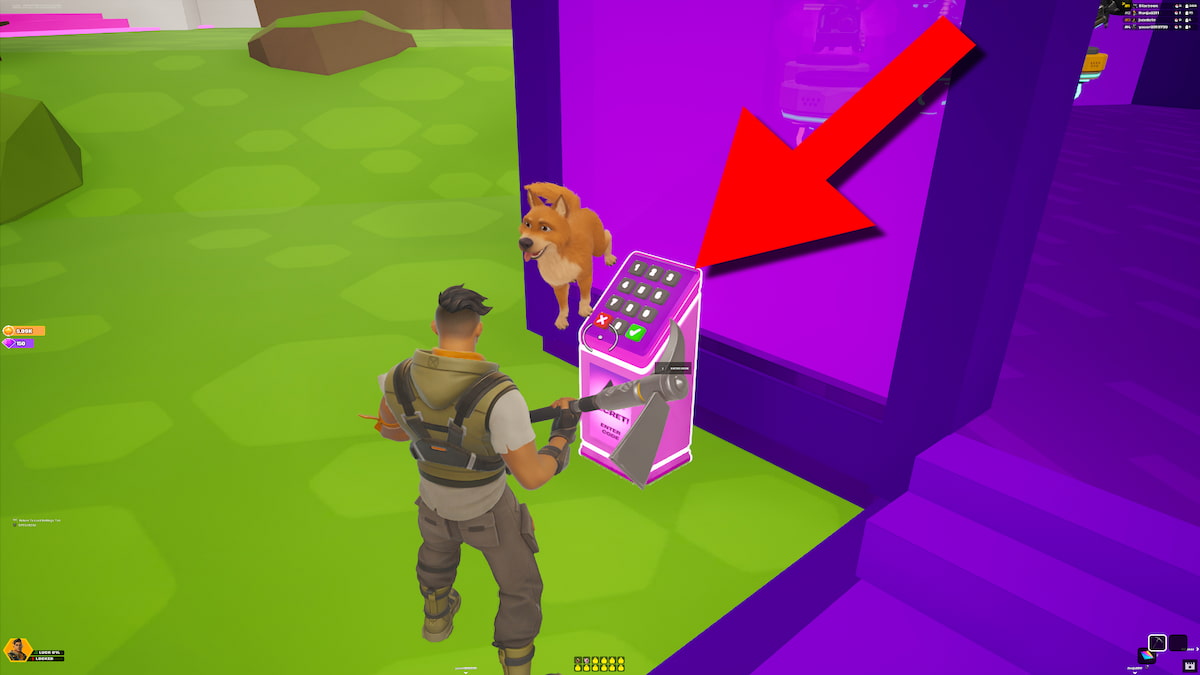
As always, pay attention when typing in your code to make sure you don't mistype a single number. Since this is a Fortnite code redemption system, you can’t copy a code from our list, so you’ll have to enter each code manually.
Where Do You Find New Fortnite PET TYCOON Codes?
The official PET TYCOON Discord server is the number one destination to find new codes, learn about upcoming updates, and sign up for special giveaways. As the game grows in popularity, Discord channels will become crowded with hundreds of messages. If you don't want to sift through these messages all day long, simply bookmark this article (Ctrl+D) and let us do the code hunting for you.
What Do Gems Do in Fortnite PET TYCOON?
Gems let you upgrade Gem and Pet Luck, Critical and Break Bonuses, and hatch Eggs to expand your Pet collection. You can earn more Gems by spending more time in Fortnite PET TYCOON and buying up more Pets, who will also destroy Coin Ores and make passive income on your behalf.
Jump into our Free Game Codes page to grab the latest Fortnite Steal the Oil Tycoon Codes, as well as rewards in other amazing titles!