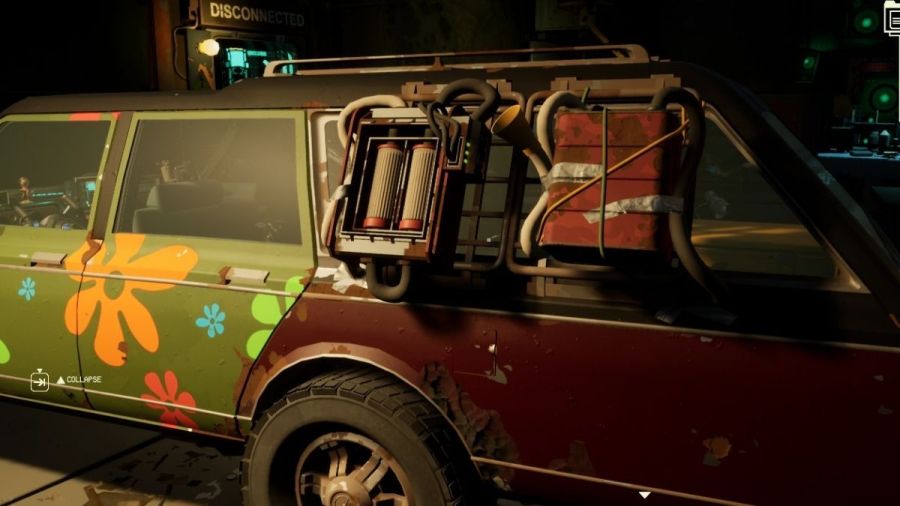
You can upgrade your car with many useful tools, but some are more beneficial to you, and you should focus on getting them first. Learn how to get the Fuel Synthesizer in Pacific Drive, and you won't have to worry about running dry.
How to unlock the Fuel Synthesizer in Pacific Drive
You will find fuel in the environment through cars, gas stations, and even fuel canisters. But when you are going through absolute darkness or running into anomalies left and right, stopping for fuel isn't going to be your priority. Here's how to unlock the Fuel Synthesizer so you'll make it back safely.
The Fuel Synthesizer is a car upgrade that is unlocked at the Fabricator under the Fuel tab. You will need to do a few steps first before you can get it, though. For starters, you'll need to unlock the Large Fuel Can and Side Fuel Tank. Once you have those open, you can unlock the Fuel Synthesizer blueprint.
| Upgrade name | Pre-requisites | Energy type |
|---|---|---|
| Large Fuel Tank | - Basic Workbench - Install the Scanning Antenna | Stable energy |
| Side Fuel Tank | - Unlock the Large Fuel Tank - Basic Workbench - Unlock a Side Rack - Research Steel Sheet | Stable energy |
| Fuel Synthesizer | - Unlock the Side Fuel Tank - Advanced Workbench - Unlock a Side Rack - Scan an ARDA Fuel Tanker - Research Circuit Board | Unstable energy |
For the Fuel Synthesizer, you need unstable energy, which you will usually find inside the middle wall of the Olympic zone, in the Scorch and Mire areas. Check if the junction has unstable anchors, and make sure you have an escape plan ready to go. When you have the blueprint, head over to the Advanced Workbench and craft the Fuel Synthesizer. You will need:
- Scrap Metal x2
- Rubber x5
- Copper Wire x2
- Circuit Board x2
Keep in mind that the Fuel Synthesizer has to go on the Side Rack, which you can get through the Car Body upgrades tab on the Fabricator. Once you have both ready to go, place this upgrade on the car and be ready to go out.
If you want to improve your storage space, check out How to increase your inventory in Pacific Drive on Pro Game Guides.