There are 50 active Hit Sound ID codes for Forsaken in the guide below. The most popular right now are MLG Airhorns (678089961), Mega Knight (1310127925561718), Vine Boom (6308606116), Get the Camera (102942819597181), and Stagger (17731296797). You can paste any of these codes into the Hit Sound input box from the Settings Menu to play it.
Apart from using Kill Sounds, another way to troll or scare Survivors in Forsaken is to use Hit Sound IDs that play each time you hit them. So, if you are looking for some awesome Hit Sound IDs to play during the game, here is a list to check out.
All Active Hit Sound IDs for Forsaken- Roblox
The list below contains 50 funny and scary Hit Sounds to play in-game. These are sound effects and dialogues from popular TV series, anime & internet memes. My favorite is the Dante DMC "Too Easy" dialogue because it sounds extremely cool while you troll your enemy. Try each one, and I can guarantee you'll like at least one.
| Hit Sound Name | Code Name |
|---|---|
| 2011x Laugh | 111531561995063 |
| A Jobbb | 134659166665541 |
| AGHH | 135922084193550 |
| Bleh | 137168352230145 |
| Chicken Scream | 113528182535727 |
| Close to Me!! | 89188745224181 |
| Confident Boulder | 105275141816690 |
| Cruel King Speak | 77855735450754 |
| Dante dmc3 (too easy) | 103097433252950 |
| Dash | 10984611112469 |
| Enrique | 8438244251549 |
| Fatherless | 8235260386 |
| FBI Open Up! | 3302969109 |
| Fatality | 122080570329927 |
| Finger Gun | 3542629272 |
| Funtime Freddy "Ready for a Surprise" | 2164397857 |
| Get Good!! | 71603993455491 |
| Get the Camera | 102942819597181 |
| Glass Shatter | 13195822712 |
| God's Hand Slap | 17049356213 |
| Guest Block | 113719064595787 |
| I AM FIRE JASON | 76796706658558 |
| I Need Iron Blocks | 85216662975005 |
| Jackpottt!!!! | 134032518132274 |
| Katana Slice | 7122613461 |
| Kick | 621557962 |
| Lazer Shot | 130791043 |
| Mafioso Scream | 115464561126276 |
| Mega Knight | 1310127925561718 |
| MLG Airhorns | 678089961 |
| Nope! | 6346074926 |
| OMG | 82424072412613 |
| Outcome Memories death | 9627119058167 |
| Pay Your Debt | 109876589013690 |
| Prince Charge Hit | 95377039431461 |
| Ring Loss! | 17184045209 |
| Siren Head M1 | 95105461487902 |
| Slap | 8907573127 |
| Stagger | 17731296797 |
| Sword Swing | 76004916986614 |
| TF2 Critical Hit | 8255306220 |
| Think Fast Chucklenuts | 99604911413786 |
| Tom and Jerry Scream | 7553397015 |
| Too Slow | 852330582388 |
| Toy Freddy "Special Present" | 138974734084567 |
| Vine Boom | 6308606116 |
| Wasabi Powa | 109000385546559 |
| Weave | 18795078847 |
| Would You Like to Sign My Petition | 5277755924 |
| Yahoo | 109201466174616 |
How to equip a Hit Sound ID in Roblox Forsaken
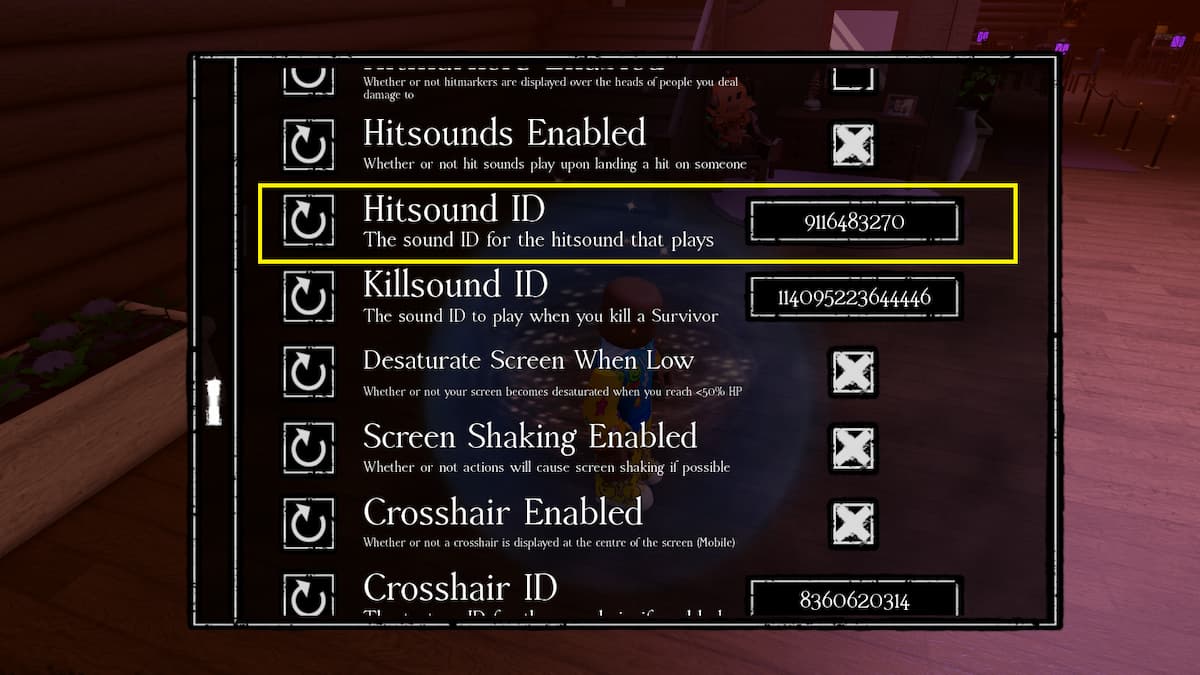
The best news about using Hit Sound IDs in Roblox Forsaken is that it is absolutely free, and you don't need to spend a dime to play sounds. To start, join the game and go to the main menu. Press the cogwheel icon at the bottom left of the screen. Inside the Settings Menu, scroll down to the bottom to find the Hit Sound ID input text box. Copy and paste the above codes to play each time you hit an opponent as a Killer.
For more on Forsaken, check out All Killers Abilities in Forsaken or Forsaken Trello Link & Discord - Roblox