Updated October 20, 2026: We added the ways to get a free private server in Evade in 2026, including Community Servers and Roblox Plus. We also corrected the server size and explained the VIP Server Panel.
Playing Evade on a private server is a completely different experience. Random players won't block you or lead Nextbots straight to you, and you can practice movement in peace. Below are free Evade private server links you can join right now, plus every way to get your own server for free or cheap.
Quick answer: The easiest free option is to join one of the links below. You can also join an open Community Server from the Community tab in Evade's Mode Browser. If you have a Roblox Plus subscription, you get one free private server per game, including Evade. Otherwise, you buy a private server with Robux from the Servers tab on Evade's Roblox page.
All Active Evade Private Server Links
Click a link on PC or mobile to join the server directly. On PlayStation or Xbox, links won't open, so ask a friend on PC or mobile to join first, then join them through your friends list or a party invite.
| Server Link | Server Host |
|---|---|
| Server Link 1 | Roweltgc |
| Server Link 2 | Jay |
How to Get a Free Private Server in Evade (2026)
Evade doesn't give out free private servers, but there are four legitimate ways to play on one without paying for it yourself.
1. Join a free private server link
The servers in the table above are paid for by their hosts and shared for free. Anyone with the link can join, so this is the fastest option. If a link stops working, it usually means the host let their subscription expire. We replace dead links when we find new ones.
2. Join a Community Server
Community Servers are player-made servers inside Evade, added in the R15 Update.
- Launch Evade and open the Mode Browser from the main menu.
- Switch to the Community tab to see the player-made servers.
- Pick a public server and join. Some servers have a level requirement or a server code (password), or only allow players with voice chat.
Unlike private servers that use cheats, Community Servers still give regular rewards. If you want to host one, you need the Create Custom Servers subscription, which costs $2.99 a month or 290 Robux for one month. It lets you create one server with up to 40 players and your own map pool, game modes, rules and VIP commands.
3. Use Roblox Plus
Roblox Plus members get one free private server per game. Roblox changed this from unlimited servers on September 24, 2026. If you're a Plus member, create a private server from Evade's Servers tab as usual. It will show as "Included with Roblox Plus" under Settings > Subscriptions. If you cancel Plus, the free server expires at the end of your billing cycle.
4. Ask a friend who owns one
A private server owner can add up to 50 specific players or let their whole friends list join. If someone in your group already pays for one, there's no need for everyone to buy their own.
Avoid scams: Sites and videos promising a "free Evade VIP server generator" or free Robux are fake. Never enter your Roblox password anywhere except the official Roblox site or app.
How to Buy an Evade Private Server
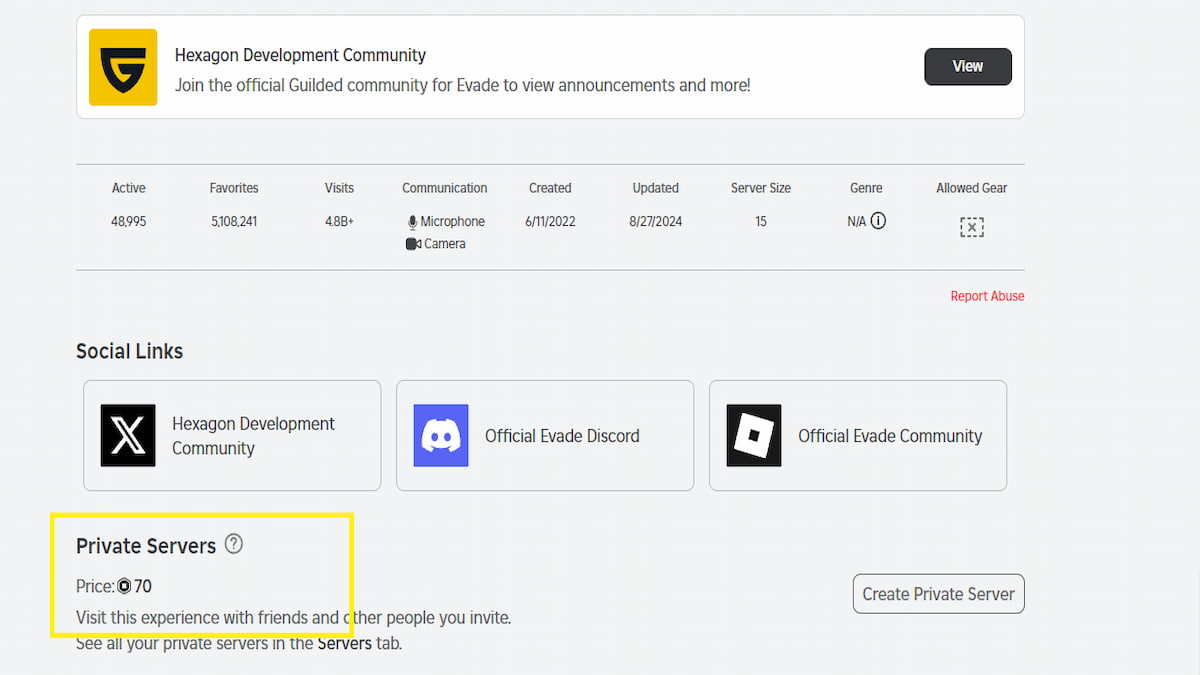
- Open the Evade page on Roblox and select the Servers tab.
- Click Create Private Server and give it a name.
- Accept the subscription terms and pay the Robux price shown. Evade's developers set the price, and it renews automatically every month until you cancel.
- Open the server's Configure page to create an invite link you can share with friends.
How Many Players Can Join an Evade Private Server?
An Evade server holds up to 15 players at a time. If yours is full, kick inactive players from the VIP Server Panel or move to another server from the list above. Community Servers are the exception: their hosts can raise the cap to 40 players.
Private vs. Public Servers in Evade
The maps, Nextbots and items are the same, but private server owners get the VIP Server Panel. Press N or use its main menu button to change maps, timers, gravity and player speed, spawn Nextbots and vehicles, give items, and kick or ban players. Owners can also type chat commands like !map, !insertai, !kill and !tool.
There's one catch: using any cheat from the panel turns off daily missions and stops tokens, XP and event currency at the end of rounds. If you're grinding the Halloween event, play on a public server, a Community Server or a private server with no cheats on.
Is an Evade Private Server Worth It?
If you play with the same group every week, run Discord tournaments or want a quiet place to practice movement like bhopping and slide hopping, yes. If you just want a calmer lobby now and then, try the free links or a Community Server first. They cost nothing and still give rewards.
Evade Private Server FAQ
Can you get a free private server in Evade?
Yes, in three ways: join a shared private server link, join an open Community Server, or use the one free private server per game that comes with Roblox Plus.
Do you get rewards in an Evade private server?
Only if no cheats are used. Turning on any VIP Server Panel cheat disables daily missions and stops tokens, XP and event currency at the end of rounds.
How do you join an Evade private server on console?
Console players can't open links. Have a friend on PC or mobile join the server first, then join that friend from your Roblox friends list.
For more Evade guides, check out our Evade codes, Evade Boombox song IDs and Evade controls. For more Roblox private server links, see Anime Card Battle Private Server Links or Realm Rampage Private Server Links on Pro Game Guides.