




Updated: November 14, 2025
We are still looking for new codes!
Train Sim codes are your ticket to turbocharged progress in this immersive railway simulator. Whether you're grinding for that sleek bullet train or just vibing on scenic routes, there's something magical about watching your empire grow. From mastering complex rail networks to collecting those premium locomotives you've been eyeing, this game keeps pulling you back to the tracks for just one more run.
All Train Sim Codes List
Want to unlock trains faster? Use the Train Sim codes listed below and level up to become an expert diver. Take the passengers across the world in your luxurious passenger train. For another driving experience, use Realistic Car Driving Codes and get cool car models to drive around town.
Active Codes
- There are no active codes.
Expired Codes
- CLOSEWINTER
- 5MVISITS
- 4MVISITSOMG
- SUMMERVIBES
- SPRINGTIME
- 2MVISITS
- 1MVISITS
- TSWINTER2023
- NDSD5
Related: Roblox The Drive Codes
How to Redeem Codes in Train Sim
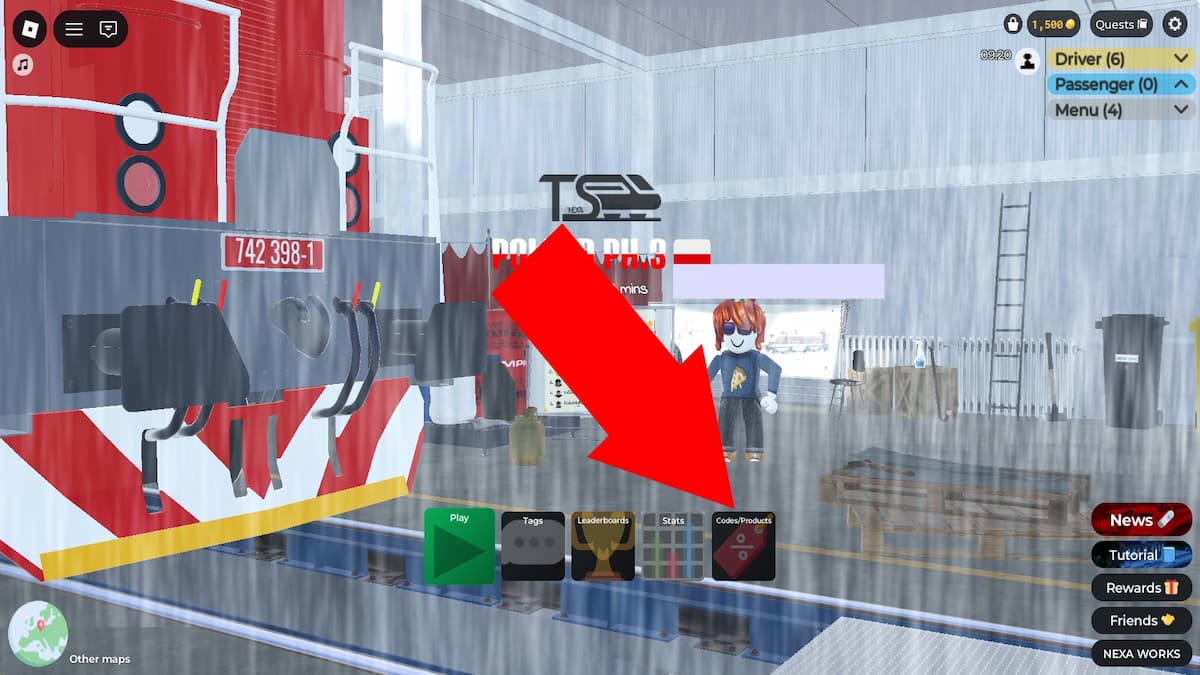
To redeem Train Sim codes, you should do the following:
- Run Train Sim in Roblox.
- Press Quickplay.
- Click on the Codes/Products button in the main menu.
- Type a code into the 'Type Code here' text box.
- Hit Redeem to claim goodies.
How to Get More Codes
One option is to join the Nexa Works Discord and keep checking the notifications for codes and updates. Make sure you also add our Train Sim codes article to your bookmarks so you can come back to grab the latest codes whenever you feel like it.
Train Sim FAQ
In addition to the freebies you can claim via codes, you can also obtain daily login goodies. Additionally, you can join the Nexa Works Roblox group, and you’ll receive a cool tag.
Check your level status in the main menu. You level up by unlocking new trains and driving. Each level will unlock a new title and career path. A new career path means more money.
Once you click play, choose the driver/passenger train option to create a train with the consist creator. Press next when you’re ready. Next, you’ll need to select the available train stations and mark the paths for your train. The white lines on the screen indicate the main stations, while the yellow lines represent optional stations.
If you want to make this a realistic experience, then approach the train manually or click on the drive button. There are buttons you can press, or you can even fiddle with the controls in the cabin. The important controls to keep in mind are the following:
Green Lever (Throttle) - accelerate the train
Red Lever (Brakes) - brake
L button - open/close the left doors to exchange passengers
R button - open/close the right doors to exchange passengers
Request Dispatch - leave the station
When you spot a red/green beam beneath your train, stop the train. This is the signal that you've arrived at a station.
Venture into both the Roblox Game Codes page and the Roblox Promo Codes post to find more codes.
 Ana Mitic, a seasoned code writer for GAMURS, blends her deep-rooted passion for gaming with her professional expertise. With a decade of gaming experience, she specializes in immersive titles like Baldur’s Gate 3 and The Witcher 3. Her fondness for horror games highlights her diverse gaming tastes. Beyond gaming, her life is enriched by her four cats and a fluffy dog, adding a personal touch to her tech-savvy persona.