


Updated: October 31, 2026
There are currently 4 active Spin To Upgrade codes as of October 31, 2026. Redeem them for free Gems, Iron, Candy, and several useful boosts. SPINTOHALLOWEEN is the best code at the moment, giving you 150 Candy, a 30-minute Halloween Luck boost, and a 30-minute Candy Boost to help with seasonal progression.
Ready to dig your way toward the rarest gems with the help of the latest Spin to Upgrade codes? Spin To Upgrade lets you mine ores, improve your pickaxe, and unlock new zones packed with better resources. You can also hire miners to earn Coins while you're offline, collect playtime gifts, and take advantage of server-wide boosts as you work your way up.
What Are All The Active Spin To Upgrade Codes?
There are currently 4 active codes in Spin To Upgrade as of October 31, 2026, offering a mixture of resources and temporary boosts. The newest addition, SPINTOHALLOWEEN, is especially useful during the Halloween event, providing Candy alongside two seasonal boosts. If you enjoy mining, collecting resources, and gradually improving your equipment, check out our Mining Simulator 2 Codes.
Spin To Upgrade Active Codes
| Code | Copy | Description |
|---|---|---|
| SPINTOHALLOWEEN | 150 Candy, 30 mins of Halloween Luck boost, and 30 mins of Candy Boost | |
| SPINTOUPGRADE | 10 Iron, 10 mins of Luck boost, and 5 mins of Mini Variant Luck boost | |
| 1kCCU | 5 Gems, 250 Candy, and 15 mins of 125% Variant Luck boost | |
| 250PLAYERS | 10 mins of Luck, Ore, Variant Luck, and Speed boosts |
Spin To Upgrade Inactive Codes
| Code | Copy | Description |
|---|---|---|
| FIRSTUPDATE | Free Rewards | |
| RELEASE | Free Rewards |
Related: Idle Obelisk Miner Codes
How to Redeem Spin To Upgrade Codes
Ready to collect your free Gems, Iron, Candy, and boosts? Follow these steps to redeem your Spin To Upgrade codes:
- Open Spin To Upgrade on Roblox.
- Click on the Codes icon in the upper right corner of the screen.
- Once the Codes Tab is visible, simply enter the Codes as shown, press the Redeem button, and enjoy your freebies!
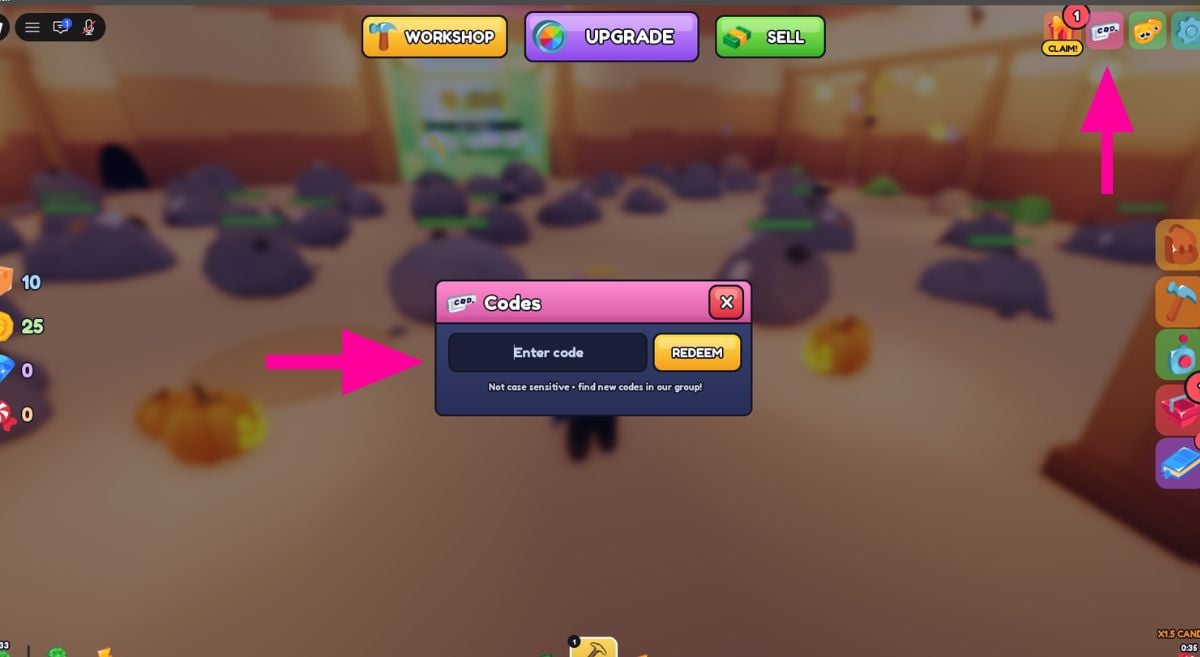
Make sure to enter each code exactly as shown above, since incorrect spelling or capitalization may prevent it from working.
Where to Find New Spin To Upgrade Codes
The best place to look for new Spin To Upgrade codes is the game's official Discord Server and developer announcements in the Roblox Community. The developers publish codes directly in the game description, making it a useful place to check whenever a new update or milestone arrives. Alternatively, bookmark this page and check back regularly as we'll add new codes as soon as they become available!
What Is Spin To Upgrade?
Spin To Upgrade is a Roblox mining simulator where you break ores, collect gems, and upgrade your pickaxe to reach increasingly valuable mining zones. Each new area has its own pickaxe requirement, giving you a clear progression goal as you work toward discovering the rarest gems. Mining isn't your only way to earn resources, either. You can hire miners who continue generating Coins while you're offline, take advantage of server-wide boosts, and unlock free gifts simply by spending time in the game.
If you want to know if a game you play has freebies, check out our Roblox Game Codes. You can also check out our Stone Miner Simulator 2 Codes.


