Updated: August 12, 2026
There are currently 12 active STARVERSE codes as of July 12, 2026. The best ones to use are BLACKBEARDJOESTAR, JOSEPHDTEACH and TREASUREOHMY, as they grant you StarSpheres, Clan Roll Essence, and Star Fragments. Keep coming back to our article. We will check for new codes every day, verify them, and add them to the list below!
STARVERSE brings together iconic characters from numerous anime and manga franchises, including Bleach, One Piece, Jujutsu Kaisen, and Dragon Ball. This all-star mashup delivers epic battles, powerful abilities, and tons of content to boot! STARVERSE codes are also part of the package, and you can get plenty of awesome rewards from them.
What Are All the STARVERSE Codes?
So far, there are 9 active STARVERSE codes as of July 13, 2026. You can use them to obtain Money Bags, Race Rerolls and Clan Roll Essence. Once the devs drop more codes, we'll add them to our list below. In the meantime, visit our Anime Story 2 Codes guide to get plentiful rewards in another awesome Roblox action game.
What Are All The Working Codes for STARVERSE?
StarVerse Active Codes
| Code | Copy | Description |
|---|---|---|
| BLACKBEARDJOESTAR NEW | 1x StarSphere, 4x Reroll Essence NEW | |
| JOSEPHDTEACH NEW | 1x Mode Reroll Essence, 2x Clan Reroll Essence NEW | |
| TREASUREOHMY NEW | 5x Star Fragment NEW | |
| SHUTDOWN7 | 2x Money Bag, 2x Clan Reroll Essence, 2x Star Fragment | |
| SHUTDOWN6 | 2x Money Bag, 2x Clan Reroll Essence, 2x Star Fragment | |
| SHUTDOWN5 | 2x Money Bag, 2x Clan Reroll Essence, 2x Star Fragment | |
| SHUTDOWN4 | 2x Money Bag, 2x Clan Reroll Essence, 2x Star Fragment | |
| SHUTDOWN3 | 2x Money Bag, 2x Clan Reroll Essence, 2x Star Fragment | |
| SHUTDOWN2 | 2x Money Bag, 2x Clan Reroll Essence, 2x Star Fragment | |
| SHUTDOWN1 | 2x Money Bag, 2x Clan Reroll Essence, 2x Star Fragment | |
| STARVERSE | 2 Race Rerolls | |
| RELEASE | 5 Clan Roll Essence | |
StarVerse Inactive Codes
| Code | Copy | Description |
|---|---|---|
| DAY1 | Rewards | |
| FIRSTTEST | Rewards | |
| MEOW | Rewards | |
| CHUNGUS | Rewards | |
| TEST | Rewards |
Related: Anime Apocalypse Codes
How Do You Redeem Codes in STARVERSE?
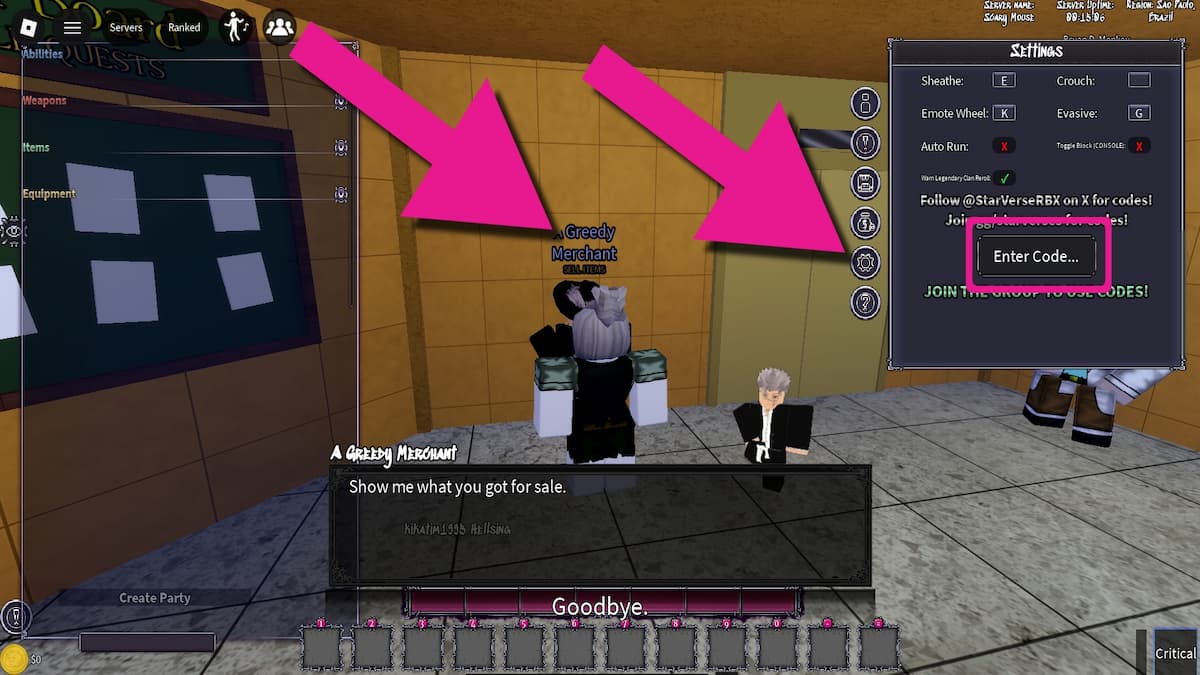
To redeem STARVERSE codes, you need to talk to A Greedy Merchant in the lobby. Check out our guide below to find the codes redemption system and get your goodies more easily:
- Join the Porpoise Lagoon Roblox group.
- Run StarVerse on Roblox.
- Approach and click on A Greedy Merchant in the lobby.
- Choose to sell something.
- Click on the Settings button in the right.
- Scroll down to the Codes section.
- Enter your code into the text block.
- Press Enter on your keyboard to get your freebies.
Where Do You Find New STARVERSE Codes?
The best place to find the latest STARVERSE codes is right here, in this guide! Save this page in your bookmarks by pressing Ctrl + D, and we'll dig through all the socials and add new codes with no delay. If you want to join the search yourself, follow the developer's X account (@StarVerseRBX), join the STARVERSE Discord community, and become a member of the Porpoise Lagoon Roblox group.
Craving more freebies? Visit our dedicated Roblox Game Codes page and enjoy thousands of codes in even more awesome games, such as Voxel Fighters.