Updated: October 1, 2026
We added the latest Survive Zombie Arena code! Check out FACTIONS, FRONTIERand more in our list below.
Use the latest Survive Zombie Arena codes to gear up, hop aboard a spaceship with your squad, and drop into the arena for one simple mission: SURVIVE. Face endless waves of undead walkers, blast your way through hordes of zombies, and earn Credits to unlock devastating weapons and game-changing gear.
All Survive Zombie Arena Codes List
Obtain free Coins with Survive Zombie Arena codes and manage your resources wisely so that you can mow down zombies like there's no tomorrow. Will you invest in auto-turrets and barricades, or upgrade your arsenal to obliterate enemies with pure firepower? The choice is yours, survivor. Lock and load—humanity is counting on you! Dive into the Hunty Zombie Codes article for goodies!
Survive Zombie Arena Active Codes
| Code | Copy | Description |
|---|---|---|
| FACTIONS NEW | 2x Faction XP for 8h and 5 Free Artifact Crates NEW | |
| FRONTIER NEW | 2 Frontier Free Spins, 2x Tokens for 24h, and 5k Credits NEW | |
| QolSwag | 2x Gold for 24 hours | |
| Viciboy | 2x Credit for 12 hours, 5k Credits, 3 Pirate Spins | |
| Pirate | 2x Pirate Pass XP for 24 hours | |
| Swaggin | 2x credits for 12 hours and a Pirate Chest | |
| Iron | 20 Pirate Wood and 12 Pirate Iron | |
| SWAGGYBOI | 2x Credits for 12h, and 2x Bloodmoon for 24h | |
| NODELAYSWAG | 2x Bloodmoon for 48h, 2 Bloodmoon Crates, and 5k Credits | |
| DELAY | 2.5k Credits, 1 Bloodmoon Crate | |
| UPDATEDAYSWAG | 1069 Credits, 1 Bloodmoon Crate | |
| GALACTIC | 2x Void Shards (24h) | |
| Zombies | 2.5k Credits | |
Survive Zombie Arena Inactive Codes
| Code | Copy | Description |
|---|---|---|
| patchboi | 2x Credits for 4 hours | |
| TUNDRASZN | 2x Bloodmoon Shards for 48 hours + 2x arena credits for 4 hours | |
| BOSSRUSH | 3,500 Credits + 2x Ultra Yeti encounter chance for 12 hours | |
| DELAYSAHUR | 4,500 Credits + 2 Bloodmoon Crate spins | |
| UPDATE0.5 | 5k Credits, 2× Credits for 8h, and 2× Bloodmoon Shards for 12h | |
| BEWARETHETUNDRA | 1 Artifact Crate Spin | |
| LUVUGUYS | 1 Bloodmoon Spin | |
| COOLPFPSWAG | 3 BloodmoonSpins, and 2× Bloodmoon Shards for 4h | |
| SORRY4DELAY | 5k Credits, 1 Bloodmoon Spin, 2x Bloodmoon Shards for 12h | |
| MUTATE | 10k Credits |
Related: Blade X Zombies Codes
How to Redeem Codes in Survive Zombie Arena
Check the tutorial below to learn how to use Survive Zombie Arena codes:
- Run Survive Zombie Arena in Roblox.
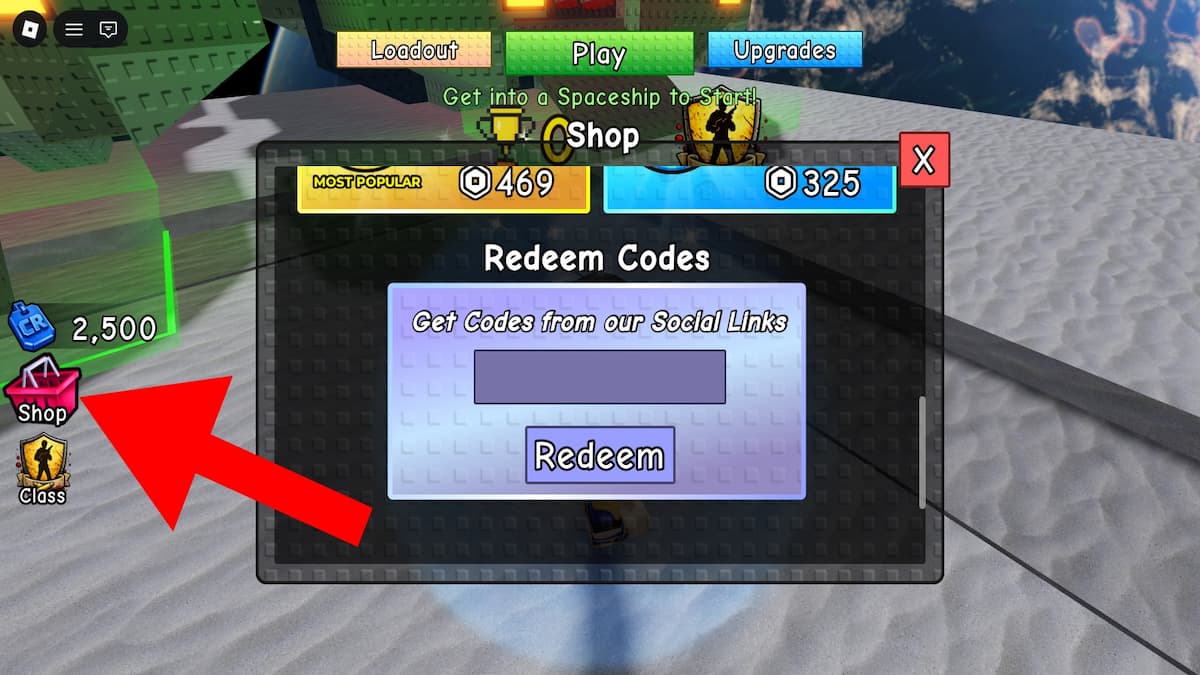
- Press the Shop button on the left and scroll down to the Redeem Codes section.
- Type a code into the text box.
- Hit Redeem to snatch goodies.
How to Get More Codes
Dive into the Survive Zombie Arena Discord to find the latest codes and game info! If you only care about gift codes, then our article is perfect for you. Hit the bookmark button and come back to check out the list regularly for updates!
Survive Zombie Arena FAQ
Survive Zombie Arena is a survival shooter game on Roblox where you fight off waves of zombies either solo or with friends. Your goal is to defeat as many zombies as possible before they overwhelm you, earning Credits and rewards based on your performance.
Credits are the main currency you earn by defeating zombies. You can spend them on:
Weapons: Unlock new guns for your four weapon slots in the hub.
Upgrades: Permanently boost your weapons' damage, DPS, and fire rate.
Gear: Buy barricades, auto-turrets, and landmines mid-battle to help defend yourself.
Yes! If you're feeling confident, you can skip waves to add more zombies to the field and speed up your progression.
Don’t leave loot on the table! Score some epic wins with our Roblox Game Codes list, then teleport over to our Roblox Promo Codes hub to unlock more rewards.