


Updated: October 1, 2026
VR Chat currently has one active code, which you should redeem quickly, as it is time-bound and the promotion will expire soon! Most VR Chat Codes provide players with cosmetic accessories released during festive celebrations or anniversary events. Currently, the only available code, "CUBEFRIEND" will reward the player with the Reference Cube Companion.
VR Chat is one of the world's largest role-playing games, where the objective is to meet new players from around the world, hang out with friends, and participate in organized events. Since each event and user-generated world has a theme, you need to dress up for the occasion. This is where the VR Chat Codes come in handy, offering players several free cosmetic accessories to help them get ready for the occasion.
What Are The VR Chat Codes?
After our check on October 1, 2026, there is one redeemable Code for VR Chat. Most of the codes in VR Chat grant you exclusive accessories or cosmetic items that are usually time-limited and released during festive celebrations or anniversaries. You can equip these items during events and enjoy the celebrations with your friends. On that note, if you love such role-playing games, I recommend checking out Punishing Gray Raven Code.
Active Codes
- CUBEFRIEND — Redeem for the Cube Companion.
Expired Codes
- MORILIVE — Redeem for Mori Calliope Penlight item.
How Do I Redeem Codes in VR Chat?
Redeeming Codes in VR Chat is quite easy, but it can be confusing for new players. We will explain how it works in a simple way below.
- Open the VR Chat game page on your PC or mobile browser.
- Log in to your VR Chat account using the correct credentials.
- Go to the VR Chat Redeem page.
- Paste the text above into the textbox in the Active codes section to get the reward.
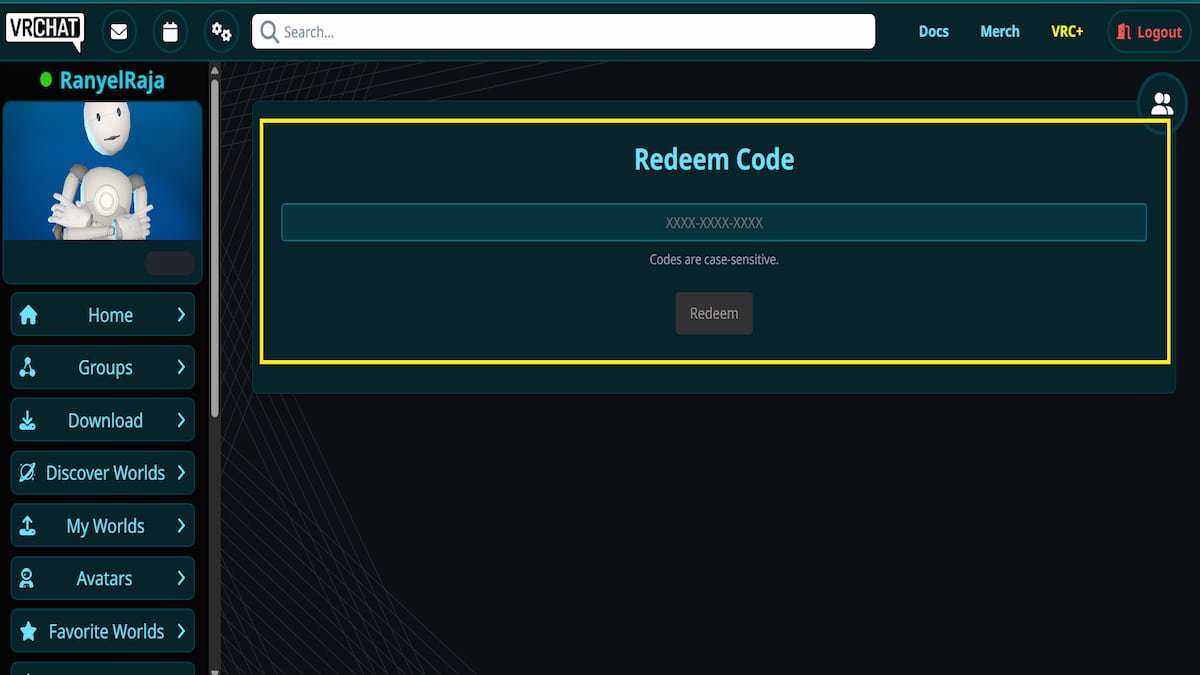
If your code is not working, it might be due to a misspelling error. So, I recommend copying and pasting them directly to avoid this. Another major reason may be that you are using codes from the expired section instead of the active ones.
Where Can I Get More VR Chat Codes?
You can always get more VR Chat codes by either following the VR Chat X page or by joining the VR Chat official Discord server. Both platforms share the latest code as soon as the developers release it. However, if you find it too tiring to look up the codes on each of the platforms mentioned yourself, you can always bookmark our page to find all the latest codes in one place!
What are Companions in VR Chat?
In VR Chat, Companions are small, interactable creatures, drones, pets, or objects that follow the player throughout the map. Players can equip them from the accessory/cosmetic section of their inventory. There are some official Companions released by the developers, as well as community-created ones. Also, you can create any Companions you like using the VR Chat Companion Creator package, which modifies the Avatar & Animation system.
If you're looking for codes for other games, we have a ton of them in our Roblox Game Codes post! You can also check out different games like BitLife codes, or Arknights codes as well.


