


As a part of the Star Wars Crossover update, a lot of new content like cosmetics, quests, and map changes has been made available in the base game. One such quest as a part of the latest update is to disable a tank by shooting its engine. To do this, you will need to find a tank in the first place and then disable it by shooting the gold-plated rear ends.
Where to find Tanks in Fortnite?
As mentioned earlier, you will need to find a tank to complete the mission. You can locate a tank in any of the following locations given below.

We recommend dropping at Condo Canynons or Rocky Reels, as players don't tend to drop much at the southern end of the map.
Where to shoot to disable a tank in Fortnite
After locating a Tank, simply hop inside and drive a few laps inside it. Now, jump out of the Tank and go to its rear end. You will find the engine of the Tank with gold plates on it.
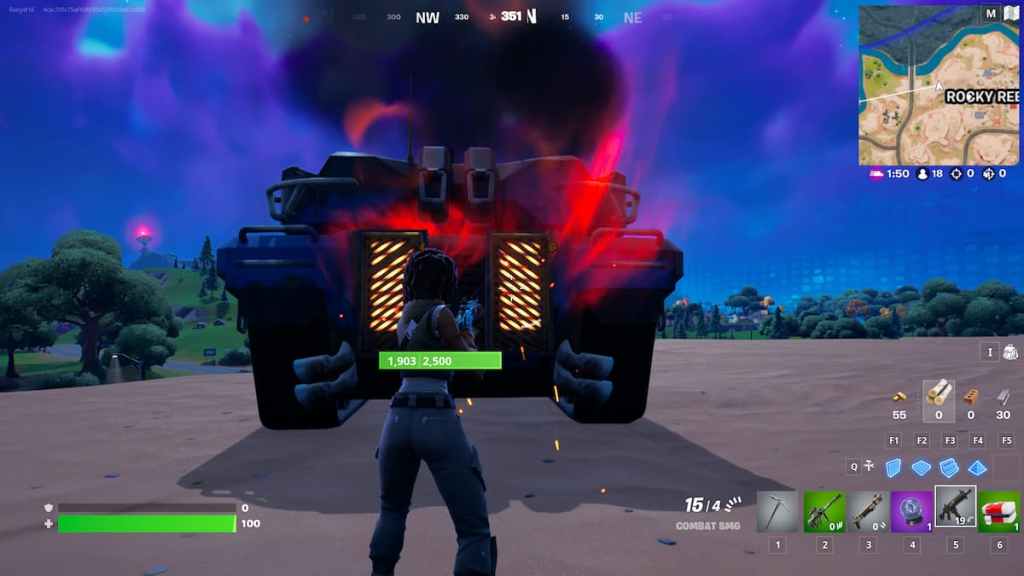
Shoot at it with any weapon of your choice for 3 to 5 seconds, and the engine will erupt in flames. If you try to access the Tank at this moment, it will display a message saying "Temporary Disabled: Engine Heated."
Remember, after 10 seconds, you can again use and drive the Tank.
For more guides on Fortnite, check out Where to find Klomberries in Fortnite Chapter 3 Season 2, and How long is downtime for Fortnite on Pro Game Guides.


