Get all of the free tickets from the PS Advent Calendar codes!
PlayStation has started off winter celebration with a 2025 Advent Calendar, but how can you join in and win some cool prizes? In order to participate, you will first have to redeem PlayStation Advent Calendar codes which give you free tickets for various PS prizes. The Advent Calendar event lasts from December 1 until December 24, 2025.
Recommended Videos
All Active PlayStation Advent Calendar Codes
While the event lasts, you will have ample opportunity to join various reward draws and hopefully win something. To increase your chances, make sure to redeem all of the PlayStation Advent Calendar codes below!
Updated: December 24, 2025 - Last Day of the Playstation Advent Calendar 2025!
Updated daily with verified codes! - Today's main prize is the exclusive PlayStation®5 Pro Console. - Ten Runner-ups will get €10 PSN Store credit each. - All participants in the Raffle will get a limited edition avatar.
Log in with your PSN account. If you don't have one, you can also log in through Gmail, Facebook, Discord, and Twitch.
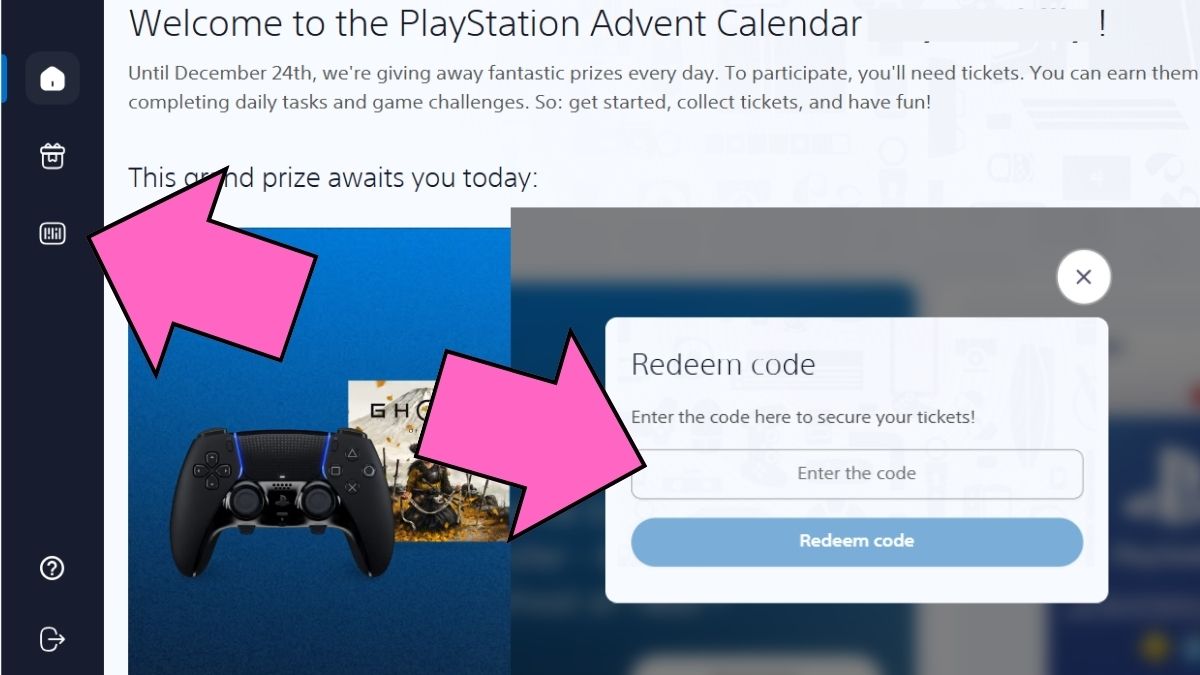
Click on the Redeem Ticket Button on the left side of the screen (the third icon).
Enter code as shown in our tables above.
Click to Redeem Code and get the Tickets.
Image by Pro Game Guides
Pro Tip: Codes don't expire during this event, so you can redeem them all and still use them at any point until December 24, 2025
What is the PlayStation Advent Calendar 2025?
The PlayStation Advent Calendar 2025 is a free daily event from Sony lasting from December 1 until December 24, 2025. For the duration of the event, you will be able to redeem special codes (all listed above) and redeem them for free tickets. When you collect tickets, you can enter various prize draws for some great rewards.
Both main and Runner-Up prizes change daily, so if you don't like what is currently available, you can save up for the following day. However, keep in mind that you can get a free exclusive PSN avatar every day, so you should try to draw at least once to get them.
Important information: The Advent Calendar is only available in US, Canada, and Europe
Prize Categories
Main Prizes - Controllers, bundles, etc.
Runner-Up Prizes - PSN credit, game codes, etc.
Daily Rewards - Free exclusive PSN Avatars
How to Get More Tickets
Apart from redeeming codes, you can get even more tickets for a greater chance of winning by completing specific activities on the website. These usually refresh daily so make sure to log back in and complete all of the quizzes, mini games, and more.
Activity
Tickets
Frequency
Link Your PSN account
6
One-time
Quiz
1-2
Daily
Watch Videos
1-2
Daily
Question of the Day
1
Daily
Mini Games (Easy)
1
Daily
Mini Games (Hard)
2-3
Daily
Invite Friends
2 per friend
100 Invite limit
Mini-Games List
All of the Mini-Games on the site have a Light and Hard difficulty. You should complete both to get all of the available rewards.
PlayShapes
Play4 (2 tickets for each response to your challenge)
PlayMatch (Memory game)
Christmas Ninja
Daily Quiz
Where to Find New Codes
Since codes can be found across many different platforms, the easiest way would be to bookmark our page. We will update it as soon as new codes drop, multiple times a day so that you don't miss out on a single ticket. If you want to do your own research, you can find PlayStation Advent Calendar codes at the following:
The PlayStation Advent Calendar ends on December 24, 2025.
Are codes region-locked?
The codes are the same for most regions, but do keep in mind that the event isn't available everywhere, only in US, Canada, and Europe.
Can I use multiple codes?
Yes! You can use as many codes as you want (which should be all of them), even ones from previous days. They don't expire so you can redeem them all for more Tickets.
How many tickets can I use per day?
Maximum 100 tickets per account per day.
Do I need PlayStation Plus?
No, it's free for everyone. You don't even need a PSN account. However, if you already do have one and have trophies, you will get extra tickets. Level 0 - 99 = 2 tickets Level 100 - 199 = 4 tickets Level 200 - 299 = 6 tickets Level 300 - 399 = 8 tickets Level 400 - 499 = 10 tickets Level 500 - 599 = 12 tickets Level 600 - 699 = 14 tickets Level 700 - 799 = 16 tickets Level 800 - 899 = 18 tickets Level 900 - 999 = 20 tickets
For all new trophies you get during this time period, you will get: Bronze - 2 tickets Silver - 4 tickets Gold - 6 tickets Platinum - 10 tickets
More Posts from PGG
Follow us on Twitter and Facebook to get updates on your favorite games!
About the Author
Hristina is the Assigning Editor for Pro Game Guides with a Master's degree in English Language, Literature and Culture from the University of Belgrade. She's written blogs, anime quizzes, books, as well as worked as a Content Editor before starting at PGG as a Staff Writer. She lives, breathes and often screams for the horror genre. If a game has multiplayer, be sure that she is playing it, like Dead by Daylight, PEAK, R.E.P.O. and Marvel Rivals. Hristina's comfort games are Outlast, Last of Us, and Until Dawn, which she has played or watched other people play more than 10 times each.





 Hristina is the Assigning Editor for Pro Game Guides with a Master's degree in English Language, Literature and Culture from the University of Belgrade. She's written blogs, anime quizzes, books, as well as worked as a Content Editor before starting at PGG as a Staff Writer. She lives, breathes and often screams for the horror genre. If a game has multiplayer, be sure that she is playing it, like Dead by Daylight, PEAK, R.E.P.O. and Marvel Rivals. Hristina's comfort games are Outlast, Last of Us, and Until Dawn, which she has played or watched other people play more than 10 times each.