


Microsoft Rewards can be a legitimate way to redeem Roblox digital cards for Robux, but the reward is not always available for every account or country. Some players may see Roblox gift card options in their Microsoft Rewards dashboard, while others may not see Roblox at all. This guide explains how to check if Robux is available in Microsoft Rewards, why the reward may be missing, how many points you may need, and what safe alternatives to use if Roblox does not appear in your account.
Important: Microsoft Rewards availability can change by region, account, stock, and current Rewards catalog. Before saving points for Robux, always check your own Microsoft Rewards Redeem dashboard while signed in.
Related: Best ways to earn free Robux safely
Can you still get Robux with Microsoft Rewards?
Sometimes, yes. Microsoft Rewards can include Roblox digital cards as a redemption option, but the reward may not appear for everyone. If Roblox is available for your account, you should see it in the Redeem section of your Microsoft Rewards dashboard. If it is missing, that usually means the reward is not available for your region, account, or current Rewards catalog.
This is why it is safer to treat Microsoft Rewards as a possible way to get Robux, not a guaranteed way. Two people in different countries, or even two accounts in the same country, may not always see the same rewards.
What is Microsoft Rewards?
Microsoft Rewards is a free rewards program that lets users earn Microsoft Points through eligible activities such as using Bing search, completing daily sets, quizzes, offers, and other tasks. These points can then be redeemed for available rewards, which may include gift cards, sweepstakes entries, charity donations, Xbox-related rewards, and sometimes Roblox digital cards.
The exact rewards you see can vary. Microsoft Rewards does not show the same redemption catalog to every user, so the Roblox option may appear for one account and be missing for another.
How to check if Robux is available in Microsoft Rewards
To check whether you can redeem Microsoft Points for Robux, you need to look inside your own Microsoft Rewards account. Follow these steps:
- Sign in to your Microsoft account.
- Go to the Microsoft Rewards Redeem page.
- Look for the Redeem tab or reward catalog.
- Search or scroll for Roblox, Roblox Digital Card, or Robux.
- If Roblox appears, select the available Robux amount and confirm the point cost before redeeming.
- After redemption, use the code on Roblox's official redeem page.
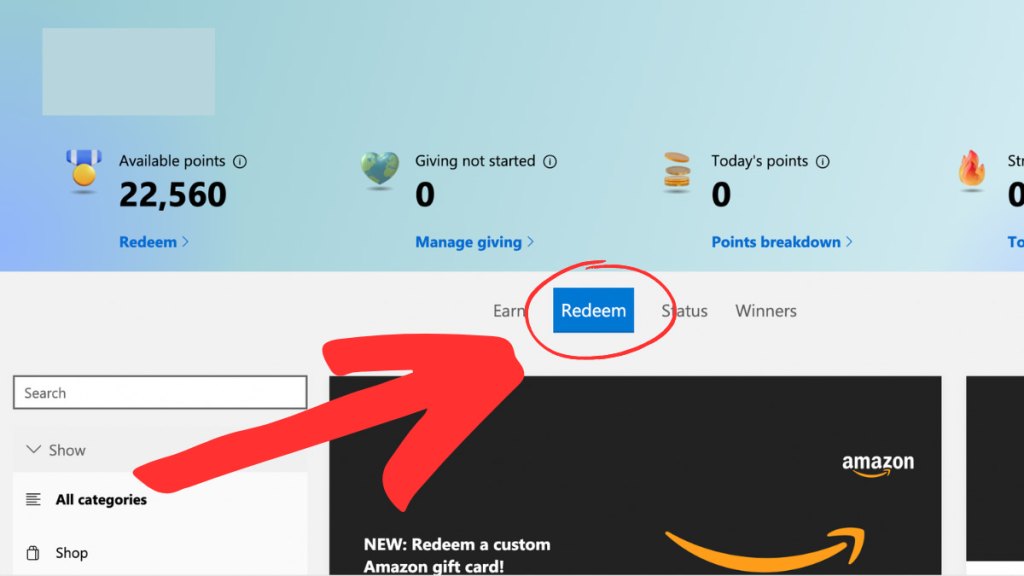
If you do not see Roblox in the Redeem section, do not assume you are doing anything wrong. It may simply not be available for your account right now.
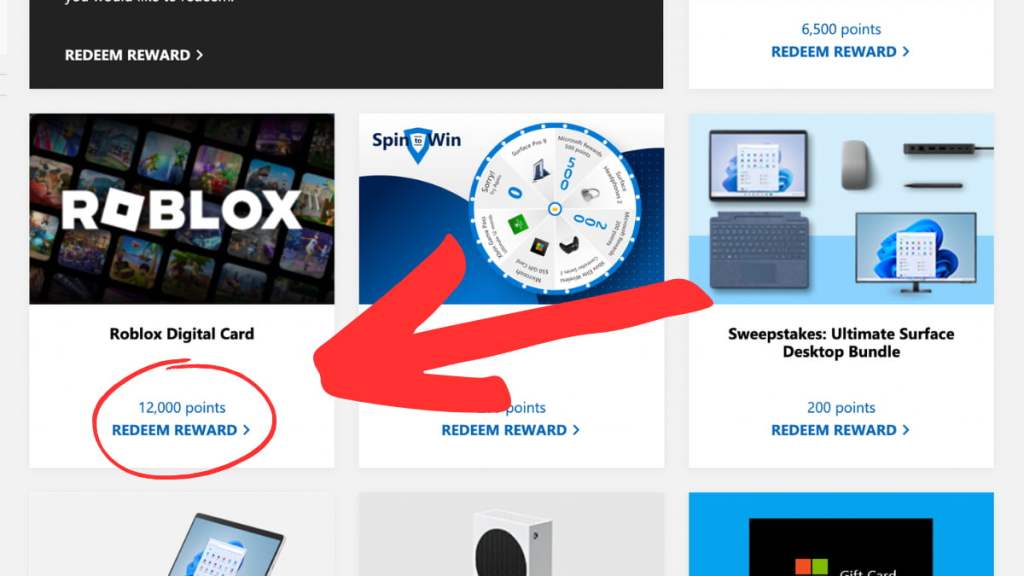
Editor's note: Microsoft Rewards pages can change over time. If your dashboard looks different from the screenshots above, use the Redeem page search bar or browse the gift card section manually.
Why Robux may not appear in Microsoft Rewards
If Roblox or Robux does not appear in your Microsoft Rewards dashboard, there are several possible reasons:
- Regional availability: Microsoft Rewards catalogs can vary by country or market.
- Temporary stock issues: Some gift card rewards may disappear if they are temporarily unavailable.
- Account differences: Your account status, location, and Rewards eligibility may affect what you can redeem.
- Catalog changes: Microsoft can add, remove, or change rewards over time.
- Login or device differences: Make sure you are signed in to the correct Microsoft account when checking the Redeem page.
The most important thing to know is that Roblox being missing from your account does not always mean the reward has been removed for everyone. It may only be unavailable for your current region or account.
How many Microsoft Rewards points do you need for Robux?
The number of Microsoft Rewards points needed for Robux can change, and the real cost may only be visible after you sign in to your Microsoft Rewards account. Older versions of the reward have included several Robux amounts, but not every tier is always available.
| Robux reward | Availability note |
|---|---|
| 100 Robux | May appear for some users, but not guaranteed |
| 200 Robux | May be missing from some Rewards catalogs |
| 400 Robux | Availability can change by account or region |
| 800 Robux | May appear in some accounts if Roblox rewards are available |
| 1,000 Robux | May appear in some accounts if Roblox rewards are available |
Do not rely on old point lists unless you can see the same offer in your own account. The safest way to check the current Robux point cost is to visit the Microsoft Rewards Redeem page while signed in and open the Roblox reward, if it appears.
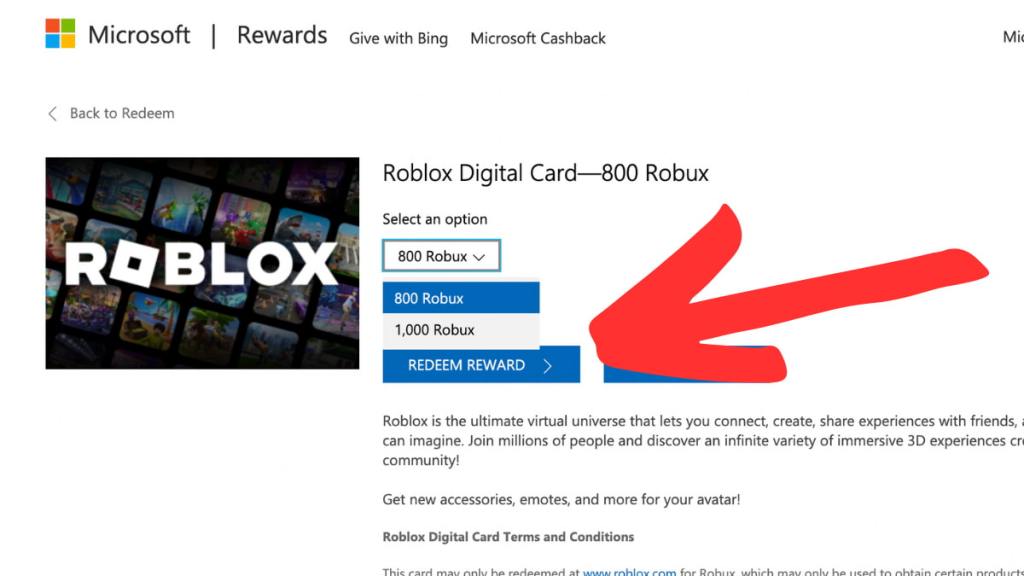
Needs verification: The available Robux tiers and point costs should be checked from a signed-in Microsoft Rewards account before adding exact 2026 point values to this guide.
Can you use Microsoft Rewards Robux outside the US or UK?
Microsoft Rewards is available in many regions, but that does not mean every reward is available everywhere. Roblox digital cards may appear in some countries and be missing in others. Because of that, the only reliable answer is to check the Redeem page in your own Microsoft Rewards account.
If you live outside the US or UK and do not see Roblox in your Rewards dashboard, the reward may not currently be supported in your region. Avoid using a VPN or changing your region just to force a different reward catalog, as that may cause account or redemption issues.
How to redeem a Roblox digital card from Microsoft Rewards
If Roblox is available in your Microsoft Rewards account, the redemption process should be straightforward:
- Open the Microsoft Rewards Redeem page.
- Select the Roblox digital card or Robux reward.
- Confirm the Robux amount and Microsoft Points cost.
- Redeem the reward and follow Microsoft's instructions to receive your code.
- Go to the official Roblox gift card or code redemption page.
- Enter the code and apply it to your Roblox account.
Make sure you are signed in to the correct Roblox account before redeeming the code. Once a code is applied to an account, it usually cannot be moved to another account.
Related: How to Buy Robux - Complete Step-by-Step Guide for All Platforms
What to do if Robux is missing from Microsoft Rewards
If you cannot find Roblox or Robux in your Microsoft Rewards dashboard, try the following troubleshooting steps:
- Make sure you are signed in to the correct Microsoft account.
- Open the official Microsoft Rewards Redeem page directly.
- Search for Roblox, Robux, and Roblox Digital Card.
- Check again later in case the reward is temporarily unavailable.
- Try checking on desktop and mobile, but do not assume this will always change the available rewards.
- Contact Microsoft Rewards Support if you redeemed points but did not receive your reward.
If Roblox still does not appear, the reward is likely unavailable for your account right now. In that case, it is better to use a safe official alternative than to search for risky free Robux methods.
Safe alternatives if Microsoft Rewards Robux is unavailable
If you cannot redeem Robux through Microsoft Rewards, use official Roblox options instead. Avoid any website, Discord server, browser extension, or survey page that promises unlimited free Robux, especially if it asks for your Roblox password.
- Buy Robux directly from Roblox: This is the safest and most reliable option.
- Use official Roblox gift cards: Only buy them from trusted retailers.
- Consider Roblox Premium: Premium can be useful for players who buy Robux regularly.
- Look for official Roblox promo items: These usually give free avatar items, not Robux.
- Use budget avatar guides: You can still customize your Roblox avatar without spending much.
Related: Best cheap Roblox avatar outfits
How to earn Microsoft Rewards points
To start earning Microsoft Rewards points, create a free Microsoft Rewards account or sign in with an existing Microsoft account. Once signed in, you can earn points through eligible activities such as Bing searches, daily sets, quizzes, gaming tasks, and other offers shown in your dashboard.
You can track your points and see available rewards from the Microsoft Rewards dashboard. Remember that earning points does not guarantee that Roblox will be available when you are ready to redeem them, so check the Rewards catalog before focusing only on Robux.
Is Microsoft Rewards safe for Robux?
Yes, Microsoft Rewards is safe when you use the official Microsoft Rewards website and redeem codes through Roblox's official website. The risky part is not Microsoft Rewards itself, but fake “free Robux” pages that pretend to offer rewards in exchange for surveys, downloads, passwords, or personal information.
Never enter your Roblox password on a third-party site that promises free Robux. Real Roblox gift card redemption should happen through official Roblox pages only.
FAQ
Is Roblox still in Microsoft Rewards?
Roblox digital cards may still appear in Microsoft Rewards, but they are not guaranteed for every account or region. Check your own Microsoft Rewards Redeem dashboard to see whether Roblox is currently available to you.
Why can't I see Robux in Microsoft Rewards?
Robux may be missing because of regional availability, temporary stock issues, account eligibility, or changes to the Microsoft Rewards catalog. If Roblox does not appear in your Redeem page, it is likely unavailable for your account right now.
How many points do I need for 100 Robux?
The point cost for 100 Robux can change and may only be visible after you sign in to Microsoft Rewards. If the 100 Robux option does not appear in your dashboard, it is not currently available for your account.
Can I use Microsoft Rewards Robux outside the US?
Possibly, but it depends on your region and Microsoft Rewards catalog. Microsoft Rewards is available in many countries, but Roblox digital cards may not appear everywhere.
Can I use a VPN to get Robux in Microsoft Rewards?
It is not recommended. Microsoft Rewards availability is region-based, and trying to force a different region may cause account or redemption problems.
Is Microsoft Rewards a free Robux generator?
No. Microsoft Rewards is a legitimate rewards program where you earn points and redeem them for available rewards. It is not the same as unsafe “free Robux generator” websites, which should be avoided.
What should I do if Roblox gift cards are out of stock?
Check your Microsoft Rewards dashboard again later, because reward availability can change. If you need Robux immediately, use Roblox's official purchase options or trusted Roblox gift cards instead.
And for the conclusion
Microsoft Rewards can be a safe way to get Robux when Roblox digital cards are available in your account, but it should not be treated as guaranteed. Always check your own Rewards dashboard, confirm the current point cost, and redeem only through official Microsoft and Roblox pages.
Looking for more Roblox content? Check out our guides on How to Buy Robux, Best cheap Roblox avatar outfits, Roblox Price Guide: How much do Robux cost?, and What can you do with One Robux? here on Pro Game Guides!


